Compare commits
442 Commits
| Author | SHA1 | Date | |
|---|---|---|---|

|
780e5477d8 | ||
|
|
f302f8c8bc | ||
|
|
468ec83bfe | ||
|
|
c2d884e910 | ||
|
|
381ff00ea4 | ||
|
|
452c5a5903 | ||
|
|
3795bc067b | ||
|
|
5b8f1f39f3 | ||
|
|
0e2dd62f9c | ||
|
|
5fca93c76a | ||
|
|
1b11ffc4c8 | ||
|
|
cb338037d2 | ||
|
|
19a6b28cb8 | ||
|
|
b9f56459d4 | ||
|
|
a574bcc5aa | ||
|
|
b2fb001618 | ||
|
|
5ebdb8d05e | ||
|
|
13663aad63 | ||
|
|
4f9ac0dca5 | ||
|
|
6562746f1e | ||
|
|
fb75e72a43 | ||
|
|
5cef61cc04 | ||
|
|
e70385bd26 | ||
|
|
f7b6883dff | ||
|
|
82d3f73eeb | ||
|
|
c9434d4be7 | ||
|
|
422ebf51d8 | ||
|
|
a908ca60a9 | ||
|
|
c883ec828f | ||
|
|
b87a1dc6f0 | ||
|
|
146d84dcab | ||
|
|
e32153c222 | ||
|
|
1c56c7709b | ||
|
|
d0f48cfd77 | ||
|
|
fc34514bb3 | ||
|
|
a640f3f17e | ||
|
|
d8990643f4 | ||
|
|
98cb6da924 | ||
|
|
54ca3ab0d2 | ||
|
|
2b79c5df16 | ||
|
|
31867085ea | ||
|
|
6df3279909 | ||
|
|
550a390703 | ||
|
|
8b42e52db0 | ||
|
|
2b1b73abff | ||
|
|
9cd08b74d1 | ||
|
|
8355faf39e | ||
|
|
228b741ba5 | ||
|
|
e286465946 | ||
|
|
2904f0b43d | ||
|
|
5f675aa796 | ||
|
|
eeac05745f | ||
|
|
33a7ba9645 | ||
|
|
8571f899da | ||
|
|
34b0cd53ea | ||
|
|
fdb2d71d2e | ||
|
|
a8f6dcf882 | ||
|
|
6f2800cdb8 | ||
|
|
72cd1e95fd | ||
|
|
b6af649c30 | ||
|
|
44ed5a27b3 | ||
|
|
0052178b5a | ||
|
|
87f7a6eb86 | ||
|
|
5660a399b8 | ||
|
|
9dd368c883 | ||
|
|
f2b80eaf2f | ||
|
|
f2af26998a | ||
|
|
952c2e09c0 | ||
|
|
40d6a49bfc | ||
|
|
267d60fb1a | ||
|
|
70098975d5 | ||
|
|
54dc335b02 | ||
|
|
d8e35ebfc3 | ||
|
|
653eee4e76 | ||
|
|
1aa94d3e50 | ||
|
|
e6ccf6ee58 | ||
|
|
1f7a127499 | ||
|
|
24f2e65f2b | ||
|
|
c9a036043e | ||
|
|
edf36d3dd1 | ||
|
|
39e7e78b3a | ||
|
|
12b88d2a93 | ||
|
|
ba128edd40 | ||
|
|
ed1401ccb8 | ||
|
|
4632e69def | ||
|
|
b7b693b6d6 | ||
|
|
6e0becee7c | ||
|
|
3fea5132ce | ||
|
|
c3d3d524de | ||
|
|
5423f2fb7f | ||
|
|
d6c69594b9 | ||
|
|
f8eb314bd0 | ||
|
|
dad1d22d69 | ||
|
|
cb2aa585c4 | ||
|
|
46aa17f320 | ||
|
|
4999c2abcb | ||
|
|
168d987779 | ||
|
|
c9623a5ec6 | ||
|
|
f281ccc1da | ||
|
|
e36c9849a8 | ||
|
|
b78bf54e21 | ||
|
|
c226922f07 | ||
|
|
1cf1a60583 | ||
|
|
1f9636ac96 | ||
|
|
c768af6cf9 | ||
|
|
1a5c9b8c39 | ||
|
|
96715753b0 | ||
|
|
b6cd6975f8 | ||
|
|
aab50e5a78 | ||
|
|
ed5b747844 | ||
|
|
8fb9d5dba9 | ||
|
|
6a3fab6198 | ||
|
|
9b23b5e712 | ||
|
|
ad0cd5dd11 | ||
|
|
d057601c72 | ||
|
|
68fbd6caa0 | ||
|
|
a8f0c72a3f | ||
|
|
bc4686e598 | ||
|
|
b7a5b69619 | ||
|
|
4a251eccc4 | ||
|
|
e944b695b1 | ||
|
|
24a0d67a33 | ||
|
|
89a85a295e | ||
|
|
9790bff15c | ||
|
|
dd8747f66b | ||
|
|
e1b0231490 | ||
|
|
17dbdcb66a | ||
|
|
badd1e414f | ||
|
|
b6d02938fd | ||
|
|
8e2e910b5f | ||
|
|
1337db3dff | ||
|
|
36dab8cd5a | ||
|
|
cf1fa1a0f1 | ||
|
|
a116e4d44b | ||
|
|
fe122ce31a | ||
|
|
dc59b81841 | ||
|
|
34571698ee | ||
|
|
ed1a940238 | ||
|
|
51b9389128 | ||
|
|
84573a7283 | ||
|
|
2883c0c553 | ||
|
|
497f480cad | ||
|
|
aa9efa0121 | ||
|
|
d8010fce1e | ||
|
|
076a5c2905 | ||
|
|
5866624317 | ||
|
|
c9bc4ba0e2 | ||
|
|
be2fcad8dc | ||
|
|
f06383e46b | ||
|
|
16d3d26a31 | ||
|
|
2e0fd23695 | ||
|
|
0bec7efd5c | ||
|
|
f3a80259eb | ||
|
|
d25592232b | ||
|
|
042761259e | ||
|
|
7f524eb48b | ||
|
|
bcca79dfc1 | ||
|
|
5c40f81e3d | ||
|
|
1f54ec3a85 | ||
|
|
4429882b60 | ||
|
|
00e11e7cb6 | ||
|
|
2714fc076f | ||
|
|
d7fc72e45d | ||
|
|
214a55898c | ||
|
|
90b1eb2da0 | ||
|
|
391a5310e0 | ||
|
|
b339724a25 | ||
|
|
ea403c0be5 | ||
|
|
6ed91b856a | ||
|
|
17ef0b28ef | ||
|
|
f793b62627 | ||
|
|
2788764430 | ||
|
|
d31fae1077 | ||
|
|
14197e7436 | ||
|
|
4dde2bd121 | ||
|
|
6c58e34bec | ||
|
|
f07b05eaa1 | ||
|
|
315f9f8d18 | ||
|
|
ca688aa975 | ||
|
|
d25d81967d | ||
|
|
8a1db44119 | ||
|
|
1970b9f007 | ||
|
|
416935e530 | ||
|
|
6fc2a47527 | ||
|
|
ba91433bb1 | ||
|
|
f783503b51 | ||
|
|
5219a0c766 | ||
|
|
d032413a56 | ||
|
|
8fb4f017e5 | ||
|
|
c43459e987 | ||
|
|
81232fbb04 | ||
|
|
34d6a676ea | ||
|
|
eb755f7e6f | ||
|
|
177a8fbba8 | ||
|
|
28ead10408 | ||
|
|
44f682c3ba | ||
|
|
1113ed0c50 | ||
|
|
6e052c64ab | ||
|
|
a2bbaeb15a | ||
|
|
317c728f37 | ||
|
|
767fdebe2c | ||
|
|
475cb507cf | ||
|
|
eaf2eac028 | ||
|
|
9412466747 | ||
|
|
b98b326674 | ||
|
|
dbc229b1b7 | ||
|
|
8ea10bb813 | ||
|
|
7e00d8c0d6 | ||
|
|
86940906ca | ||
|
|
568e4fbb25 | ||
|
|
2094e117c1 | ||
|
|
ccb0da2779 | ||
|
|
32f284b3c4 | ||
|
|
3172f37090 | ||
|
|
85e3f1f6c8 | ||
|
|
c82e65eea4 | ||
|
|
a0e8628e8a | ||
|
|
1b6f4ae53c | ||
|
|
7f91d1cbaa | ||
|
|
4018b2b02b | ||
|
|
ddd3b77182 | ||
|
|
59cc0ad683 | ||
|
|
6511c32b02 | ||
|
|
d523a1bf1f | ||
|
|
b65a19ad7f | ||
|
|
3b75b121c4 | ||
|
|
747eac3879 | ||
|
|
881bc88f5c | ||
|
|
23fe83f85c | ||
|
|
0a59ea9478 | ||
|
|
091782d000 | ||
|
|
bc147649c7 | ||
|
|
1b345cbbdd | ||
|
|
70173b9b82 | ||
|
|
bd4dd405d2 | ||
|
|
bc694b8a6f | ||
|
|
cd63e1eba4 | ||
|
|
303d6dc6b0 | ||
|
|
50e478317c | ||
|
|
72467de6b9 | ||
|
|
0997fb4eed | ||
|
|
a6b2bed0f8 | ||
|
|
118c4814fb | ||
|
|
14f49580b9 | ||
|
|
1625cd0628 | ||
|
|
e18d1de429 | ||
|
|
24b1fa84e5 | ||
|
|
7b715ea6e3 | ||
|
|
64c5834901 | ||
|
|
4217347366 | ||
|
|
cbc180ac9f | ||
|
|
2fad6d3213 | ||
|
|
992e6503fd | ||
|
|
be51ff7e4d | ||
|
|
025c127707 | ||
|
|
b016b32154 | ||
|
|
c26a7183ae | ||
|
|
a9e2013138 | ||
|
|
69e527416c | ||
|
|
224d4e1f7e | ||
|
|
4a5d29e87e | ||
|
|
cabc91f3bc | ||
|
|
f5c4042f58 | ||
|
|
b020aa4561 | ||
|
|
9236004a26 | ||
|
|
c5b544771b | ||
|
|
909bc54249 | ||
|
|
5d49f84949 | ||
|
|
08b3607123 | ||
|
|
e86407130c | ||
|
|
afa550986a | ||
|
|
6a5d0169a7 | ||
|
|
b6ccc1531e | ||
|
|
17438df5da | ||
|
|
08a9aad8ab | ||
|
|
7a83ba8984 | ||
|
|
83d3e58bb3 | ||
|
|
e9f94c4344 | ||
|
|
412bc8e5d0 | ||
|
|
d443ebe790 | ||
|
|
480d82e422 | ||
|
|
c3185f324f | ||
|
|
3015b7d576 | ||
|
|
5a0b0ae6e2 | ||
|
|
6a5dc2a6c5 | ||
|
|
a236687ecd | ||
|
|
d8435da52c | ||
|
|
b0c2ed9b13 | ||
|
|
45a497af97 | ||
|
|
6510c04154 | ||
|
|
d8650dcaa1 | ||
|
|
9bdcf7a60d | ||
|
|
bb2cdebac3 | ||
|
|
28bfe461dc | ||
|
|
5326e8543e | ||
|
|
513b10d939 | ||
|
|
47d702ee76 | ||
|
|
e44a2fe9fd | ||
|
|
9d2f87496b | ||
|
|
e2a1b673d6 | ||
|
|
5152eb5239 | ||
|
|
5b277fa130 | ||
|
|
a8ab4bf2e2 | ||
|
|
2abaae21b0 | ||
|
|
1a8d39f92d | ||
|
|
a0a3987209 | ||
|
|
63c3f0b6a2 | ||
|
|
36afa809c4 | ||
|
|
00d9340825 | ||
|
|
4de11c5f96 | ||
|
|
d95e625297 | ||
|
|
31a64b6638 | ||
|
|
f052bda831 | ||
|
|
4bc2b41a38 | ||
|
|
843492ccba | ||
|
|
81e9ef6373 | ||
|
|
9b1ecf7bf3 | ||
|
|
2651004e1c | ||
|
|
eb2e3b911f | ||
|
|
1d4361b2cf | ||
|
|
3ac00be115 | ||
|
|
2009fe796c | ||
|
|
1a5df34c4f | ||
|
|
217f2d2773 | ||
|
|
81f1ca8a23 | ||
|
|
6b759faeb9 | ||
|
|
3163364da3 | ||
|
|
69c4111f02 | ||
|
|
8c50fe34a0 | ||
|
|
cd067db4a7 | ||
|
|
e9790da1a2 | ||
|
|
3e65de2837 | ||
|
|
fe2ab6da14 | ||
|
|
7a89e5646f | ||
|
|
1cddbd94bc | ||
|
|
95da9027e6 | ||
|
|
0afd5fab02 | ||
|
|
68ed6c1c24 | ||
|
|
8ec1311675 | ||
|
|
27882d8f23 | ||
|
|
5623a6dd64 | ||
|
|
736d269c3b | ||
|
|
5bb5fbf334 | ||
|
|
3bdaeb0c29 | ||
|
|
4f383d9d77 | ||
|
|
4e0d01d5ea | ||
|
|
7f4a87722b | ||
|
|
1e6d392a24 | ||
|
|
0998dae5d4 | ||
|
|
446119aa5e | ||
|
|
182689204d | ||
|
|
8fdfcf1251 | ||
|
|
873fe19f9e | ||
|
|
462d5d38f8 | ||
|
|
e28c829613 | ||
|
|
af30a8d2cd | ||
|
|
734f3e7f9d | ||
|
|
e2df0340cf | ||
|
|
e80e04351e | ||
|
|
cffa1ec5e8 | ||
|
|
e6d67faaf9 | ||
|
|
8dde2fea92 | ||
|
|
77178e05e8 | ||
|
|
0521511dfd | ||
|
|
f646a360ad | ||
|
|
187e0e2244 | ||
|
|
ee56d4ab64 | ||
|
|
c8207a007b | ||
|
|
c8a2c752c4 | ||
|
|
d3a8ec0a1e | ||
|
|
abf4229bae | ||
|
|
775da3c22b | ||
|
|
c1891dc005 | ||
|
|
9ab21a2d8d | ||
|
|
0d31f3aef9 | ||
|
|
02f7bd8969 | ||
|
|
ba0ee06f63 | ||
|
|
f649065d6c | ||
|
|
b91a823c95 | ||
|
|
00d5bd9bb5 | ||
|
|
28aa2f32bc | ||
|
|
5170305537 | ||
|
|
9d923b3a08 | ||
|
|
41a6fdb6cd | ||
|
|
e3c0946553 | ||
|
|
977261156b | ||
|
|
ff37b79f4d | ||
|
|
06e7186e13 | ||
|
|
6b5ae7d2f6 | ||
|
|
5852c2ae20 | ||
|
|
5c79a1d839 | ||
|
|
ad1a7a0c4c | ||
|
|
4bbcb17f9f | ||
|
|
be5b940a9f | ||
|
|
600c3a4f0e | ||
|
|
503c0dddd6 | ||
|
|
f118ab4cc7 | ||
|
|
c3a991cf9c | ||
|
|
9793885107 | ||
|
|
401cb9846d | ||
|
|
8d8b2d2bb0 | ||
|
|
4cb4d209cf | ||
|
|
f34697803f | ||
|
|
b205f9a922 | ||
|
|
bb94b3f003 | ||
|
|
3253ef9ab4 | ||
|
|
7a7e9827ca | ||
|
|
d5367fc414 | ||
|
|
940a9eda63 | ||
|
|
36f98dc3cb | ||
|
|
47c94df5cf | ||
|
|
389fb975c3 | ||
|
|
cdb13035ea | ||
|
|
d05dd8fc62 | ||
|
|
6c7b3549ce | ||
|
|
7eb45e1590 | ||
|
|
24049b5e54 | ||
|
|
8ed517e181 | ||
|
|
1f3326f16f | ||
|
|
9b38ba2fce | ||
|
|
6a35304341 | ||
|
|
5a39be4df6 | ||
|
|
e47b417f4e | ||
|
|
23edf7e794 | ||
|
|
1bc1fbb354 | ||
|
|
d81d612b1c | ||
|
|
3cd360e429 | ||
|
|
9b2c23f51a | ||
|
|
7d06b42ea6 | ||
|
|
ef8e262d08 | ||
|
|
4eb4b43673 | ||
|
|
cb2bb065f9 | ||
|
|
78fe543e5b | ||
|
|
759323313b | ||
|
|
89ecf1f29a | ||
|
|
5122c3f932 | ||
|
|
c28dc9c663 | ||
|
|
012b373289 | ||
|
|
9c10303c47 | ||
|
|
50399c2271 | ||
|
|
1adcfae81d | ||
|
|
3486bff376 |
@@ -1,13 +0,0 @@
|
|||||||
### 该问题是怎么引起的?
|
|
||||||
|
|
||||||
|
|
||||||
|
|
||||||
### 重现步骤
|
|
||||||
|
|
||||||
|
|
||||||
|
|
||||||
### 报错信息
|
|
||||||
|
|
||||||
|
|
||||||
|
|
||||||
|
|
||||||
@@ -1,14 +0,0 @@
|
|||||||
### 相关的Issue
|
|
||||||
|
|
||||||
|
|
||||||
### 原因(目的、解决的问题等)
|
|
||||||
|
|
||||||
|
|
||||||
### 描述(做了什么,变更了什么)
|
|
||||||
|
|
||||||
|
|
||||||
### 测试用例(新增、改动、可能影响的功能)
|
|
||||||
|
|
||||||
|
|
||||||
|
|
||||||
|
|
||||||
95
.workflow/pipeline-docker.yml
Normal file
@@ -0,0 +1,95 @@
|
|||||||
|
version: '1.0'
|
||||||
|
name: pipeline-docker
|
||||||
|
displayName: 构建镜像
|
||||||
|
triggers:
|
||||||
|
trigger: auto
|
||||||
|
push:
|
||||||
|
branches:
|
||||||
|
precise:
|
||||||
|
- master
|
||||||
|
commitMessages:
|
||||||
|
include:
|
||||||
|
- ^deploy-docker
|
||||||
|
stages:
|
||||||
|
- name: stage-5ecf171c
|
||||||
|
displayName: 项目打包
|
||||||
|
strategy: naturally
|
||||||
|
trigger: auto
|
||||||
|
executor:
|
||||||
|
- kerwincui
|
||||||
|
steps:
|
||||||
|
- step: build@maven
|
||||||
|
name: build_maven
|
||||||
|
displayName: Maven 构建后端
|
||||||
|
jdkVersion: '8'
|
||||||
|
mavenVersion: 3.6.1
|
||||||
|
commands:
|
||||||
|
- cd ./springboot
|
||||||
|
- mvn -B clean package -Dmaven.test.skip=true
|
||||||
|
artifacts:
|
||||||
|
- name: BUILD_JAVA
|
||||||
|
path:
|
||||||
|
- ./springboot/wumei-admin/target/wumei-admin.jar
|
||||||
|
settings: []
|
||||||
|
strategy:
|
||||||
|
retry: '0'
|
||||||
|
- step: build@nodejs
|
||||||
|
name: build_nodejs
|
||||||
|
displayName: Nodejs 构建前端
|
||||||
|
nodeVersion: 14.16.0
|
||||||
|
commands:
|
||||||
|
- cd ./vue
|
||||||
|
- npm install --registry=https://registry.npm.taobao.org \
|
||||||
|
- '&& rm -rf ./dist && npm run build:prod'
|
||||||
|
artifacts:
|
||||||
|
- name: BUILD_VUE
|
||||||
|
path:
|
||||||
|
- ./vue/dist
|
||||||
|
strategy:
|
||||||
|
retry: '0'
|
||||||
|
- name: stage-f5631c9e
|
||||||
|
displayName: 上传打包文件
|
||||||
|
strategy: naturally
|
||||||
|
trigger: auto
|
||||||
|
executor:
|
||||||
|
- kerwincui
|
||||||
|
steps:
|
||||||
|
- step: publish@general_artifacts
|
||||||
|
name: publish_general_artifacts_java
|
||||||
|
displayName: 上传后端制品
|
||||||
|
dependArtifact: BUILD_JAVA
|
||||||
|
artifactName: springboot
|
||||||
|
strategy:
|
||||||
|
retry: '0'
|
||||||
|
- step: publish@general_artifacts
|
||||||
|
name: publish_general_artifacts_vue
|
||||||
|
displayName: 上传前端制品
|
||||||
|
dependArtifact: BUILD_VUE
|
||||||
|
artifactName: vue
|
||||||
|
strategy:
|
||||||
|
retry: '0'
|
||||||
|
- name: stage-59a550ac
|
||||||
|
displayName: 构建镜像
|
||||||
|
strategy: naturally
|
||||||
|
trigger: auto
|
||||||
|
executor:
|
||||||
|
- kerwincui
|
||||||
|
steps:
|
||||||
|
- step: build@docker
|
||||||
|
name: build_docker
|
||||||
|
displayName: 镜像构建
|
||||||
|
type: cert
|
||||||
|
certificate: kerwincui-docker
|
||||||
|
tag: kerwincui/wumei-smart:1.01
|
||||||
|
dockerfile: ./docker/Dockerfile
|
||||||
|
context: ./docker
|
||||||
|
artifacts:
|
||||||
|
- ${BUILD_JAVA}
|
||||||
|
- ${BUILD_VUE}
|
||||||
|
isCache: true
|
||||||
|
strategy:
|
||||||
|
retry: '0'
|
||||||
|
permissions:
|
||||||
|
- role: admin
|
||||||
|
members:
|
||||||
|
- kerwincui
|
||||||
64
.workflow/pipeline-java.yml
Normal file
@@ -0,0 +1,64 @@
|
|||||||
|
version: '1.0'
|
||||||
|
name: pipeline-java
|
||||||
|
displayName: 部署后端
|
||||||
|
triggers:
|
||||||
|
trigger: auto
|
||||||
|
push:
|
||||||
|
branches:
|
||||||
|
precise:
|
||||||
|
- master
|
||||||
|
commitMessages:
|
||||||
|
include:
|
||||||
|
- ^deploy-server
|
||||||
|
stages:
|
||||||
|
- name: stage-2c3f9607
|
||||||
|
displayName: 构建后端
|
||||||
|
strategy: naturally
|
||||||
|
trigger: auto
|
||||||
|
executor:
|
||||||
|
- kerwincui
|
||||||
|
steps:
|
||||||
|
- step: build@maven
|
||||||
|
name: build_maven
|
||||||
|
displayName: Maven 构建
|
||||||
|
jdkVersion: '8'
|
||||||
|
mavenVersion: 3.6.1
|
||||||
|
commands:
|
||||||
|
- cd ./springboot
|
||||||
|
- mvn -B clean package -Dmaven.test.skip=true
|
||||||
|
artifacts:
|
||||||
|
- name: BUILD_JAVA
|
||||||
|
path:
|
||||||
|
- ./springboot/wumei-admin/target/wumei-admin.jar
|
||||||
|
settings: []
|
||||||
|
strategy:
|
||||||
|
retry: '0'
|
||||||
|
- name: stage-b6625c4a
|
||||||
|
displayName: 部署后端
|
||||||
|
strategy: naturally
|
||||||
|
trigger: auto
|
||||||
|
executor:
|
||||||
|
- kerwincui
|
||||||
|
steps:
|
||||||
|
- step: deploy@agent
|
||||||
|
name: deploy_agent
|
||||||
|
displayName: 主机部署
|
||||||
|
hostGroupID: alicloud
|
||||||
|
deployArtifact:
|
||||||
|
- source: build
|
||||||
|
name: springboot
|
||||||
|
target: ~/gitee_go/deploy
|
||||||
|
dependArtifact: BUILD_JAVA
|
||||||
|
script: |-
|
||||||
|
# 请在此输入部署脚本,如启动Java应用如下
|
||||||
|
# nohup java -jar test.jar > nohup.out &
|
||||||
|
echo 'Hello Gitee!'
|
||||||
|
touch springboot
|
||||||
|
strategy:
|
||||||
|
retry: '0'
|
||||||
|
strategy:
|
||||||
|
blocking: true
|
||||||
|
permissions:
|
||||||
|
- role: admin
|
||||||
|
members:
|
||||||
|
- kerwincui
|
||||||
60
.workflow/pipeline-vue.yml
Normal file
@@ -0,0 +1,60 @@
|
|||||||
|
version: '1.0'
|
||||||
|
name: pipeline-vue
|
||||||
|
displayName: 部署前端
|
||||||
|
triggers:
|
||||||
|
trigger: auto
|
||||||
|
push:
|
||||||
|
branches:
|
||||||
|
precise:
|
||||||
|
- master
|
||||||
|
commitMessages:
|
||||||
|
include:
|
||||||
|
- ^deploy-vue
|
||||||
|
stages:
|
||||||
|
- name: stage-3761fd9a
|
||||||
|
displayName: 构建前端
|
||||||
|
strategy: naturally
|
||||||
|
trigger: auto
|
||||||
|
executor:
|
||||||
|
- kerwincui
|
||||||
|
steps:
|
||||||
|
- step: build@nodejs
|
||||||
|
name: build_nodejs
|
||||||
|
displayName: Nodejs 构建
|
||||||
|
nodeVersion: 14.16.0
|
||||||
|
commands:
|
||||||
|
- cd ./vue
|
||||||
|
- npm install --registry=https://registry.npm.taobao.org \
|
||||||
|
- '&& rm -rf ./dist && npm run build:prod'
|
||||||
|
artifacts:
|
||||||
|
- name: BUILD_VUE
|
||||||
|
path:
|
||||||
|
- ./vue/dist
|
||||||
|
strategy:
|
||||||
|
retry: '0'
|
||||||
|
- name: stage-79a96375
|
||||||
|
displayName: 部署前端
|
||||||
|
strategy: naturally
|
||||||
|
trigger: auto
|
||||||
|
executor:
|
||||||
|
- kerwincui
|
||||||
|
steps:
|
||||||
|
- step: deploy@agent
|
||||||
|
name: deploy_agent
|
||||||
|
displayName: 主机部署
|
||||||
|
hostGroupID: alicloud
|
||||||
|
deployArtifact:
|
||||||
|
- source: build
|
||||||
|
name: vue
|
||||||
|
target: ~/gitee_go/deploy
|
||||||
|
dependArtifact: BUILD_VUE
|
||||||
|
script: |-
|
||||||
|
# 请在此输入部署脚本,如启动Java应用如下
|
||||||
|
# nohup java -jar test.jar > nohup.out &
|
||||||
|
echo 'Hello Gitee!' && touch vuetest
|
||||||
|
touch vue
|
||||||
|
strategy:
|
||||||
|
retry: '0'
|
||||||
|
permissions:
|
||||||
|
- role: admin
|
||||||
|
members: []
|
||||||
140
README.md
@@ -1,33 +1,32 @@
|
|||||||
|
|
||||||
### 一、项目简介
|
### 一、项目简介
|
||||||
|
|
||||||
1. 物美智能 [wumei-smart](http://wumei.live/) 是一个简单易用的生活物联网平台。可用于搭建物联网平台以及二次开发和学习。
|
#### 1. 物美智能 [wumei-smart](http://wumei.live/) 是一个简单易用的生活物联网平台。可用于搭建物联网平台以及二次开发和学习。
|
||||||
|
|
||||||
|
#### 2. 设备接入使用EMQX消息服务器,加密认证;后端采用Spring boot;前端采用Vue;移动端采用Uniapp;数据库采用Mysql、TDengine和Redis;设备端支持ESP32、ESP8266、树莓派等;系统架构图如下:
|
||||||
|
<img src="https://oscimg.oschina.net/oscnet/up-98eefff896394066a60d664b875a3d05d1d.png" max-width="800" />
|
||||||
|
|
||||||
|
#### 3. 项目可用于个人学习和使用,商业用途需要赞助项目,获得授权。[查看详情 >>](https://wumei.live/doc/pages/sponsor/)
|
||||||
|
|
||||||
|
#### 4. 参考设备
|
||||||
|
| [空气检测仪](https://item.taobao.com/item.htm?spm=a1z10.1-c.w4004-22657217218.2.355d14963FSV69&id=623332279126) | [Wifi通断器](https://item.taobao.com/item.htm?spm=a1z10.3-c.w4002-22657217231.57.74076af5XpmsRi&id=651305232489&qq-pf-to=pcqq.group) | [智能插座](https://item.taobao.com/item.htm?spm=a1z0d.6639537.1997196601.63.4cc47484zEjJ34&id=675275353501) | [智能开关](https://item.taobao.com/item.htm?spm=a1z0d.6639537.1997196601.72.4cc47484zEjJ34&id=675278061047) | [Wifi通断器](https://item.taobao.com/item.htm?spm=a1z0d.6639537.1997196601.31.4cc47484zEjJ34&id=662773208714) |
|
||||||
|
| :----: | :----------: |:----------: |:----------: |:----------: |
|
||||||
|
|  | 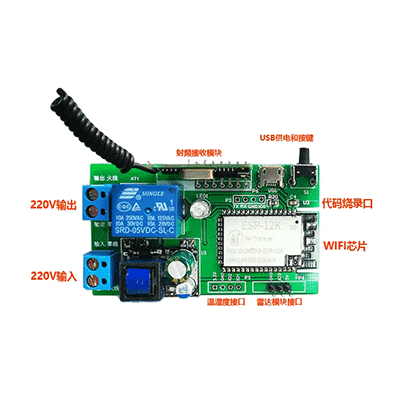 |  | 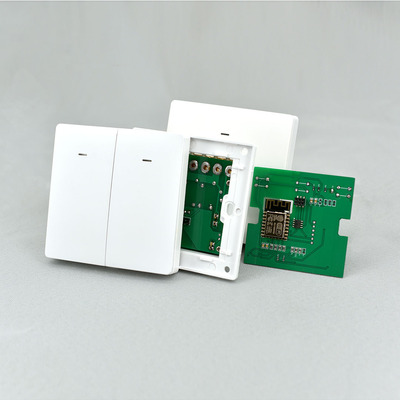 | 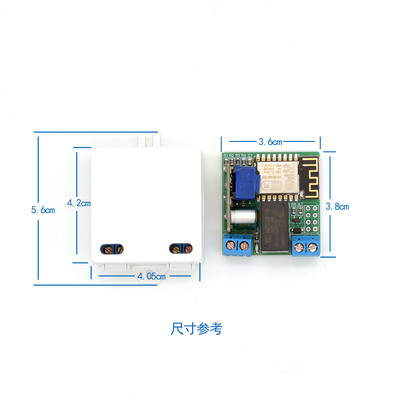 |
|
||||||
|
|
||||||
2. 设备接入使用EMQX消息服务器,认证采用EMQX内置的Http插件对称加密认证。后端采用Spring boot;前端采用Vue;移动端采用Uniapp;数据库采用Mysql、Redis和TDengine;设备端支持硬件SDK生成,例如ESP32、ESP8266、树莓派等;设备模拟器采用Android和WPF框架,不仅能模拟硬件设备,还可以控制和监测电脑、手机。
|
|
||||||
|
|
||||||
3. 系统架构图
|
|
||||||

|
|
||||||
4. 使用流程
|
|
||||||

|
|
||||||
|
|
||||||
|
|
||||||
### 二、功能
|
### 二、功能
|
||||||
- 权限管理: 用户管理、部门管理、岗位管理、菜单管理、角色管理、字典和参数管理等
|
- 权限管理: 用户管理、部门管理、岗位管理、菜单管理、角色管理、字典和参数管理等
|
||||||
- 系统监控: 操作日志、登录日志、系统日志、在线用户、服务监控、连接池监控、缓存监控等
|
- 系统监控: 操作日志、登录日志、系统日志、在线用户、服务监控、连接池监控、缓存监控等
|
||||||
- 产品管理: 产品、产品物模型、产品分类、产品固件等
|
- 产品管理: 产品、产品物模型、产品分类、产品固件、授权码等
|
||||||
- 设备管理: 控制、分组、定时、日志、统计、定位、OTA升级、影子模式、实时监测、加密认证等
|
- 设备管理: 控制、分组、定时、日志、统计、定位、分享、配置、OTA升级、影子模式、实时监测、加密认证等
|
||||||
- EMQ管理: Mqtt客户端、监听器、消息主题、消息订阅、插件管理
|
- EMQ管理: Mqtt客户端、监听器、消息主题、消息订阅、插件管理、规则引擎、资源
|
||||||
- 硬件 SDK: 支持WIFI和MQTT连接、物模型响应、实时监测、定时上报监测数据、AES加密、NTP时间等
|
- 硬件 SDK: 支持WIFI和MQTT连接、物模型响应、实时监测、定时上报监测数据、AES加密、NTP时间等
|
||||||
- 物模型管理: 属性(设备状态和监测数据),功能(执行特定任务),事件(设备主动上报给云端)
|
- 物模型管理: 属性(设备状态和监测数据),功能(执行特定任务),事件(设备主动上报给云端)
|
||||||
|
- 其他功能:多租户、统计、新闻资讯、通知公告、支持TDengine时序数据库
|
||||||
### 三、开发中功能
|
- 计划开发完善功能:设备告警、场景联动、云云对接智能音箱、设备配网、第三方登录、短信登录、APP界面自定义、视频流处理
|
||||||
- 设备分享、设备告警、场景联动(进度50%)
|
、
|
||||||
- 智能音箱、多租户、APP界面自定义(进度40%)
|
|
||||||
- 时序数据库、分布式集群部署、Granfa监控(进度30%)
|
|
||||||
- 视频流处理(进度0%)
|
|
||||||
- 桌面端模拟器/监控(进度5%)
|
|
||||||
- 安卓端模拟器/监控(进度0%)
|
|
||||||
- App和小程序(正在开发中......)
|
|
||||||
|
|
||||||
### 四、技术栈
|
### 四、技术栈
|
||||||
* 服务端
|
* 服务端
|
||||||
@@ -36,20 +35,14 @@
|
|||||||
* Web端
|
* Web端
|
||||||
- 相关技术:ES6、Vue、Vuex、Vue-router、Vue-cli、Axios、Element-ui等
|
- 相关技术:ES6、Vue、Vuex、Vue-router、Vue-cli、Axios、Element-ui等
|
||||||
- 开发工具:Visual Studio Code
|
- 开发工具:Visual Studio Code
|
||||||
* 移动端(android / ios / 微信小程序)
|
* 移动端(Android / Ios / 微信小程序 / H5)
|
||||||
- 相关技术:uniapp、smartconfig
|
- 相关技术:uniapp、[uView](https://www.uviewui.com/)、[uChart](https://www.ucharts.cn/)
|
||||||
- 开发工具:HBuilder
|
- 开发工具:HBuilder
|
||||||
* 硬件端
|
* 硬件端
|
||||||
- 相关技术: ESP-IDF、Arduino、FreeRTOS等
|
- 相关技术: ESP-IDF、Arduino、FreeRTOS等
|
||||||
- 开发工具:Visual Studio Code 和 Arduino
|
- 开发工具:Visual Studio Code 和 Arduino
|
||||||
* 安卓端模拟器/监控
|
|
||||||
- 相关技术:android
|
|
||||||
- 开发工具:Android Studio
|
|
||||||
* 电脑端模拟器/监控
|
|
||||||
- 相关技术:WPF
|
|
||||||
- 开发工具:Visual Studio
|
|
||||||
|
|
||||||
### 五、硬件接入(具体参考文档,项目提供了示例SDK,使用ESP8266芯片,基于Arduino开发)
|
### 五、硬件接入
|
||||||
1. 设备认证
|
1. 设备认证
|
||||||
* 加密认证(推荐)
|
* 加密认证(推荐)
|
||||||
* 简单认证
|
* 简单认证
|
||||||
@@ -58,31 +51,106 @@
|
|||||||
* 发布物模型、设备信息、时钟同步相关Mqtt主题
|
* 发布物模型、设备信息、时钟同步相关Mqtt主题
|
||||||
* 订阅物模型、设备升级、时钟同步相关Mqtt主题
|
* 订阅物模型、设备升级、时钟同步相关Mqtt主题
|
||||||
|
|
||||||
|
###### 项目提供了示例SDK,使用ESP8266芯片,基于Arduino开发。设备烧录使用串口模块,例如Ch340,接线图如下:
|
||||||
|
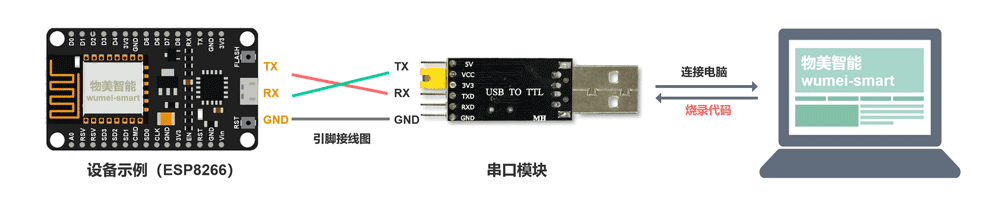
|
||||||
|
|
||||||
|
|
||||||
### 六、项目目录
|
### 六、项目目录
|
||||||
spring-boot ---------------------------------------------------- 后端<br/>
|
spring-boot --------------- 后端<br/>
|
||||||
vue ------------------------------------------------------------- 前端<br />
|
vue ----------------------- 前端<br />
|
||||||
docker ---------------------------------------------------------- docker部署文件<br />
|
docker -------------------- docker部署文件<br />
|
||||||
sdk ------------------------------------------------------------- 硬件SDK<br />
|
sdk ----------------------- 硬件SDK<br />
|
||||||
download ------------------------------------------------------- 工具下载<br />
|
app ----------------------- 移动端打包文件
|
||||||
|
|
||||||
|
###### 移动端适配多端
|
||||||
|
|安卓/Android|苹果/IOS|微信小程序| 网页/H5|Vue2.0
|
||||||
|
| :---: | :---: | :---: | :---: |:---: |
|
||||||
|
| √ | √| √ | √ | √ |
|
||||||
|
|
||||||
|
|
||||||
### 七、相关文档
|
### 七、相关文档
|
||||||
##### 权限管理基于ruoyi-vue系统,Mqtt消息服务器基于EMQX4.0开源版,SDK示例使用ESP8266 Core For Arduino开发
|
##### 权限管理基于ruoyi-vue系统,Mqtt消息服务器基于EMQX4.0开源版,SDK示例使用ESP8266 Core For Arduino开发
|
||||||
* [项目文档(编写中...)](http://wumei.live/kerwincui/document/wiki/)
|
* [项目文档](https://wumei.live/doc/)
|
||||||
* [物美智能官网](http://wumei.live/)
|
* [物美智能官网](http://wumei.live/)
|
||||||
* [权限管理系统ruoyi-vue](https://gitee.com/y_project/RuoYi-Vue)
|
* [权限管理系统ruoyi-vue](https://gitee.com/y_project/RuoYi-Vue)
|
||||||
* [Mqtt消息服务器EMQX4.0](https://github.com/emqx/emqx)
|
* [Mqtt消息服务器EMQX4.0](https://github.com/emqx/emqx)
|
||||||
* [ESP8266 Core For Arduino](https://github.com/esp8266/Arduino)
|
* [ESP8266 Core For Arduino](https://github.com/esp8266/Arduino)
|
||||||
|
* [uCharts高性能跨平台图表库](https://www.ucharts.cn)
|
||||||
|
* [TDengine时序数据库](https://www.taosdata.com/?zh)
|
||||||
|
|
||||||
|
##### Docker快速安装
|
||||||
|
* Mysql中创建wumei-smart数据库,[导入Sql脚本](https://gitee.com/kerwincui/wumei-smart/tree/master/springboot/sql)
|
||||||
|
* 修改命令中的Mysql配置,并执行
|
||||||
|
```
|
||||||
|
docker run \
|
||||||
|
--name wumei-smart \
|
||||||
|
--env DB_HOST=localhost:3306 \
|
||||||
|
--env DB_NAME=wumei-smart \
|
||||||
|
--env DB_USER=root \
|
||||||
|
--env DB_PASSWORD=wumei-smart \
|
||||||
|
--publish 80:80 \
|
||||||
|
--publish 1883:1883 \
|
||||||
|
--publish 8083:8083 \
|
||||||
|
--volume /var/wumei-smart/java/uploadPath:/var/wumei-smart/java/uploadPath \
|
||||||
|
--restart unless-stopped \
|
||||||
|
--detach \
|
||||||
|
kerwincui/wumei-smart:1.1
|
||||||
|
```
|
||||||
|
|
||||||
|
|
||||||
### 八、其他
|
### 八、其他
|
||||||
* 互助交流群:1073236354
|
* 互助交流群:1073236354
|
||||||
* [演示地址>>](https://iot.wumei.live/)
|
* [演示地址>>](https://iot.wumei.live/)
|
||||||
|
* 小程序演示
|
||||||
|
|
||||||
|

|
||||||
|
|
||||||
|
##### 项目贡献者
|
||||||
|
|
||||||
|
|[小驿物联](https://gitee.com/iot-xiaoyi) |[Guanshubiao](https://gitee.com/guanshubiao)|[CrazyDull](https://gitee.com/crazyDull) |[Kami0314](https://github.com/kami0314)|[YBZX](https://github.com/YBZX)
|
||||||
|
|--|--|--|--|--|
|
||||||
|
|
||||||
|
| [SXH](https://gitee.com/sixiaohu) | [Redamancy_zxp](https://gitee.com/redamancy-zxp) | [LEE](https://gitee.com/yueming188) | [LemonTree](https://gitee.com/fishhunterplus) | [Tang](https://gitee.com/mexiaotang)
|
||||||
|
|--|--|--|--|--|
|
||||||
|
|
||||||
|
| [xxmfl](https://gitee.com/xxmfl) |
|
||||||
|
|--|
|
||||||
|
|
||||||
|
|
||||||
### 九、界面图片
|
### 九、部分图片
|
||||||
* web端
|
|
||||||
|

|
||||||
|
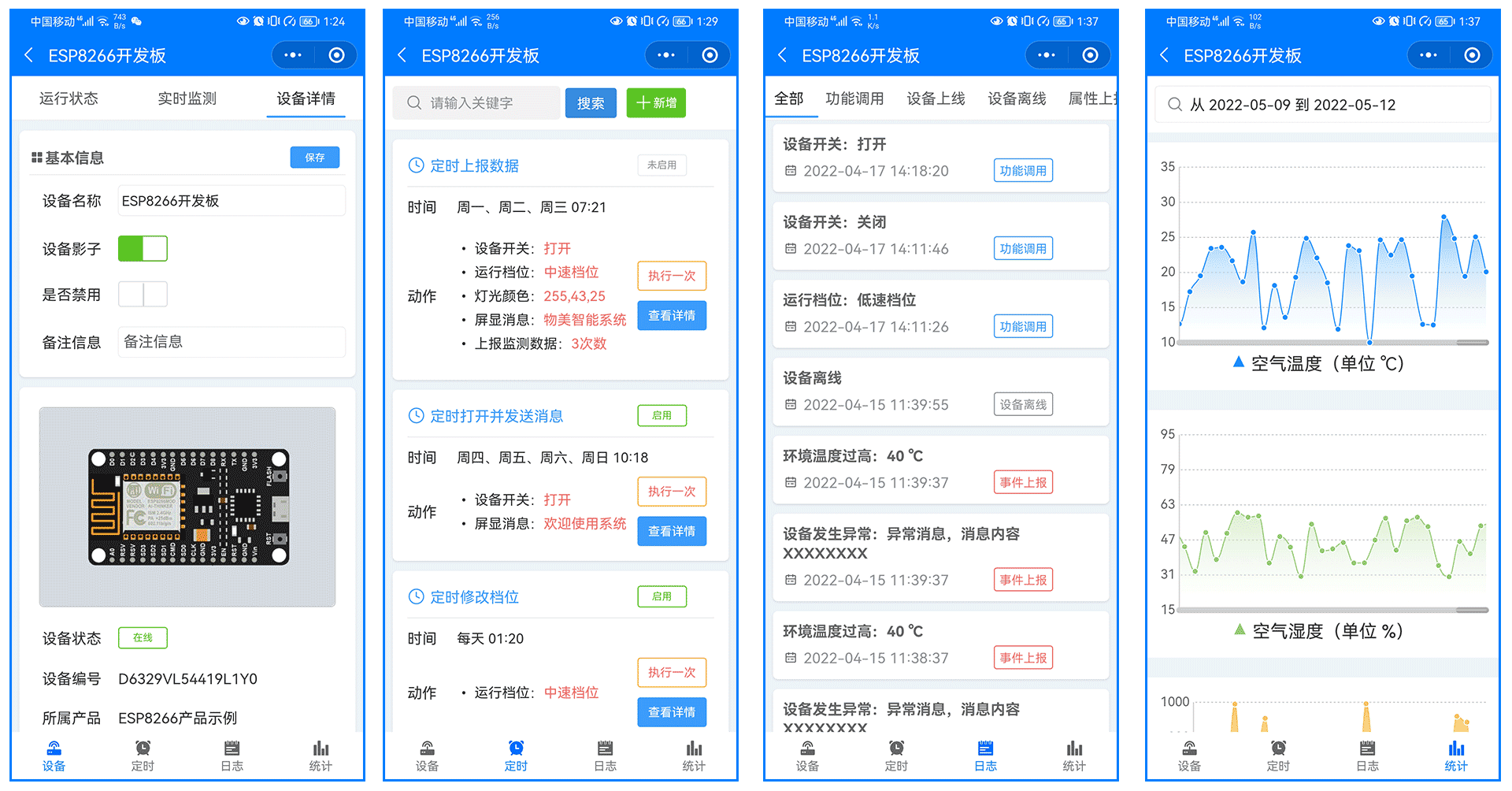
|
||||||
|
|
||||||
|
<table>
|
||||||
|
<tr>
|
||||||
|
<td><img src="https://oscimg.oschina.net/oscnet/up-60ff517f5362f4c7b98bb4cb3df543e4ecb.png"/></td>
|
||||||
|
<td><img src="https://oscimg.oschina.net/oscnet/up-d9dd014cec34b6424eb6d768e362356a622.png"/></td>
|
||||||
|
</tr>
|
||||||
|
<tr>
|
||||||
|
<td><img src="https://oscimg.oschina.net/oscnet/up-cefbaf28d2ea5438b17dbad53638852519b.png"/></td>
|
||||||
|
<td><img src="https://oscimg.oschina.net/oscnet/up-20672c691106771f3a38168c0f6c6a7bf20.png"/></td>
|
||||||
|
</tr>
|
||||||
|
<tr>
|
||||||
|
<td><img src="https://oscimg.oschina.net/oscnet/up-75e099216e1fa33f5e83989838ffd1b16fa.png"/></td>
|
||||||
|
<td><img src="https://oscimg.oschina.net/oscnet/up-51d2ae913a83a542fc2c3b6f802dc34369f.png"/></td>
|
||||||
|
</tr>
|
||||||
|
<tr>
|
||||||
|
<td><img src="https://oscimg.oschina.net/oscnet/up-287864587ec8116ee8be115a94d1d6f9302.png"/></td>
|
||||||
|
<td><img src="https://oscimg.oschina.net/oscnet/up-2b0a744a83f939b6694dc33c7b80193029b.png"/></td>
|
||||||
|
</tr>
|
||||||
|
<tr>
|
||||||
|
<td><img src="https://oscimg.oschina.net/oscnet/up-c8c388b20e70f6a668749aab94d214b8270.png"/></td>
|
||||||
|
<td><img src="https://oscimg.oschina.net/oscnet/up-cc512e6367b55a3afa78bee7e1cd8c8cab9.png"/></td>
|
||||||
|
</tr>
|
||||||
|
<tr>
|
||||||
|
<td><img src="https://oscimg.oschina.net/oscnet/up-457424f66db64e5e66d200d94a0d42358ad.png"/></td>
|
||||||
|
<td><img src="https://oscimg.oschina.net/oscnet/up-bf47113b636fa96ceaf9607df795f8b3a17.png"/></td>
|
||||||
|
</tr>
|
||||||
|
<td><img src="https://oscimg.oschina.net/oscnet/up-e05690366e11fb173cebafcba57b5567e38.png"/></td>
|
||||||
|
<td><img src="https://oscimg.oschina.net/oscnet/up-f7856cca6a3dd60afafd1cb0e1ae67c596e.png"/></td>
|
||||||
|
</tr>
|
||||||
|
</table>
|
||||||
|
|
||||||
|
|
||||||
|
|
||||||
|
|||||||
47
app/README.md
Normal file
@@ -0,0 +1,47 @@
|
|||||||
|
<br />
|
||||||
|
|
||||||
|
* 项目可用于个人学习;商业使用请赞助该项目,获得授权;
|
||||||
|
* 赞助后还提供了小程序、APP源码和相关教程。[详情](https://wumei.live/doc/pages/sponsor/)
|
||||||
|
|
||||||
|
|
||||||
|
#### 移动端介绍
|
||||||
|
|
||||||
|
|安卓/Android|苹果/IOS|微信小程序| 网页/H5|Vue2.0
|
||||||
|
| :---: | :---: | :---: | :---: |:---: |
|
||||||
|
| √ | √| √ | √ | √ |
|
||||||
|
|
||||||
|
|
||||||
|
1. 项目使用uniapp开发,适配小程序、安卓、苹果和H5,其他平台未测试。
|
||||||
|
2. UI框架使用uView2.0
|
||||||
|
3. 组件使用easycom模式,只要组件安装在项目的components目录下或uni_modules目录下,并符合components/组件名称/组件名称.vue目录结构。就可以不用引用、注册,直接在页面中使用。
|
||||||
|
4. 开发工具为Hbuilder3.3版本,版本不易过低。
|
||||||
|
|
||||||
|
|
||||||
|
###### 项目结构
|
||||||
|
|
||||||
|
```
|
||||||
|
├─apis // 接口管理
|
||||||
|
│ ├─modules // api模块化目录
|
||||||
|
│ │ └─device.js // 设备接口地址
|
||||||
|
│ ├─http.api.js // 接口定义文件
|
||||||
|
│ └─http.interceptor // 拦截器
|
||||||
|
├─common // 公共文件
|
||||||
|
│ ├─config // 环境配置 (设置baseurl等)
|
||||||
|
│ ├─extend // 扩展原型方法
|
||||||
|
│ ├─filters // 全局过滤器
|
||||||
|
│ └─tools // 全局公共方法
|
||||||
|
├─components // 项目组件库,组件放置这里,其他页面可直接使用
|
||||||
|
│ ├─cl-test // easycom测试组件
|
||||||
|
│ └─cl-icon // iconfont图标组件
|
||||||
|
├─pages // 页面目录
|
||||||
|
│ ├─public // 公共页面
|
||||||
|
│ └─tarbar // 底部导航栏页面
|
||||||
|
├─static // 图片目录
|
||||||
|
├─store // vuex
|
||||||
|
│ ├─$u.mixin // store全局混入方法
|
||||||
|
│ └─index // vuex 组件全局状态管理
|
||||||
|
├─uni_modules // 插件市场插件目录
|
||||||
|
│ └─uview-ui // uview-ui
|
||||||
|
```
|
||||||
|
|
||||||
|
<br /><br />
|
||||||
BIN
app/wumei.apk
Normal file
BIN
app/wumei.ipa
Normal file
72
docker/Dockerfile
Normal file
@@ -0,0 +1,72 @@
|
|||||||
|
FROM openjdk:8u322-jre-slim-buster
|
||||||
|
|
||||||
|
ENV VERSION 1.1
|
||||||
|
ENV AUTHOR kerwincui
|
||||||
|
ENV INFO wumei smart open source living iot platform
|
||||||
|
ENV SERVERS nginx:1.14.2, redis-server:5.0.14, emqx:4.0, openjdk:8u322-jre-slim-buster
|
||||||
|
|
||||||
|
# mysql环境变量
|
||||||
|
ENV DB_HOST localhost
|
||||||
|
ENV DB_NAME wumei
|
||||||
|
ENV DB_USER root
|
||||||
|
ENV DB_PASSWORD admin
|
||||||
|
|
||||||
|
RUN apt-get update && \
|
||||||
|
echo "1. 安装网络工具和设置时区 =====================" && \
|
||||||
|
apt-get install wget -y --no-install-recommends && \
|
||||||
|
ln -sf /usr/share/zoneinfo/Asia/Shanghai /etc/localtime && \
|
||||||
|
|
||||||
|
echo "2. 更换国内源 =============================" && \
|
||||||
|
wget http://qiniu.xiwen.online/Debian10.list && \
|
||||||
|
mv Debian10.list /etc/apt/sources.list && \
|
||||||
|
apt update && apt upgrade -y && \
|
||||||
|
|
||||||
|
echo "3. 安装压缩工具 ============================" && \
|
||||||
|
apt install zip -y && \
|
||||||
|
|
||||||
|
echo "4. 安装nginx ==============================" && \
|
||||||
|
apt-get install nginx -y --no-install-recommends && \
|
||||||
|
|
||||||
|
echo "5. 安装redis ===============================" && \
|
||||||
|
apt-get install redis-server -y --no-install-recommends && \
|
||||||
|
|
||||||
|
echo "6. 修改redis配置 =============================" && \
|
||||||
|
sed -i "s/# requirepass foobared/requirepass wumei-smart/g" /etc/redis/redis.conf && \
|
||||||
|
sed -i "s/bind 127.0.0.1/# bind 127.0.0.1/g" /etc/redis/redis.conf
|
||||||
|
|
||||||
|
# echo "6. 安装 emqx =============================" && \
|
||||||
|
# apt update && apt install -y \
|
||||||
|
# apt-transport-https \
|
||||||
|
# ca-certificates \
|
||||||
|
# curl \
|
||||||
|
# gnupg-agent \
|
||||||
|
# software-properties-common && \
|
||||||
|
# echo "6.2 添加EMQX官方GPG秘钥 =============================" && \
|
||||||
|
# curl -fsSL https://repos.emqx.io/gpg.pub | apt-key add - && \
|
||||||
|
# echo "6.3 设置存储库 =============================" && \
|
||||||
|
# add-apt-repository \
|
||||||
|
# "deb [arch=amd64] https://repos.emqx.io/emqx-ce/deb/ubuntu/ \
|
||||||
|
# ./bionic \
|
||||||
|
# stable" && \
|
||||||
|
# echo "6.4 更新apt包索引 =============================" && \
|
||||||
|
# apt update && \
|
||||||
|
# echo "6.5 安装4.0版本 =============================" && \
|
||||||
|
# apt install emqx=4.0.0 -y --no-install-recommends
|
||||||
|
|
||||||
|
# 复制emqx和Nginx的配置文件
|
||||||
|
# COPY ./emqx4.0/emqx.conf /etc/emqx/emqx.conf
|
||||||
|
# COPY ./emqx4.0/emqx_auth_http.conf /etc/emqx/plugins/emqx_auth_http.conf
|
||||||
|
# COPY ./emqx4.0/emqx_web_hook.conf /etc/emqx/plugins/emqx_web_hook.conf
|
||||||
|
# COPY ./emqx4.0/loaded_plugins /var/lib/emqx/loaded_plugins
|
||||||
|
COPY ./nginx.conf /etc/nginx/nginx.conf
|
||||||
|
|
||||||
|
|
||||||
|
# 解压前端和后端文件并放置到对应位置
|
||||||
|
|
||||||
|
# 启动脚本
|
||||||
|
COPY docker-entrypoint.sh /
|
||||||
|
ENTRYPOINT ["/docker-entrypoint.sh"]
|
||||||
|
|
||||||
|
# 映射端口
|
||||||
|
EXPOSE 80 1883 8083
|
||||||
|
|
||||||
48
docker/description.txt
Normal file
@@ -0,0 +1,48 @@
|
|||||||
|
# 服务启动
|
||||||
|
service nginx start
|
||||||
|
service redis-server start
|
||||||
|
service mysql start
|
||||||
|
emqx start
|
||||||
|
java -jar /var/wumei-smart/app.jar
|
||||||
|
|
||||||
|
# 镜像构建
|
||||||
|
docker build -t wumei-smart:1.0 .
|
||||||
|
# 复制文件到容器
|
||||||
|
docker cp wumei-smart/* container:/var/wumei-smart/
|
||||||
|
# 镜像导出导入
|
||||||
|
docker export container| docker import - kerwincui/wumei-smart:1.0
|
||||||
|
# 镜像推送
|
||||||
|
阿里云镜像:registry.cn-chengdu.aliyuncs.com/kerwincui/wumei-smart:1.0
|
||||||
|
docker tag wumei-smart kerwincui/wumei-smart:1.0
|
||||||
|
docker push kerwinci/wumei-smart:1.0
|
||||||
|
|
||||||
|
# 容器运行
|
||||||
|
docker run \
|
||||||
|
--name wumei-smart \
|
||||||
|
--env DB_HOST=wumei.live:3306 \
|
||||||
|
--env DB_NAME=wumei-smart \
|
||||||
|
--env DB_USER=root \
|
||||||
|
--env DB_PASSWORD=wumei-smart \
|
||||||
|
--publish 80:80 \
|
||||||
|
--publish 1883:1883 \
|
||||||
|
--publish 8083:8083 \
|
||||||
|
--volume /var/wumei-smart/java/uploadPath:/var/wumei-smart/java/uploadPath \
|
||||||
|
--restart unless-stopped \
|
||||||
|
--detach \
|
||||||
|
kerwincui/wumei-smart:1.1
|
||||||
|
|
||||||
|
--publish 18083:18083 \
|
||||||
|
--publish 8084:8084 \
|
||||||
|
--publish 8883:8883 \
|
||||||
|
--publish 8081:8081 \
|
||||||
|
--publish 6379:6379 \
|
||||||
|
--publish 8080:8080 \
|
||||||
|
|
||||||
|
--volume /var/wumei-smart/java/logs:/var/wumei-smart/java/logs \
|
||||||
|
--volume /var/wumei-smart/nginx/nginx.conf:/etc/nginx/nginx.conf \
|
||||||
|
--volume /var/wumei-smart/nginx/error.log:/var/log/nginx/error.log \
|
||||||
|
--volume /var/wumei-smart/redis/redis.conf:/etc/redis/redis.conf \
|
||||||
|
--volume /var/wumei-smart/redis/redis-server.log:/var/log/redis/redis-server.log \
|
||||||
|
--volume /var/wumei-smart/emqx/emqx.conf:/etc/emqx/emqx.conf \
|
||||||
|
--volume /var/wumei-smart/emqx/log:/var/log/emqx \
|
||||||
|
|
||||||
32
docker/docker-entrypoint.sh
Normal file
@@ -0,0 +1,32 @@
|
|||||||
|
#!/bin/bash
|
||||||
|
|
||||||
|
# start service
|
||||||
|
startTime=$(date "+%Y-%m-%d %H:%M:%S")
|
||||||
|
echo $startTime : wumei-smart is starting, please waiting ...
|
||||||
|
|
||||||
|
# 提取jar包配置文件
|
||||||
|
cd /var/wumei-smart/java
|
||||||
|
unzip app.jar BOOT-INF/classes/application-druid.yml
|
||||||
|
# 修改mysql配置
|
||||||
|
sed -i "s/{DB_HOST}/$DB_HOST/g" BOOT-INF/classes/application-druid.yml
|
||||||
|
sed -i "s/{DB_NAME}/$DB_NAME/g" BOOT-INF/classes/application-druid.yml
|
||||||
|
sed -i "s/{DB_USER}/$DB_USER/g" BOOT-INF/classes/application-druid.yml
|
||||||
|
sed -i "s/{DB_PASSWORD}/$DB_PASSWORD/g" BOOT-INF/classes/application-druid.yml
|
||||||
|
# 配置文件写入jar包,并删除提取的配置
|
||||||
|
zip app.jar BOOT-INF/classes/application-druid.yml
|
||||||
|
rm -rf BOOT-INF
|
||||||
|
|
||||||
|
service nginx start
|
||||||
|
service redis-server start
|
||||||
|
emqx start
|
||||||
|
java -jar /var/wumei-smart/java/app.jar
|
||||||
|
|
||||||
|
|
||||||
|
while true
|
||||||
|
do
|
||||||
|
time=$(date "+%Y-%m-%d %H:%M:%S")
|
||||||
|
echo $time : wumei-smart is running...
|
||||||
|
sleep 3600
|
||||||
|
done
|
||||||
|
|
||||||
|
|
||||||
2061
docker/emqx4.0/emqx.conf
Normal file
133
docker/emqx4.0/emqx_auth_http.conf
Normal file
@@ -0,0 +1,133 @@
|
|||||||
|
##--------------------------------------------------------------------
|
||||||
|
## HTTP Auth/ACL Plugin
|
||||||
|
##--------------------------------------------------------------------
|
||||||
|
|
||||||
|
|
||||||
|
##------------------------------------------------------------------------------
|
||||||
|
## SSL options
|
||||||
|
|
||||||
|
## Path to the file containing PEM-encoded CA certificates. The CA certificates
|
||||||
|
## are used during server authentication and when building the client certificate chain.
|
||||||
|
##
|
||||||
|
## Value: File
|
||||||
|
## auth.http.ssl.cacertfile = /etc/emqx/certs/ca.pem
|
||||||
|
|
||||||
|
## The path to a file containing the client's certificate.
|
||||||
|
##
|
||||||
|
## Value: File
|
||||||
|
## auth.http.ssl.certfile = /etc/emqx/certs/client-cert.pem
|
||||||
|
|
||||||
|
## Path to a file containing the client's private PEM-encoded key.
|
||||||
|
##
|
||||||
|
## Value: File
|
||||||
|
## auth.http.ssl.keyfile = /etc/emqx/certs/client-key.pem
|
||||||
|
|
||||||
|
##--------------------------------------------------------------------
|
||||||
|
## HTTP Request Headers
|
||||||
|
##
|
||||||
|
## Example: auth.http.header.Accept-Encoding = *
|
||||||
|
##
|
||||||
|
## Value: String
|
||||||
|
## auth.http.header.Accept = */*
|
||||||
|
|
||||||
|
##--------------------------------------------------------------------
|
||||||
|
## Authentication request.
|
||||||
|
##
|
||||||
|
## Variables:
|
||||||
|
## - %u: username
|
||||||
|
## - %c: clientid
|
||||||
|
## - %a: ipaddress
|
||||||
|
## - %r: protocol
|
||||||
|
## - %P: password
|
||||||
|
## - %p: sockport of server accepted
|
||||||
|
## - %C: common name of client TLS cert
|
||||||
|
## - %d: subject of client TLS cert
|
||||||
|
##
|
||||||
|
## Value: URL
|
||||||
|
auth.http.auth_req = http://localhost:8080/iot/tool/mqtt/auth
|
||||||
|
## Value: post | get | put
|
||||||
|
auth.http.auth_req.method = post
|
||||||
|
## Value: Params
|
||||||
|
auth.http.auth_req.params = clientid=%c,username=%u,password=%P
|
||||||
|
|
||||||
|
##--------------------------------------------------------------------
|
||||||
|
## Superuser request.
|
||||||
|
##
|
||||||
|
## Variables:
|
||||||
|
## - %u: username
|
||||||
|
## - %c: clientid
|
||||||
|
## - %a: ipaddress
|
||||||
|
## - %r: protocol
|
||||||
|
## - %P: password
|
||||||
|
## - %p: sockport of server accepted
|
||||||
|
## - %C: common name of client TLS cert
|
||||||
|
## - %d: subject of client TLS cert
|
||||||
|
##
|
||||||
|
## Value: URL
|
||||||
|
# auth.http.super_req = http://127.0.0.1:8991/mqtt/superuser
|
||||||
|
## Value: post | get | put
|
||||||
|
# auth.http.super_req.method = post
|
||||||
|
## Value: Params
|
||||||
|
# auth.http.super_req.params = clientid=%c,username=%u
|
||||||
|
|
||||||
|
##--------------------------------------------------------------------
|
||||||
|
## ACL request.
|
||||||
|
##
|
||||||
|
## Variables:
|
||||||
|
## - %A: 1 | 2, 1 = sub, 2 = pub
|
||||||
|
## - %u: username
|
||||||
|
## - %c: clientid
|
||||||
|
## - %a: ipaddress
|
||||||
|
## - %r: protocol
|
||||||
|
## - %m: mountpoint
|
||||||
|
## - %t: topic
|
||||||
|
##
|
||||||
|
## Value: URL
|
||||||
|
# auth.http.acl_req = http://127.0.0.1:8991/mqtt/acl
|
||||||
|
## Value: post | get | put
|
||||||
|
# auth.http.acl_req.method = get
|
||||||
|
## Value: Params
|
||||||
|
# auth.http.acl_req.params = access=%A,username=%u,clientid=%c,ipaddr=%a,topic=%t,mountpoint=%m
|
||||||
|
|
||||||
|
##------------------------------------------------------------------------------
|
||||||
|
## Http Reqeust options
|
||||||
|
|
||||||
|
## Time-out time for the http request, 0 is never timeout.
|
||||||
|
##
|
||||||
|
## Value: Duration
|
||||||
|
## -h: hour, e.g. '2h' for 2 hours
|
||||||
|
## -m: minute, e.g. '5m' for 5 minutes
|
||||||
|
## -s: second, e.g. '30s' for 30 seconds
|
||||||
|
##
|
||||||
|
## Default: 0
|
||||||
|
## auth.http.request.timeout = 0
|
||||||
|
|
||||||
|
## Connection time-out time, used during the initial request
|
||||||
|
## when the client is connecting to the server
|
||||||
|
##
|
||||||
|
## Value: Duration
|
||||||
|
##
|
||||||
|
## Default is same with the timeout option
|
||||||
|
## auth.http.request.connect_timout = 0
|
||||||
|
|
||||||
|
## Re-send http reuqest times
|
||||||
|
##
|
||||||
|
## Value: integer
|
||||||
|
##
|
||||||
|
## Default: 3
|
||||||
|
auth.http.request.retry_times = 3
|
||||||
|
|
||||||
|
## The interval for re-sending the http request
|
||||||
|
##
|
||||||
|
## Value: Duration
|
||||||
|
##
|
||||||
|
## Default: 1s
|
||||||
|
auth.http.request.retry_interval = 1s
|
||||||
|
|
||||||
|
## The 'Exponential Backoff' mechanism for re-sending request. The actually
|
||||||
|
## re-send time interval is `interval * backoff ^ times`
|
||||||
|
##
|
||||||
|
## Value: float
|
||||||
|
##
|
||||||
|
## Default: 2.0
|
||||||
|
auth.http.request.retry_backoff = 2.0
|
||||||
22
docker/emqx4.0/emqx_web_hook.conf
Normal file
@@ -0,0 +1,22 @@
|
|||||||
|
|
||||||
|
web.hook.api.url = http://localhost:8080/iot/tool/mqtt/webhook
|
||||||
|
|
||||||
|
## Encode message payload field
|
||||||
|
##
|
||||||
|
## Value: base64 | base62
|
||||||
|
##
|
||||||
|
## Default: undefined
|
||||||
|
## web.hook.encode_payload = base64
|
||||||
|
|
||||||
|
# web.hook.rule.client.connect.1 = {"action": "on_client_connect"}
|
||||||
|
# web.hook.rule.client.connack.1 = {"action": "on_client_connack"}
|
||||||
|
web.hook.rule.client.connected.1 = {"action": "on_client_connected"}
|
||||||
|
web.hook.rule.client.disconnected.1 = {"action": "on_client_disconnected"}
|
||||||
|
# web.hook.rule.client.subscribe.1 = {"action": "on_client_subscribe"}
|
||||||
|
# web.hook.rule.client.unsubscribe.1 = {"action": "on_client_unsubscribe"}
|
||||||
|
# web.hook.rule.session.subscribed.1 = {"action": "on_session_subscribed"}
|
||||||
|
# web.hook.rule.session.unsubscribed.1 = {"action": "on_session_unsubscribed"}
|
||||||
|
# web.hook.rule.session.terminated.1 = {"action": "on_session_terminated"}
|
||||||
|
# web.hook.rule.message.publish.1 = {"action": "on_message_publish"}
|
||||||
|
# web.hook.rule.message.delivered.1 = {"action": "on_message_delivered"}
|
||||||
|
# web.hook.rule.message.acked.1 = {"action": "on_message_acked"}
|
||||||
8
docker/emqx4.0/loaded_plugins
Normal file
@@ -0,0 +1,8 @@
|
|||||||
|
{emqx_management,true}.
|
||||||
|
{emqx_recon,true}.
|
||||||
|
{emqx_retainer,true}.
|
||||||
|
{emqx_dashboard,true}.
|
||||||
|
{emqx_rule_engine,true}.
|
||||||
|
{emqx_bridge_mqtt,false}.
|
||||||
|
{emqx_auth_http,true}.
|
||||||
|
{emqx_web_hook,true}.
|
||||||
61
docker/local_build/Dockerfile
Normal file
@@ -0,0 +1,61 @@
|
|||||||
|
FROM openjdk:8u322-jre-slim-buster
|
||||||
|
|
||||||
|
ENV VERSION 1.1
|
||||||
|
ENV AUTHOR kerwincui
|
||||||
|
ENV INFO wumei smart open source living iot platform
|
||||||
|
ENV SERVERS nginx:1.14.2, redis-server:5.0.14, emqx:4.0, openjdk:8u322-jre-slim-buster
|
||||||
|
|
||||||
|
# mysql环境变量
|
||||||
|
ENV DB_HOST localhost
|
||||||
|
ENV DB_NAME wumei
|
||||||
|
ENV DB_USER root
|
||||||
|
ENV DB_PASSWORD admin
|
||||||
|
|
||||||
|
RUN apt-get update && \
|
||||||
|
# 安装网络工具和设置时区
|
||||||
|
apt-get install wget -y --no-install-recommends && \
|
||||||
|
ln -sf /usr/share/zoneinfo/Asia/Shanghai /etc/localtime && \
|
||||||
|
# 更换国内源
|
||||||
|
wget http://qiniu.xiwen.online/Debian10.list && \
|
||||||
|
mv Debian10.list /etc/apt/sources.list && \
|
||||||
|
apt update && apt upgrade -y && \
|
||||||
|
# 安装压缩工具
|
||||||
|
apt install zip -y && \
|
||||||
|
# 安装nginx和redis
|
||||||
|
apt-get install nginx -y --no-install-recommends && \
|
||||||
|
apt-get install redis-server -y --no-install-recommends && \
|
||||||
|
# 安装 emqx
|
||||||
|
apt update && apt install -y \
|
||||||
|
apt-transport-https \
|
||||||
|
ca-certificates \
|
||||||
|
curl \
|
||||||
|
gnupg-agent \
|
||||||
|
software-properties-common && \
|
||||||
|
curl -fsSL https://repos.emqx.io/gpg.pub | apt-key add - && \
|
||||||
|
add-apt-repository \
|
||||||
|
"deb [arch=amd64] https://repos.emqx.io/emqx-ce/deb/ubuntu/ \
|
||||||
|
./bionic \
|
||||||
|
stable" && \
|
||||||
|
apt update && \
|
||||||
|
apt install emqx=4.0.0 -y --no-install-recommends && \
|
||||||
|
# 修改redis配置
|
||||||
|
sed -i "s/# requirepass foobared/requirepass wumei-smart/g" /etc/redis/redis.conf && \
|
||||||
|
sed -i "s/bind 127.0.0.1/# bind 127.0.0.1/g" /etc/redis/redis.conf
|
||||||
|
|
||||||
|
# 复制emqx和Nginx的配置文件
|
||||||
|
COPY ./emqx4.0/emqx.conf /etc/emqx/emqx.conf
|
||||||
|
COPY ./emqx4.0/emqx_auth_http.conf /etc/emqx/plugins/emqx_auth_http.conf
|
||||||
|
COPY ./emqx4.0/emqx_web_hook.conf /etc/emqx/plugins/emqx_web_hook.conf
|
||||||
|
COPY ./emqx4.0/loaded_plugins /var/lib/emqx/loaded_plugins
|
||||||
|
COPY ./nginx.conf /etc/nginx/nginx.conf
|
||||||
|
# 拷贝前后端压缩文件到容器,容器内解压后删除
|
||||||
|
COPY ./wumei-smart.tar /var/
|
||||||
|
RUN cd /var && tar -xvf wumei-smart.tar && rm wumei-smart.tar
|
||||||
|
|
||||||
|
# 启动脚本
|
||||||
|
COPY docker-entrypoint.sh /
|
||||||
|
ENTRYPOINT ["/docker-entrypoint.sh"]
|
||||||
|
|
||||||
|
# 映射端口
|
||||||
|
EXPOSE 80 1883 8083
|
||||||
|
|
||||||
48
docker/local_build/description.txt
Normal file
@@ -0,0 +1,48 @@
|
|||||||
|
# 服务启动
|
||||||
|
service nginx start
|
||||||
|
service redis-server start
|
||||||
|
service mysql start
|
||||||
|
emqx start
|
||||||
|
java -jar /var/wumei-smart/app.jar
|
||||||
|
|
||||||
|
# 镜像构建
|
||||||
|
docker build -t wumei-smart:1.0 .
|
||||||
|
# 复制文件到容器
|
||||||
|
docker cp wumei-smart/* container:/var/wumei-smart/
|
||||||
|
# 镜像导出导入
|
||||||
|
docker export container| docker import - kerwincui/wumei-smart:1.0
|
||||||
|
# 镜像推送
|
||||||
|
阿里云镜像:registry.cn-chengdu.aliyuncs.com/kerwincui/wumei-smart:1.0
|
||||||
|
docker tag wumei-smart kerwincui/wumei-smart:1.0
|
||||||
|
docker push kerwinci/wumei-smart:1.0
|
||||||
|
|
||||||
|
# 容器运行
|
||||||
|
docker run \
|
||||||
|
--name wumei-smart \
|
||||||
|
--env DB_HOST=wumei.live:3306 \
|
||||||
|
--env DB_NAME=wumei-smart \
|
||||||
|
--env DB_USER=root \
|
||||||
|
--env DB_PASSWORD=wumei-smart \
|
||||||
|
--publish 80:80 \
|
||||||
|
--publish 1883:1883 \
|
||||||
|
--publish 8083:8083 \
|
||||||
|
--volume /var/wumei-smart/java/uploadPath:/var/wumei-smart/java/uploadPath \
|
||||||
|
--restart unless-stopped \
|
||||||
|
--detach \
|
||||||
|
kerwincui/wumei-smart:1.1
|
||||||
|
|
||||||
|
--publish 18083:18083 \
|
||||||
|
--publish 8084:8084 \
|
||||||
|
--publish 8883:8883 \
|
||||||
|
--publish 8081:8081 \
|
||||||
|
--publish 6379:6379 \
|
||||||
|
--publish 8080:8080 \
|
||||||
|
|
||||||
|
--volume /var/wumei-smart/java/logs:/var/wumei-smart/java/logs \
|
||||||
|
--volume /var/wumei-smart/nginx/nginx.conf:/etc/nginx/nginx.conf \
|
||||||
|
--volume /var/wumei-smart/nginx/error.log:/var/log/nginx/error.log \
|
||||||
|
--volume /var/wumei-smart/redis/redis.conf:/etc/redis/redis.conf \
|
||||||
|
--volume /var/wumei-smart/redis/redis-server.log:/var/log/redis/redis-server.log \
|
||||||
|
--volume /var/wumei-smart/emqx/emqx.conf:/etc/emqx/emqx.conf \
|
||||||
|
--volume /var/wumei-smart/emqx/log:/var/log/emqx \
|
||||||
|
|
||||||
32
docker/local_build/docker-entrypoint.sh
Normal file
@@ -0,0 +1,32 @@
|
|||||||
|
#!/bin/bash
|
||||||
|
|
||||||
|
# start service
|
||||||
|
startTime=$(date "+%Y-%m-%d %H:%M:%S")
|
||||||
|
echo $startTime : wumei-smart is starting, please waiting ...
|
||||||
|
|
||||||
|
# 提取jar包配置文件
|
||||||
|
cd /var/wumei-smart/java
|
||||||
|
unzip app.jar BOOT-INF/classes/application-druid.yml
|
||||||
|
# 修改mysql配置
|
||||||
|
sed -i "s/{DB_HOST}/$DB_HOST/g" BOOT-INF/classes/application-druid.yml
|
||||||
|
sed -i "s/{DB_NAME}/$DB_NAME/g" BOOT-INF/classes/application-druid.yml
|
||||||
|
sed -i "s/{DB_USER}/$DB_USER/g" BOOT-INF/classes/application-druid.yml
|
||||||
|
sed -i "s/{DB_PASSWORD}/$DB_PASSWORD/g" BOOT-INF/classes/application-druid.yml
|
||||||
|
# 配置文件写入jar包,并删除提取的配置
|
||||||
|
zip app.jar BOOT-INF/classes/application-druid.yml
|
||||||
|
rm -rf BOOT-INF
|
||||||
|
|
||||||
|
service nginx start
|
||||||
|
service redis-server start
|
||||||
|
emqx start
|
||||||
|
java -jar /var/wumei-smart/java/app.jar
|
||||||
|
|
||||||
|
|
||||||
|
while true
|
||||||
|
do
|
||||||
|
time=$(date "+%Y-%m-%d %H:%M:%S")
|
||||||
|
echo $time : wumei-smart is running...
|
||||||
|
sleep 3600
|
||||||
|
done
|
||||||
|
|
||||||
|
|
||||||
2061
docker/local_build/emqx4.0/emqx.conf
Normal file
133
docker/local_build/emqx4.0/emqx_auth_http.conf
Normal file
@@ -0,0 +1,133 @@
|
|||||||
|
##--------------------------------------------------------------------
|
||||||
|
## HTTP Auth/ACL Plugin
|
||||||
|
##--------------------------------------------------------------------
|
||||||
|
|
||||||
|
|
||||||
|
##------------------------------------------------------------------------------
|
||||||
|
## SSL options
|
||||||
|
|
||||||
|
## Path to the file containing PEM-encoded CA certificates. The CA certificates
|
||||||
|
## are used during server authentication and when building the client certificate chain.
|
||||||
|
##
|
||||||
|
## Value: File
|
||||||
|
## auth.http.ssl.cacertfile = /etc/emqx/certs/ca.pem
|
||||||
|
|
||||||
|
## The path to a file containing the client's certificate.
|
||||||
|
##
|
||||||
|
## Value: File
|
||||||
|
## auth.http.ssl.certfile = /etc/emqx/certs/client-cert.pem
|
||||||
|
|
||||||
|
## Path to a file containing the client's private PEM-encoded key.
|
||||||
|
##
|
||||||
|
## Value: File
|
||||||
|
## auth.http.ssl.keyfile = /etc/emqx/certs/client-key.pem
|
||||||
|
|
||||||
|
##--------------------------------------------------------------------
|
||||||
|
## HTTP Request Headers
|
||||||
|
##
|
||||||
|
## Example: auth.http.header.Accept-Encoding = *
|
||||||
|
##
|
||||||
|
## Value: String
|
||||||
|
## auth.http.header.Accept = */*
|
||||||
|
|
||||||
|
##--------------------------------------------------------------------
|
||||||
|
## Authentication request.
|
||||||
|
##
|
||||||
|
## Variables:
|
||||||
|
## - %u: username
|
||||||
|
## - %c: clientid
|
||||||
|
## - %a: ipaddress
|
||||||
|
## - %r: protocol
|
||||||
|
## - %P: password
|
||||||
|
## - %p: sockport of server accepted
|
||||||
|
## - %C: common name of client TLS cert
|
||||||
|
## - %d: subject of client TLS cert
|
||||||
|
##
|
||||||
|
## Value: URL
|
||||||
|
auth.http.auth_req = http://localhost:8080/iot/tool/mqtt/auth
|
||||||
|
## Value: post | get | put
|
||||||
|
auth.http.auth_req.method = post
|
||||||
|
## Value: Params
|
||||||
|
auth.http.auth_req.params = clientid=%c,username=%u,password=%P
|
||||||
|
|
||||||
|
##--------------------------------------------------------------------
|
||||||
|
## Superuser request.
|
||||||
|
##
|
||||||
|
## Variables:
|
||||||
|
## - %u: username
|
||||||
|
## - %c: clientid
|
||||||
|
## - %a: ipaddress
|
||||||
|
## - %r: protocol
|
||||||
|
## - %P: password
|
||||||
|
## - %p: sockport of server accepted
|
||||||
|
## - %C: common name of client TLS cert
|
||||||
|
## - %d: subject of client TLS cert
|
||||||
|
##
|
||||||
|
## Value: URL
|
||||||
|
# auth.http.super_req = http://127.0.0.1:8991/mqtt/superuser
|
||||||
|
## Value: post | get | put
|
||||||
|
# auth.http.super_req.method = post
|
||||||
|
## Value: Params
|
||||||
|
# auth.http.super_req.params = clientid=%c,username=%u
|
||||||
|
|
||||||
|
##--------------------------------------------------------------------
|
||||||
|
## ACL request.
|
||||||
|
##
|
||||||
|
## Variables:
|
||||||
|
## - %A: 1 | 2, 1 = sub, 2 = pub
|
||||||
|
## - %u: username
|
||||||
|
## - %c: clientid
|
||||||
|
## - %a: ipaddress
|
||||||
|
## - %r: protocol
|
||||||
|
## - %m: mountpoint
|
||||||
|
## - %t: topic
|
||||||
|
##
|
||||||
|
## Value: URL
|
||||||
|
# auth.http.acl_req = http://127.0.0.1:8991/mqtt/acl
|
||||||
|
## Value: post | get | put
|
||||||
|
# auth.http.acl_req.method = get
|
||||||
|
## Value: Params
|
||||||
|
# auth.http.acl_req.params = access=%A,username=%u,clientid=%c,ipaddr=%a,topic=%t,mountpoint=%m
|
||||||
|
|
||||||
|
##------------------------------------------------------------------------------
|
||||||
|
## Http Reqeust options
|
||||||
|
|
||||||
|
## Time-out time for the http request, 0 is never timeout.
|
||||||
|
##
|
||||||
|
## Value: Duration
|
||||||
|
## -h: hour, e.g. '2h' for 2 hours
|
||||||
|
## -m: minute, e.g. '5m' for 5 minutes
|
||||||
|
## -s: second, e.g. '30s' for 30 seconds
|
||||||
|
##
|
||||||
|
## Default: 0
|
||||||
|
## auth.http.request.timeout = 0
|
||||||
|
|
||||||
|
## Connection time-out time, used during the initial request
|
||||||
|
## when the client is connecting to the server
|
||||||
|
##
|
||||||
|
## Value: Duration
|
||||||
|
##
|
||||||
|
## Default is same with the timeout option
|
||||||
|
## auth.http.request.connect_timout = 0
|
||||||
|
|
||||||
|
## Re-send http reuqest times
|
||||||
|
##
|
||||||
|
## Value: integer
|
||||||
|
##
|
||||||
|
## Default: 3
|
||||||
|
auth.http.request.retry_times = 3
|
||||||
|
|
||||||
|
## The interval for re-sending the http request
|
||||||
|
##
|
||||||
|
## Value: Duration
|
||||||
|
##
|
||||||
|
## Default: 1s
|
||||||
|
auth.http.request.retry_interval = 1s
|
||||||
|
|
||||||
|
## The 'Exponential Backoff' mechanism for re-sending request. The actually
|
||||||
|
## re-send time interval is `interval * backoff ^ times`
|
||||||
|
##
|
||||||
|
## Value: float
|
||||||
|
##
|
||||||
|
## Default: 2.0
|
||||||
|
auth.http.request.retry_backoff = 2.0
|
||||||
22
docker/local_build/emqx4.0/emqx_web_hook.conf
Normal file
@@ -0,0 +1,22 @@
|
|||||||
|
|
||||||
|
web.hook.api.url = http://localhost:8080/iot/tool/mqtt/webhook
|
||||||
|
|
||||||
|
## Encode message payload field
|
||||||
|
##
|
||||||
|
## Value: base64 | base62
|
||||||
|
##
|
||||||
|
## Default: undefined
|
||||||
|
## web.hook.encode_payload = base64
|
||||||
|
|
||||||
|
# web.hook.rule.client.connect.1 = {"action": "on_client_connect"}
|
||||||
|
# web.hook.rule.client.connack.1 = {"action": "on_client_connack"}
|
||||||
|
web.hook.rule.client.connected.1 = {"action": "on_client_connected"}
|
||||||
|
web.hook.rule.client.disconnected.1 = {"action": "on_client_disconnected"}
|
||||||
|
# web.hook.rule.client.subscribe.1 = {"action": "on_client_subscribe"}
|
||||||
|
# web.hook.rule.client.unsubscribe.1 = {"action": "on_client_unsubscribe"}
|
||||||
|
# web.hook.rule.session.subscribed.1 = {"action": "on_session_subscribed"}
|
||||||
|
# web.hook.rule.session.unsubscribed.1 = {"action": "on_session_unsubscribed"}
|
||||||
|
# web.hook.rule.session.terminated.1 = {"action": "on_session_terminated"}
|
||||||
|
# web.hook.rule.message.publish.1 = {"action": "on_message_publish"}
|
||||||
|
# web.hook.rule.message.delivered.1 = {"action": "on_message_delivered"}
|
||||||
|
# web.hook.rule.message.acked.1 = {"action": "on_message_acked"}
|
||||||
8
docker/local_build/emqx4.0/loaded_plugins
Normal file
@@ -0,0 +1,8 @@
|
|||||||
|
{emqx_management,true}.
|
||||||
|
{emqx_recon,true}.
|
||||||
|
{emqx_retainer,true}.
|
||||||
|
{emqx_dashboard,true}.
|
||||||
|
{emqx_rule_engine,true}.
|
||||||
|
{emqx_bridge_mqtt,false}.
|
||||||
|
{emqx_auth_http,true}.
|
||||||
|
{emqx_web_hook,true}.
|
||||||
97
docker/local_build/nginx-ssl.conf
Normal file
@@ -0,0 +1,97 @@
|
|||||||
|
worker_processes 1;
|
||||||
|
|
||||||
|
events {
|
||||||
|
worker_connections 1024;
|
||||||
|
}
|
||||||
|
|
||||||
|
http {
|
||||||
|
include mime.types;
|
||||||
|
default_type application/octet-stream;
|
||||||
|
sendfile on;
|
||||||
|
keepalive_timeout 65;
|
||||||
|
|
||||||
|
gzip on;
|
||||||
|
gzip_min_length 1k;
|
||||||
|
gzip_buffers 16 64K;
|
||||||
|
gzip_http_version 1.1;
|
||||||
|
gzip_comp_level 5;
|
||||||
|
gzip_types text/plain application/javascript application/x-javascript text/javascript text/css application/xml;
|
||||||
|
gzip_vary on;
|
||||||
|
gzip_proxied expired no-cache no-store private auth;
|
||||||
|
gzip_disable "MSIE [1-6]\.";
|
||||||
|
|
||||||
|
server {
|
||||||
|
listen 80;
|
||||||
|
server_name localhost;
|
||||||
|
location / {
|
||||||
|
rewrite ^(.*) https://$server_name$1 permanent;
|
||||||
|
}
|
||||||
|
}
|
||||||
|
|
||||||
|
server {
|
||||||
|
# 侦听443端口
|
||||||
|
listen 443 ssl;
|
||||||
|
# 定义访问域名
|
||||||
|
server_name localhost;
|
||||||
|
#证书文件名称
|
||||||
|
ssl_certificate domain_bundle.crt;
|
||||||
|
#私钥文件名称
|
||||||
|
ssl_certificate_key domain.key;
|
||||||
|
|
||||||
|
#SSL-START SSL相关配置,请勿删除或修改下一行带注释的404规则
|
||||||
|
#error_page 404/404.html;
|
||||||
|
#HTTP_TO_HTTPS_START
|
||||||
|
if ($server_port !~ 443){
|
||||||
|
rewrite ^(/.*)$ https://$host$1 permanent;
|
||||||
|
}
|
||||||
|
ssl_session_timeout 10m;
|
||||||
|
#请按照以下协议配置
|
||||||
|
ssl_protocols TLSv1.2 TLSv1.3;
|
||||||
|
#请按照以下套件配置,配置加密套件,写法遵循 openssl 标准。
|
||||||
|
ssl_ciphers ECDHE-RSA-AES128-GCM-SHA256:HIGH:!aNULL:!MD5:!RC4:!DHE;
|
||||||
|
ssl_prefer_server_ciphers on;
|
||||||
|
|
||||||
|
# web端
|
||||||
|
location / {
|
||||||
|
root /var/wumei-smart/vue;
|
||||||
|
try_files $uri $uri/ /index.html;
|
||||||
|
index index.html index.htm;
|
||||||
|
}
|
||||||
|
|
||||||
|
# 服务端接口
|
||||||
|
location /prod-api/{
|
||||||
|
proxy_set_header Host $http_host;
|
||||||
|
proxy_set_header X-Real-IP $remote_addr;
|
||||||
|
proxy_set_header REMOTE-HOST $remote_addr;
|
||||||
|
proxy_set_header X-Forwarded-For $proxy_add_x_forwarded_for;
|
||||||
|
proxy_pass http://localhost:8080/;
|
||||||
|
}
|
||||||
|
|
||||||
|
# emqx接口
|
||||||
|
location /api/v4/{
|
||||||
|
proxy_set_header Host $http_host;
|
||||||
|
proxy_set_header X-Real-IP $remote_addr;
|
||||||
|
proxy_set_header REMOTE-HOST $remote_addr;
|
||||||
|
proxy_set_header X-Forwarded-For $proxy_add_x_forwarded_for;
|
||||||
|
proxy_pass http://localhost:8081/api/v4/;
|
||||||
|
}
|
||||||
|
|
||||||
|
# wss连接
|
||||||
|
location /mqtt {
|
||||||
|
proxy_pass http://localhost:8083/mqtt;
|
||||||
|
proxy_read_timeout 90s;
|
||||||
|
proxy_set_header Host $host;
|
||||||
|
proxy_set_header X-Real_IP $remote_addr;
|
||||||
|
proxy_set_header X-Forwarded-for $remote_addr;
|
||||||
|
proxy_http_version 1.1;
|
||||||
|
proxy_set_header Upgrade $http_upgrade;
|
||||||
|
proxy_set_header Connection 'Upgrade';
|
||||||
|
}
|
||||||
|
|
||||||
|
|
||||||
|
error_page 500 502 503 504 /50x.html;
|
||||||
|
location = /50x.html {
|
||||||
|
root html;
|
||||||
|
}
|
||||||
|
}
|
||||||
|
}
|
||||||
55
docker/local_build/nginx.conf
Normal file
@@ -0,0 +1,55 @@
|
|||||||
|
worker_processes 1;
|
||||||
|
|
||||||
|
events {
|
||||||
|
worker_connections 1024;
|
||||||
|
}
|
||||||
|
|
||||||
|
http {
|
||||||
|
include mime.types;
|
||||||
|
default_type application/octet-stream;
|
||||||
|
sendfile on;
|
||||||
|
keepalive_timeout 65;
|
||||||
|
|
||||||
|
gzip on;
|
||||||
|
gzip_min_length 1k;
|
||||||
|
gzip_buffers 16 64K;
|
||||||
|
gzip_http_version 1.1;
|
||||||
|
gzip_comp_level 5;
|
||||||
|
gzip_types text/plain application/javascript application/x-javascript text/javascript text/css application/xml;
|
||||||
|
gzip_vary on;
|
||||||
|
gzip_proxied expired no-cache no-store private auth;
|
||||||
|
gzip_disable "MSIE [1-6]\.";
|
||||||
|
|
||||||
|
server {
|
||||||
|
listen 80;
|
||||||
|
server_name localhost;
|
||||||
|
charset utf-8;
|
||||||
|
|
||||||
|
location / {
|
||||||
|
root /var/wumei-smart/vue;
|
||||||
|
try_files $uri $uri/ /index.html;
|
||||||
|
index index.html index.htm;
|
||||||
|
}
|
||||||
|
|
||||||
|
location /prod-api/ {
|
||||||
|
proxy_set_header Host $http_host;
|
||||||
|
proxy_set_header X-Real-IP $remote_addr;
|
||||||
|
proxy_set_header REMOTE-HOST $remote_addr;
|
||||||
|
proxy_set_header X-Forwarded-For $proxy_add_x_forwarded_for;
|
||||||
|
proxy_pass http://localhost:8080/;
|
||||||
|
}
|
||||||
|
|
||||||
|
location /api/v4/ {
|
||||||
|
proxy_set_header Host $http_host;
|
||||||
|
proxy_set_header X-Real-IP $remote_addr;
|
||||||
|
proxy_set_header REMOTE-HOST $remote_addr;
|
||||||
|
proxy_set_header X-Forwarded-For $proxy_add_x_forwarded_for;
|
||||||
|
proxy_pass http://localhost:8081/api/v4/;
|
||||||
|
}
|
||||||
|
|
||||||
|
error_page 500 502 503 504 /50x.html;
|
||||||
|
location = /50x.html {
|
||||||
|
root html;
|
||||||
|
}
|
||||||
|
}
|
||||||
|
}
|
||||||
0
docker/local_build/wumei-smart/vue/放置vue打包文件内容.txt
Normal file
97
docker/nginx-ssl.conf
Normal file
@@ -0,0 +1,97 @@
|
|||||||
|
worker_processes 1;
|
||||||
|
|
||||||
|
events {
|
||||||
|
worker_connections 1024;
|
||||||
|
}
|
||||||
|
|
||||||
|
http {
|
||||||
|
include mime.types;
|
||||||
|
default_type application/octet-stream;
|
||||||
|
sendfile on;
|
||||||
|
keepalive_timeout 65;
|
||||||
|
|
||||||
|
gzip on;
|
||||||
|
gzip_min_length 1k;
|
||||||
|
gzip_buffers 16 64K;
|
||||||
|
gzip_http_version 1.1;
|
||||||
|
gzip_comp_level 5;
|
||||||
|
gzip_types text/plain application/javascript application/x-javascript text/javascript text/css application/xml;
|
||||||
|
gzip_vary on;
|
||||||
|
gzip_proxied expired no-cache no-store private auth;
|
||||||
|
gzip_disable "MSIE [1-6]\.";
|
||||||
|
|
||||||
|
server {
|
||||||
|
listen 80;
|
||||||
|
server_name localhost;
|
||||||
|
location / {
|
||||||
|
rewrite ^(.*) https://$server_name$1 permanent;
|
||||||
|
}
|
||||||
|
}
|
||||||
|
|
||||||
|
server {
|
||||||
|
# 侦听443端口
|
||||||
|
listen 443 ssl;
|
||||||
|
# 定义访问域名
|
||||||
|
server_name localhost;
|
||||||
|
#证书文件名称
|
||||||
|
ssl_certificate domain_bundle.crt;
|
||||||
|
#私钥文件名称
|
||||||
|
ssl_certificate_key domain.key;
|
||||||
|
|
||||||
|
#SSL-START SSL相关配置,请勿删除或修改下一行带注释的404规则
|
||||||
|
#error_page 404/404.html;
|
||||||
|
#HTTP_TO_HTTPS_START
|
||||||
|
if ($server_port !~ 443){
|
||||||
|
rewrite ^(/.*)$ https://$host$1 permanent;
|
||||||
|
}
|
||||||
|
ssl_session_timeout 10m;
|
||||||
|
#请按照以下协议配置
|
||||||
|
ssl_protocols TLSv1.2 TLSv1.3;
|
||||||
|
#请按照以下套件配置,配置加密套件,写法遵循 openssl 标准。
|
||||||
|
ssl_ciphers ECDHE-RSA-AES128-GCM-SHA256:HIGH:!aNULL:!MD5:!RC4:!DHE;
|
||||||
|
ssl_prefer_server_ciphers on;
|
||||||
|
|
||||||
|
# web端
|
||||||
|
location / {
|
||||||
|
root /var/wumei-smart/vue;
|
||||||
|
try_files $uri $uri/ /index.html;
|
||||||
|
index index.html index.htm;
|
||||||
|
}
|
||||||
|
|
||||||
|
# 服务端接口
|
||||||
|
location /prod-api/{
|
||||||
|
proxy_set_header Host $http_host;
|
||||||
|
proxy_set_header X-Real-IP $remote_addr;
|
||||||
|
proxy_set_header REMOTE-HOST $remote_addr;
|
||||||
|
proxy_set_header X-Forwarded-For $proxy_add_x_forwarded_for;
|
||||||
|
proxy_pass http://localhost:8080/;
|
||||||
|
}
|
||||||
|
|
||||||
|
# emqx接口
|
||||||
|
location /api/v4/{
|
||||||
|
proxy_set_header Host $http_host;
|
||||||
|
proxy_set_header X-Real-IP $remote_addr;
|
||||||
|
proxy_set_header REMOTE-HOST $remote_addr;
|
||||||
|
proxy_set_header X-Forwarded-For $proxy_add_x_forwarded_for;
|
||||||
|
proxy_pass http://localhost:8081/api/v4/;
|
||||||
|
}
|
||||||
|
|
||||||
|
# wss连接
|
||||||
|
location /mqtt {
|
||||||
|
proxy_pass http://localhost:8083/mqtt;
|
||||||
|
proxy_read_timeout 90s;
|
||||||
|
proxy_set_header Host $host;
|
||||||
|
proxy_set_header X-Real_IP $remote_addr;
|
||||||
|
proxy_set_header X-Forwarded-for $remote_addr;
|
||||||
|
proxy_http_version 1.1;
|
||||||
|
proxy_set_header Upgrade $http_upgrade;
|
||||||
|
proxy_set_header Connection 'Upgrade';
|
||||||
|
}
|
||||||
|
|
||||||
|
|
||||||
|
error_page 500 502 503 504 /50x.html;
|
||||||
|
location = /50x.html {
|
||||||
|
root html;
|
||||||
|
}
|
||||||
|
}
|
||||||
|
}
|
||||||
55
docker/nginx.conf
Normal file
@@ -0,0 +1,55 @@
|
|||||||
|
worker_processes 1;
|
||||||
|
|
||||||
|
events {
|
||||||
|
worker_connections 1024;
|
||||||
|
}
|
||||||
|
|
||||||
|
http {
|
||||||
|
include mime.types;
|
||||||
|
default_type application/octet-stream;
|
||||||
|
sendfile on;
|
||||||
|
keepalive_timeout 65;
|
||||||
|
|
||||||
|
gzip on;
|
||||||
|
gzip_min_length 1k;
|
||||||
|
gzip_buffers 16 64K;
|
||||||
|
gzip_http_version 1.1;
|
||||||
|
gzip_comp_level 5;
|
||||||
|
gzip_types text/plain application/javascript application/x-javascript text/javascript text/css application/xml;
|
||||||
|
gzip_vary on;
|
||||||
|
gzip_proxied expired no-cache no-store private auth;
|
||||||
|
gzip_disable "MSIE [1-6]\.";
|
||||||
|
|
||||||
|
server {
|
||||||
|
listen 80;
|
||||||
|
server_name localhost;
|
||||||
|
charset utf-8;
|
||||||
|
|
||||||
|
location / {
|
||||||
|
root /var/wumei-smart/vue;
|
||||||
|
try_files $uri $uri/ /index.html;
|
||||||
|
index index.html index.htm;
|
||||||
|
}
|
||||||
|
|
||||||
|
location /prod-api/ {
|
||||||
|
proxy_set_header Host $http_host;
|
||||||
|
proxy_set_header X-Real-IP $remote_addr;
|
||||||
|
proxy_set_header REMOTE-HOST $remote_addr;
|
||||||
|
proxy_set_header X-Forwarded-For $proxy_add_x_forwarded_for;
|
||||||
|
proxy_pass http://localhost:8080/;
|
||||||
|
}
|
||||||
|
|
||||||
|
location /api/v4/ {
|
||||||
|
proxy_set_header Host $http_host;
|
||||||
|
proxy_set_header X-Real-IP $remote_addr;
|
||||||
|
proxy_set_header REMOTE-HOST $remote_addr;
|
||||||
|
proxy_set_header X-Forwarded-For $proxy_add_x_forwarded_for;
|
||||||
|
proxy_pass http://localhost:8081/api/v4/;
|
||||||
|
}
|
||||||
|
|
||||||
|
error_page 500 502 503 504 /50x.html;
|
||||||
|
location = /50x.html {
|
||||||
|
root html;
|
||||||
|
}
|
||||||
|
}
|
||||||
|
}
|
||||||
0
docker/wumei-smart/java/放置后端jar包,改名为app.jar.txt
Normal file
0
docker/wumei-smart/vue/放置vue打包文件内容.txt
Normal file
BIN
document/01.png

|
Before Width: | Height: | Size: 368 KiB |
BIN
document/02.png

|
Before Width: | Height: | Size: 113 KiB |
BIN
document/03.png

|
Before Width: | Height: | Size: 474 KiB |
BIN
document/04.png

|
Before Width: | Height: | Size: 311 KiB |
BIN
document/05.png

|
Before Width: | Height: | Size: 160 KiB |
BIN
document/06.png

|
Before Width: | Height: | Size: 83 KiB |
BIN
document/07.png

|
Before Width: | Height: | Size: 106 KiB |
BIN
document/08.png

|
Before Width: | Height: | Size: 126 KiB |
BIN
document/09.png

|
Before Width: | Height: | Size: 113 KiB |
BIN
document/images/1.png
Normal file

|
After Width: | Height: | Size: 164 KiB |
BIN
document/images/2.png
Normal file

|
After Width: | Height: | Size: 145 KiB |
BIN
document/images/category.png
Normal file

|
After Width: | Height: | Size: 93 KiB |
BIN
document/images/device-detail.png
Normal file

|
After Width: | Height: | Size: 213 KiB |
BIN
document/images/device-log.png
Normal file

|
After Width: | Height: | Size: 101 KiB |
BIN
document/images/device-statistic.png
Normal file

|
After Width: | Height: | Size: 154 KiB |
BIN
document/images/device-status.png
Normal file

|
After Width: | Height: | Size: 137 KiB |
BIN
document/images/device-timer.png
Normal file

|
After Width: | Height: | Size: 73 KiB |
BIN
document/images/device.png
Normal file

|
After Width: | Height: | Size: 132 KiB |
BIN
document/images/emqx-client.png
Normal file

|
After Width: | Height: | Size: 142 KiB |
BIN
document/images/emqx-plugin.png
Normal file

|
After Width: | Height: | Size: 140 KiB |
BIN
document/images/emqx-subscribe.png
Normal file

|
After Width: | Height: | Size: 108 KiB |
BIN
document/images/flash.png
Normal file

|
After Width: | Height: | Size: 39 KiB |
BIN
document/images/group.png
Normal file

|
After Width: | Height: | Size: 84 KiB |
BIN
document/images/index.png
Normal file

|
After Width: | Height: | Size: 318 KiB |
BIN
document/images/integrated.png
Normal file

|
After Width: | Height: | Size: 35 KiB |
BIN
document/images/message.png
Normal file

|
After Width: | Height: | Size: 58 KiB |
BIN
document/images/model.png
Normal file

|
After Width: | Height: | Size: 141 KiB |
BIN
document/images/monitor.png
Normal file

|
After Width: | Height: | Size: 148 KiB |
BIN
document/images/process.png
Normal file

|
After Width: | Height: | Size: 29 KiB |
BIN
document/images/product-detail.png
Normal file

|
After Width: | Height: | Size: 72 KiB |
BIN
document/images/product.png
Normal file

|
After Width: | Height: | Size: 153 KiB |
BIN
document/images/sys.png
Normal file

|
After Width: | Height: | Size: 77 KiB |

|
Before Width: | Height: | Size: 14 KiB |
BIN
document/sys.png

|
Before Width: | Height: | Size: 54 KiB |
7
sdk/Arduino/Arduino-ESP32/.vscode/arduino.json
vendored
Normal file
@@ -0,0 +1,7 @@
|
|||||||
|
{
|
||||||
|
"port": "COM3",
|
||||||
|
"configuration": "FlashFreq=80,UploadSpeed=921600",
|
||||||
|
"board": "esp32:esp32:nano32",
|
||||||
|
"output": "./build",
|
||||||
|
"sketch": "Arduino-Esp32.ino"
|
||||||
|
}
|
||||||
85
sdk/Arduino/Arduino-ESP32/Arduino-ESP32.ino
Normal file
@@ -0,0 +1,85 @@
|
|||||||
|
/***********************************************************
|
||||||
|
* author: LaoHuang
|
||||||
|
* create: 2022-04-14
|
||||||
|
* email:rememberyousaid@163.com
|
||||||
|
* source:https://github.com/kerwincui/wumei-smart
|
||||||
|
* board:esp32 版本 1.0.6
|
||||||
|
***********************************************************/
|
||||||
|
|
||||||
|
#include "Helper.h"
|
||||||
|
|
||||||
|
long lastMqttConn; // 上次mqtt连接时间
|
||||||
|
long lastPublishMonitor; // 上次发布监测数据时间
|
||||||
|
long lastTimerMonitor; // 上次定时发布监测数据
|
||||||
|
|
||||||
|
/**
|
||||||
|
* 启动
|
||||||
|
*/
|
||||||
|
void setup()
|
||||||
|
{
|
||||||
|
//打开串行端口:
|
||||||
|
Serial.begin(115200);
|
||||||
|
printMsg("wumei smart device starting...");
|
||||||
|
connectWifi();
|
||||||
|
connectMqtt();
|
||||||
|
}
|
||||||
|
|
||||||
|
/**
|
||||||
|
* 循环执行
|
||||||
|
*/
|
||||||
|
void loop()
|
||||||
|
{
|
||||||
|
// Wifi掉线重连
|
||||||
|
if (WiFi.status() != WL_CONNECTED)
|
||||||
|
{
|
||||||
|
connectWifi();
|
||||||
|
}
|
||||||
|
|
||||||
|
// 非阻塞Mqtt重连,间隔30秒
|
||||||
|
if (WiFi.status() == WL_CONNECTED)
|
||||||
|
{
|
||||||
|
long now = millis();
|
||||||
|
if (!mqttClient.connected())
|
||||||
|
{
|
||||||
|
if (now - lastMqttConn > 30000)
|
||||||
|
{
|
||||||
|
lastMqttConn = now;
|
||||||
|
connectMqtt();
|
||||||
|
}
|
||||||
|
}
|
||||||
|
else
|
||||||
|
{
|
||||||
|
mqttClient.loop();
|
||||||
|
}
|
||||||
|
}
|
||||||
|
|
||||||
|
// 非阻塞发布实时监测数据,间隔默认1秒
|
||||||
|
if(WiFi.status() == WL_CONNECTED && monitorCount>0){
|
||||||
|
long now = millis();
|
||||||
|
if (now - lastPublishMonitor > monitorInterval)
|
||||||
|
{
|
||||||
|
lastPublishMonitor = now;
|
||||||
|
monitorCount--;
|
||||||
|
publishMonitor();
|
||||||
|
}
|
||||||
|
}
|
||||||
|
|
||||||
|
// 非阻塞定时上报,测试用,60秒发布一次
|
||||||
|
if(WiFi.status() == WL_CONNECTED){
|
||||||
|
long now = millis();
|
||||||
|
if (now - lastTimerMonitor > 60000)
|
||||||
|
{
|
||||||
|
lastTimerMonitor = now;
|
||||||
|
printMsg("执行定时上报");
|
||||||
|
// 发布事件
|
||||||
|
publishEvent();
|
||||||
|
// 发布时钟同步
|
||||||
|
publishNtp();
|
||||||
|
|
||||||
|
// 发布属性(监测值)
|
||||||
|
String msg=randomPropertyData();
|
||||||
|
publishProperty(msg);
|
||||||
|
}
|
||||||
|
}
|
||||||
|
|
||||||
|
}
|
||||||
545
sdk/Arduino/Arduino-ESP32/Helper.cpp
Normal file
@@ -0,0 +1,545 @@
|
|||||||
|
/***********************************************************
|
||||||
|
* author: LaoHuang
|
||||||
|
* create: 2022-04-14
|
||||||
|
* email:rememberyousaid@163.com
|
||||||
|
* source:https://github.com/kerwincui/wumei-smart
|
||||||
|
* board:esp32 版本1.0.6
|
||||||
|
***********************************************************/
|
||||||
|
|
||||||
|
#include "Helper.h"
|
||||||
|
|
||||||
|
String g_time;
|
||||||
|
WiFiClient wifiClient;
|
||||||
|
PubSubClient mqttClient;
|
||||||
|
float rssi = 0;
|
||||||
|
char wumei_iv[17] = "wumei-smart-open";
|
||||||
|
int monitorCount = 0;
|
||||||
|
long monitorInterval = 1000;
|
||||||
|
|
||||||
|
//==================================== 这是需要配置的项 ===============================
|
||||||
|
// Wifi配置
|
||||||
|
char *wifiSsid = "wifi-ssid";
|
||||||
|
char *wifiPwd = "wifi-password";
|
||||||
|
|
||||||
|
// 设备信息配置
|
||||||
|
String deviceNum = "D6329VL54419L1Y0";
|
||||||
|
String userId = "1";
|
||||||
|
String productId = "2";
|
||||||
|
float firmwareVersion = 1.0;
|
||||||
|
// 经度和纬度可选,如果产品使用设备定位,则必须传
|
||||||
|
float latitude=0;
|
||||||
|
float longitude=0;
|
||||||
|
|
||||||
|
// Mqtt配置
|
||||||
|
char *mqttHost = "wumei.live";
|
||||||
|
int mqttPort = 1883;
|
||||||
|
char *mqttUserName = "wumei-smart";
|
||||||
|
char *mqttPwd = "P5FJKZJHIR82GNB2";
|
||||||
|
char mqttSecret[17] = "K63C4EA3AI5TER97";
|
||||||
|
// 产品启用授权码,则授权码不能为空
|
||||||
|
String authCode="";
|
||||||
|
|
||||||
|
// NTP地址(用于获取时间,可选的修改为自己部署项目的地址)
|
||||||
|
String ntpServer = "http://wumei.live:8080/iot/tool/ntp?deviceSendTime=";
|
||||||
|
//====================================================================================
|
||||||
|
|
||||||
|
// 订阅的主题
|
||||||
|
String prefix = "/" + productId + "/" + deviceNum;
|
||||||
|
String sOtaTopic = prefix + "/ota/get";
|
||||||
|
String sNtpTopic = prefix + "/ntp/get";
|
||||||
|
String sPropertyTopic = prefix + "/property/get";
|
||||||
|
String sFunctionTopic = prefix + "/function/get";
|
||||||
|
String sPropertyOnline = prefix + "/property-online/get";
|
||||||
|
String sFunctionOnline = prefix + "/function-online/get";
|
||||||
|
String sMonitorTopic = prefix + "/monitor/get";
|
||||||
|
// 发布的主题
|
||||||
|
String pInfoTopic = prefix + "/info/post";
|
||||||
|
String pNtpTopic = prefix + "/ntp/post";
|
||||||
|
String pPropertyTopic = prefix + "/property/post";
|
||||||
|
String pFunctionTopic = prefix + "/function/post";
|
||||||
|
String pMonitorTopic = prefix + "/monitor/post";
|
||||||
|
String pEventTopic = prefix + "/event/post";
|
||||||
|
|
||||||
|
// 物模型-属性处理
|
||||||
|
void processProperty(String payload)
|
||||||
|
{
|
||||||
|
StaticJsonDocument<1024> doc;
|
||||||
|
DeserializationError error = deserializeJson(doc, payload);
|
||||||
|
if (error)
|
||||||
|
{
|
||||||
|
Serial.print(F("deserializeJson() failed: "));
|
||||||
|
Serial.println(error.f_str());
|
||||||
|
return;
|
||||||
|
}
|
||||||
|
for (JsonObject object : doc.as<JsonArray>())
|
||||||
|
{
|
||||||
|
// 匹配云端定义的属性(不包含属性中的监测数据)
|
||||||
|
const char *id = object["id"];
|
||||||
|
const char *value = object["value"];
|
||||||
|
printMsg((String)id + ":" + (String)value);
|
||||||
|
}
|
||||||
|
// 最后发布属性,服务端订阅存储(重要)
|
||||||
|
publishProperty(payload);
|
||||||
|
}
|
||||||
|
|
||||||
|
// 物模型-功能处理
|
||||||
|
void processFunction(String payload)
|
||||||
|
{
|
||||||
|
StaticJsonDocument<1024> doc;
|
||||||
|
DeserializationError error = deserializeJson(doc, payload);
|
||||||
|
if (error)
|
||||||
|
{
|
||||||
|
Serial.print(F("deserializeJson() failed: "));
|
||||||
|
Serial.println(error.f_str());
|
||||||
|
return;
|
||||||
|
}
|
||||||
|
for (JsonObject object : doc.as<JsonArray>())
|
||||||
|
{
|
||||||
|
// 匹配云端定义的功能
|
||||||
|
const char *id = object["id"];
|
||||||
|
const char *value = object["value"];
|
||||||
|
if (strcmp(id, "switch") == 0)
|
||||||
|
{
|
||||||
|
printMsg("开关 switch:" + (String)value);
|
||||||
|
}
|
||||||
|
else if (strcmp(id, "gear") == 0)
|
||||||
|
{
|
||||||
|
printMsg("档位 gear:" + (String)value);
|
||||||
|
}
|
||||||
|
else if (strcmp(id, "light_color") == 0)
|
||||||
|
{
|
||||||
|
printMsg("灯光颜色 light_color:" + (String)value);
|
||||||
|
}
|
||||||
|
else if (strcmp(id, "message") == 0)
|
||||||
|
{
|
||||||
|
printMsg("屏显消息 message:" + (String)value);
|
||||||
|
}
|
||||||
|
else if (strcmp(id, "report_monitor") == 0)
|
||||||
|
{
|
||||||
|
String msg = randomPropertyData();
|
||||||
|
printMsg("订阅到上报监测数据指令,上报数据:");
|
||||||
|
printMsg(msg);
|
||||||
|
publishProperty(msg);
|
||||||
|
}
|
||||||
|
}
|
||||||
|
// 最后发布功能,服务端订阅存储(重要)
|
||||||
|
publishFunction(payload);
|
||||||
|
}
|
||||||
|
|
||||||
|
// Mqtt回调
|
||||||
|
void callback(char *topic, byte *payload, unsigned int length)
|
||||||
|
{
|
||||||
|
blink();
|
||||||
|
printMsg("接收数据:");
|
||||||
|
String data = "";
|
||||||
|
for (int i = 0; i < length; i++)
|
||||||
|
{
|
||||||
|
Serial.print((char)payload[i]);
|
||||||
|
data += (char)payload[i];
|
||||||
|
}
|
||||||
|
|
||||||
|
if (strcmp(topic, sOtaTopic.c_str()) == 0)
|
||||||
|
{
|
||||||
|
printMsg("订阅到设备升级指令...");
|
||||||
|
StaticJsonDocument<256> doc;
|
||||||
|
DeserializationError error = deserializeJson(doc, payload);
|
||||||
|
if (error)
|
||||||
|
{
|
||||||
|
Serial.print(F("deserializeJson() failed: "));
|
||||||
|
Serial.println(error.f_str());
|
||||||
|
return;
|
||||||
|
}
|
||||||
|
String newVersion = doc["version"];
|
||||||
|
String downloadUrl = doc["downloadUrl"];
|
||||||
|
printMsg("固件版本:"+newVersion);
|
||||||
|
printMsg("下载地址:"+downloadUrl);
|
||||||
|
}
|
||||||
|
else if (strcmp(topic, sNtpTopic.c_str()) == 0)
|
||||||
|
{
|
||||||
|
printMsg("订阅到NTP时间...");
|
||||||
|
StaticJsonDocument<256> doc;
|
||||||
|
DeserializationError error = deserializeJson(doc, payload);
|
||||||
|
if (error)
|
||||||
|
{
|
||||||
|
Serial.print(F("deserializeJson() failed: "));
|
||||||
|
Serial.println(error.f_str());
|
||||||
|
return;
|
||||||
|
}
|
||||||
|
|
||||||
|
float deviceSendTime = doc["deviceSendTime"];
|
||||||
|
float serverSendTime = doc["serverSendTime"];
|
||||||
|
float serverRecvTime = doc["serverRecvTime"];
|
||||||
|
float deviceRecvTime = millis();
|
||||||
|
float now = (serverSendTime + serverRecvTime + deviceRecvTime - deviceSendTime) / 2;
|
||||||
|
printMsg("当前时间:" + String(now, 0));
|
||||||
|
}
|
||||||
|
else if (strcmp(topic, sPropertyTopic.c_str()) == 0 || strcmp(topic, sPropertyOnline.c_str()) == 0)
|
||||||
|
{
|
||||||
|
printMsg("订阅到属性指令...");
|
||||||
|
processProperty(data);
|
||||||
|
}
|
||||||
|
else if (strcmp(topic, sFunctionTopic.c_str()) == 0 || strcmp(topic, sFunctionOnline.c_str()) == 0)
|
||||||
|
{
|
||||||
|
printMsg("订阅到功能指令...");
|
||||||
|
processFunction(data);
|
||||||
|
}
|
||||||
|
else if (strcmp(topic, sMonitorTopic.c_str()) == 0)
|
||||||
|
{
|
||||||
|
printMsg("订阅到实时监测指令...");
|
||||||
|
StaticJsonDocument<128> doc;
|
||||||
|
DeserializationError error = deserializeJson(doc, payload);
|
||||||
|
if (error)
|
||||||
|
{
|
||||||
|
Serial.print(F("deserializeJson() failed: "));
|
||||||
|
Serial.println(error.f_str());
|
||||||
|
return;
|
||||||
|
}
|
||||||
|
monitorCount = doc["count"];
|
||||||
|
monitorInterval = doc["interval"];
|
||||||
|
}
|
||||||
|
}
|
||||||
|
|
||||||
|
// 连接wifi
|
||||||
|
void connectWifi()
|
||||||
|
{
|
||||||
|
printMsg("连接 ");
|
||||||
|
Serial.print(wifiSsid);
|
||||||
|
WiFi.mode(WIFI_STA);
|
||||||
|
WiFi.begin(wifiSsid, wifiPwd);
|
||||||
|
while (WiFi.status() != WL_CONNECTED)
|
||||||
|
{
|
||||||
|
delay(500);
|
||||||
|
Serial.print(".");
|
||||||
|
}
|
||||||
|
printMsg("WiFi连接成功");
|
||||||
|
printMsg("IP地址: ");
|
||||||
|
Serial.print(WiFi.localIP());
|
||||||
|
}
|
||||||
|
|
||||||
|
// 连接mqtt
|
||||||
|
void connectMqtt()
|
||||||
|
{
|
||||||
|
printMsg("连接Mqtt服务器...");
|
||||||
|
// 生成mqtt认证密码(设备加密认证,密码加密格式为:mqtt密码 & 过期时间 & 授权码,其中授权码为可选)
|
||||||
|
String password = generationPwd();
|
||||||
|
String encryptPassword = encrypt(password, mqttSecret, wumei_iv);
|
||||||
|
printMsg("密码(已加密):" + encryptPassword);
|
||||||
|
mqttClient.setClient(wifiClient);
|
||||||
|
mqttClient.setServer(mqttHost, mqttPort);
|
||||||
|
mqttClient.setCallback(callback);
|
||||||
|
mqttClient.setBufferSize(1024);
|
||||||
|
mqttClient.setKeepAlive(10);
|
||||||
|
//连接 设备mqtt客户端Id格式为:认证类型(E=加密、S=简单) & 设备编号 & 产品ID & 用户ID
|
||||||
|
String clientId = "E&" + deviceNum + "&" + productId +"&" + userId;
|
||||||
|
bool connectResult = mqttClient.connect(clientId.c_str(), mqttUserName, encryptPassword.c_str());
|
||||||
|
if (connectResult)
|
||||||
|
{
|
||||||
|
printMsg("连接成功");
|
||||||
|
// 订阅(OTA、NTP、属性、功能、实时监测)
|
||||||
|
mqttClient.subscribe(sOtaTopic.c_str(), 1);
|
||||||
|
mqttClient.subscribe(sNtpTopic.c_str(), 1);
|
||||||
|
mqttClient.subscribe(sPropertyTopic.c_str(), 1);
|
||||||
|
mqttClient.subscribe(sFunctionTopic.c_str(), 1);
|
||||||
|
mqttClient.subscribe(sPropertyOnline.c_str(), 1);
|
||||||
|
mqttClient.subscribe(sFunctionOnline.c_str(), 1);
|
||||||
|
mqttClient.subscribe(sMonitorTopic.c_str(), 1);
|
||||||
|
printMsg("订阅主题:" + sOtaTopic);
|
||||||
|
printMsg("订阅主题:" + sNtpTopic);
|
||||||
|
printMsg("订阅主题:" + sPropertyTopic);
|
||||||
|
printMsg("订阅主题:" + sFunctionTopic);
|
||||||
|
printMsg("订阅主题:" + sPropertyOnline);
|
||||||
|
printMsg("订阅主题:" + sFunctionOnline);
|
||||||
|
printMsg("订阅主题:" + sMonitorTopic);
|
||||||
|
// 发布设备信息
|
||||||
|
publishInfo();
|
||||||
|
}
|
||||||
|
else
|
||||||
|
{
|
||||||
|
printMsg("连接失败, rc=");
|
||||||
|
Serial.print(mqttClient.state());
|
||||||
|
}
|
||||||
|
}
|
||||||
|
|
||||||
|
// 1.发布设备信息
|
||||||
|
void publishInfo()
|
||||||
|
{
|
||||||
|
StaticJsonDocument<256> doc;
|
||||||
|
doc["rssi"] = WiFi.RSSI();
|
||||||
|
doc["firmwareVersion"] = firmwareVersion;
|
||||||
|
doc["status"] = 3; // (1-未激活,2-禁用,3-在线,4-离线)
|
||||||
|
doc["userId"] = (String)userId;
|
||||||
|
doc["longitude"] = longitude; //经度 可选
|
||||||
|
doc["latitude"] = latitude; // 纬度 可选
|
||||||
|
// 设备摘要,可选(自定义配置信息,不限数量)
|
||||||
|
JsonObject summary = doc.createNestedObject("summary");
|
||||||
|
summary["name"]="wumei-smart";
|
||||||
|
summary["chip"]="esp8266";
|
||||||
|
summary["author"]="kerwincui";
|
||||||
|
summary["version"]=1.6;
|
||||||
|
summary["create"]="2022-06-06";
|
||||||
|
|
||||||
|
printMsg("发布设备信息:");
|
||||||
|
serializeJson(doc, Serial);
|
||||||
|
String output;
|
||||||
|
serializeJson(doc, output);
|
||||||
|
mqttClient.publish(pInfoTopic.c_str(), output.c_str());
|
||||||
|
}
|
||||||
|
|
||||||
|
// 2.发布时钟同步信,用于获取当前时间(可选)
|
||||||
|
void publishNtp()
|
||||||
|
{
|
||||||
|
StaticJsonDocument<128> doc;
|
||||||
|
doc["deviceSendTime"] = millis();
|
||||||
|
|
||||||
|
printMsg("发布NTP信息:");
|
||||||
|
serializeJson(doc, Serial);
|
||||||
|
String output;
|
||||||
|
serializeJson(doc, output);
|
||||||
|
mqttClient.publish(pNtpTopic.c_str(), output.c_str());
|
||||||
|
}
|
||||||
|
|
||||||
|
// 3.发布属性
|
||||||
|
void publishProperty(String msg)
|
||||||
|
{
|
||||||
|
printMsg("发布属性:" + msg);
|
||||||
|
mqttClient.publish(pPropertyTopic.c_str(), msg.c_str());
|
||||||
|
}
|
||||||
|
|
||||||
|
// 4.发布功能
|
||||||
|
void publishFunction(String msg)
|
||||||
|
{
|
||||||
|
printMsg("发布功能:" + msg);
|
||||||
|
mqttClient.publish(pFunctionTopic.c_str(), msg.c_str());
|
||||||
|
}
|
||||||
|
|
||||||
|
// 5.发布事件
|
||||||
|
void publishEvent()
|
||||||
|
{
|
||||||
|
// 匹配云端的事件
|
||||||
|
StaticJsonDocument<512> doc;
|
||||||
|
JsonObject objTmeperature = doc.createNestedObject();
|
||||||
|
objTmeperature["id"] = "height_temperature";
|
||||||
|
objTmeperature["value"] = "40";
|
||||||
|
objTmeperature["remark"] = "温度过高警告";
|
||||||
|
|
||||||
|
JsonObject objException = doc.createNestedObject();
|
||||||
|
objException["id"] = "exception";
|
||||||
|
objException["value"] = "异常消息,消息内容XXXXXXXX";
|
||||||
|
objException["remark"] = "设备发生错误";
|
||||||
|
|
||||||
|
printMsg("发布事件:");
|
||||||
|
serializeJson(doc, Serial);
|
||||||
|
String output;
|
||||||
|
serializeJson(doc, output);
|
||||||
|
mqttClient.publish(pEventTopic.c_str(), output.c_str());
|
||||||
|
}
|
||||||
|
|
||||||
|
// 6.发布实时监测数据
|
||||||
|
void publishMonitor()
|
||||||
|
{
|
||||||
|
String msg = randomPropertyData();
|
||||||
|
// 发布为实时监测数据,不会存储
|
||||||
|
printMsg("发布实时监测数据:" + msg);
|
||||||
|
mqttClient.publish(pMonitorTopic.c_str(), msg.c_str());
|
||||||
|
}
|
||||||
|
|
||||||
|
// 随机生成监测值
|
||||||
|
String randomPropertyData()
|
||||||
|
{
|
||||||
|
// 匹配云端定义的监测数据,随机数代替监测结果
|
||||||
|
float randFloat = 0;
|
||||||
|
int randInt = 0;
|
||||||
|
StaticJsonDocument<1024> doc;
|
||||||
|
JsonObject objTmeperature = doc.createNestedObject();
|
||||||
|
objTmeperature["id"] = "temperature";
|
||||||
|
randFloat = random(1000, 3000);
|
||||||
|
objTmeperature["value"] = (String)(randFloat / 100);
|
||||||
|
objTmeperature["remark"] = (String)millis();
|
||||||
|
|
||||||
|
JsonObject objHumidity = doc.createNestedObject();
|
||||||
|
objHumidity["id"] = "humidity";
|
||||||
|
randFloat = random(3000, 6000);
|
||||||
|
objHumidity["value"] = (String)(randFloat / 100);
|
||||||
|
objHumidity["remark"] = (String)millis();
|
||||||
|
|
||||||
|
JsonObject objCo2 = doc.createNestedObject();
|
||||||
|
objCo2["id"] = "co2";
|
||||||
|
randInt = random(400, 1000);
|
||||||
|
objCo2["value"] = (String)(randInt);
|
||||||
|
objCo2["remark"] = (String)millis();
|
||||||
|
|
||||||
|
JsonObject objBrightness = doc.createNestedObject();
|
||||||
|
objBrightness["id"] = "brightness";
|
||||||
|
randInt = random(1000, 10000);
|
||||||
|
objBrightness["value"] = (String)(randInt);
|
||||||
|
objBrightness["remark"] = (String)millis();
|
||||||
|
|
||||||
|
printMsg("随机生成监测数据值:");
|
||||||
|
serializeJson(doc, Serial);
|
||||||
|
String output;
|
||||||
|
serializeJson(doc, output);
|
||||||
|
return output;
|
||||||
|
}
|
||||||
|
|
||||||
|
// 生成密码
|
||||||
|
String generationPwd()
|
||||||
|
{
|
||||||
|
String jsonTime = getTime();
|
||||||
|
printMsg("getTime()= " + jsonTime);
|
||||||
|
|
||||||
|
// 128字节内存池容量
|
||||||
|
StaticJsonDocument<128> doc;
|
||||||
|
// 解析JSON
|
||||||
|
DeserializationError error = deserializeJson(doc, jsonTime);
|
||||||
|
if (error)
|
||||||
|
{
|
||||||
|
printMsg("Json解析失败:");
|
||||||
|
Serial.print(error.f_str());
|
||||||
|
return "";
|
||||||
|
}
|
||||||
|
// 获取当前时间
|
||||||
|
float deviceSendTime = doc["deviceSendTime"];
|
||||||
|
float serverSendTime = doc["serverSendTime"];
|
||||||
|
float serverRecvTime = doc["serverRecvTime"];
|
||||||
|
float deviceRecvTime = millis();
|
||||||
|
float now = (serverSendTime + serverRecvTime + deviceRecvTime - deviceSendTime) / 2;
|
||||||
|
// 过期时间 = 当前时间 + 1小时
|
||||||
|
float expireTime = now + 1 * 60 * 60 * 1000;
|
||||||
|
// 密码加密格式为:mqtt密码 & 过期时间 & 授权码(可选),如果产品启用了授权码就必须加上
|
||||||
|
String password="";
|
||||||
|
if(authCode == ""){
|
||||||
|
password = (String)mqttPwd + "&" + String(expireTime, 0);
|
||||||
|
}else{
|
||||||
|
password = (String)mqttPwd + "&" + String(expireTime, 0) + "&" + authCode;
|
||||||
|
}
|
||||||
|
printMsg("密码(未加密):" + password);
|
||||||
|
|
||||||
|
return password;
|
||||||
|
}
|
||||||
|
|
||||||
|
// HTTP获取时间
|
||||||
|
String getTime()
|
||||||
|
{
|
||||||
|
while (WiFi.status() == WL_CONNECTED)
|
||||||
|
{
|
||||||
|
HTTPClient http;
|
||||||
|
printMsg("获取时间...");
|
||||||
|
|
||||||
|
if (http.begin(wifiClient, (ntpServer + (String)millis()).c_str()))
|
||||||
|
{
|
||||||
|
// 发送请求
|
||||||
|
int httpCode = http.GET();
|
||||||
|
if (httpCode > 0)
|
||||||
|
{
|
||||||
|
if (httpCode == HTTP_CODE_OK || httpCode == HTTP_CODE_MOVED_PERMANENTLY)
|
||||||
|
{
|
||||||
|
g_time = http.getString();
|
||||||
|
printMsg("获取时间成功,data:");
|
||||||
|
Serial.print(g_time);
|
||||||
|
return g_time;
|
||||||
|
}
|
||||||
|
}
|
||||||
|
else
|
||||||
|
{
|
||||||
|
printMsg("获取时间失败,error:");
|
||||||
|
Serial.printf(http.errorToString(httpCode).c_str());
|
||||||
|
}
|
||||||
|
http.end();
|
||||||
|
}
|
||||||
|
else
|
||||||
|
{
|
||||||
|
printMsg("连接Http失败");
|
||||||
|
}
|
||||||
|
delay(500);
|
||||||
|
}
|
||||||
|
}
|
||||||
|
|
||||||
|
//打印提示信息
|
||||||
|
void printMsg(String msg)
|
||||||
|
{
|
||||||
|
Serial.print("\r\n[");
|
||||||
|
Serial.print(millis());
|
||||||
|
Serial.print("ms]");
|
||||||
|
Serial.print(msg);
|
||||||
|
}
|
||||||
|
|
||||||
|
// 控制指示灯闪烁
|
||||||
|
void blink()
|
||||||
|
{
|
||||||
|
printMsg("指示灯闪烁...");
|
||||||
|
pinMode(15, OUTPUT);
|
||||||
|
for (int i = 0; i < 2; i++)
|
||||||
|
{
|
||||||
|
digitalWrite(15, HIGH);
|
||||||
|
delay(200);
|
||||||
|
digitalWrite(15, LOW);
|
||||||
|
delay(200);
|
||||||
|
}
|
||||||
|
}
|
||||||
|
|
||||||
|
// 加密 (AES-CBC-128-pkcs5padding)
|
||||||
|
String encrypt(String plain_data, char *wumei_key, char *wumei_iv)
|
||||||
|
{
|
||||||
|
int i;
|
||||||
|
// pkcs7padding填充 Block Size : 16
|
||||||
|
int len = plain_data.length();
|
||||||
|
|
||||||
|
int n_blocks = len / 16 + 1;
|
||||||
|
uint8_t n_padding = n_blocks * 16 - len;
|
||||||
|
uint8_t data[n_blocks * 16];
|
||||||
|
memcpy(data, plain_data.c_str(), len);
|
||||||
|
for (i = len; i < n_blocks * 16; i++)
|
||||||
|
{
|
||||||
|
data[i] = n_padding;
|
||||||
|
}
|
||||||
|
uint8_t key[16], iv[16];
|
||||||
|
uint8_t crypt_data[3 * 16] = {0};
|
||||||
|
|
||||||
|
memcpy(key, wumei_key, 16);
|
||||||
|
memcpy(iv, wumei_iv, 16);
|
||||||
|
|
||||||
|
memset(crypt_data, 0, 48);
|
||||||
|
|
||||||
|
len = n_blocks * 16;
|
||||||
|
// 加密
|
||||||
|
mbedtls_aes_context aes_ctx;
|
||||||
|
mbedtls_aes_init(&aes_ctx);
|
||||||
|
mbedtls_aes_setkey_enc(&aes_ctx, key, 128);
|
||||||
|
mbedtls_aes_crypt_cbc(&aes_ctx, MBEDTLS_AES_ENCRYPT, len, iv, data, crypt_data);
|
||||||
|
|
||||||
|
// Base64编码
|
||||||
|
char encoded_data[base64_enc_len(len)];
|
||||||
|
base64_encode(encoded_data, (char *)crypt_data, len);
|
||||||
|
|
||||||
|
return String(encoded_data);
|
||||||
|
}
|
||||||
|
|
||||||
|
// 解密 (AES-CBC-128-pkcs5padding)
|
||||||
|
String decrypt(String encoded_data_str, char *wumei_key, char *wumei_iv)
|
||||||
|
{
|
||||||
|
int input_len = encoded_data_str.length();
|
||||||
|
char *encoded_data = const_cast<char *>(encoded_data_str.c_str());
|
||||||
|
int len = base64_dec_len(encoded_data, input_len);
|
||||||
|
uint8_t data[len];
|
||||||
|
base64_decode((char *)data, encoded_data, input_len);
|
||||||
|
uint8_t key[16], iv[16];
|
||||||
|
memcpy(key, wumei_key, 16);
|
||||||
|
memcpy(iv, wumei_iv, 16);
|
||||||
|
int n_blocks = len / 16;
|
||||||
|
|
||||||
|
uint8_t n_padding = data[n_blocks * 16 - 1];
|
||||||
|
len = n_blocks * 16 - n_padding;
|
||||||
|
char plain_data[len + 1];
|
||||||
|
|
||||||
|
//密文空间
|
||||||
|
mbedtls_aes_context aes_ctx;
|
||||||
|
mbedtls_aes_init(&aes_ctx);
|
||||||
|
|
||||||
|
//设置解密密钥
|
||||||
|
mbedtls_aes_setkey_dec(&aes_ctx, key, 128);
|
||||||
|
mbedtls_aes_crypt_cbc(&aes_ctx, MBEDTLS_AES_DECRYPT, 48, iv, (unsigned char *)encoded_data, (unsigned char *)plain_data);
|
||||||
|
mbedtls_aes_free(&aes_ctx);
|
||||||
|
// PKCS#7 Padding 填充
|
||||||
|
plain_data[len] = '\0';
|
||||||
|
return String(plain_data);
|
||||||
|
}
|
||||||
79
sdk/Arduino/Arduino-ESP32/Helper.h
Normal file
@@ -0,0 +1,79 @@
|
|||||||
|
/***********************************************************
|
||||||
|
* author: LaoHuang
|
||||||
|
* create: 2022-04-14
|
||||||
|
* email:rememberyousaid@163.com
|
||||||
|
* source:https://github.com/kerwincui/wumei-smart
|
||||||
|
* board:esp32 版本1.0.6
|
||||||
|
***********************************************************/
|
||||||
|
#ifndef _HELPER_H
|
||||||
|
#define _HELPER_H
|
||||||
|
|
||||||
|
#include <mbedtls/aes.h>
|
||||||
|
#include "Base64.h"
|
||||||
|
#include <WiFiClient.h>
|
||||||
|
//#include <Ethernet.h>
|
||||||
|
#include <HTTPClient.h>
|
||||||
|
#include <PubSubClient.h> // 版本2.8.0
|
||||||
|
#include <ArduinoJson.h> // 版本6.19.4
|
||||||
|
|
||||||
|
extern WiFiClient wifiClient;
|
||||||
|
extern PubSubClient mqttClient;
|
||||||
|
|
||||||
|
extern String deviceNum ; // 设备编号(重要,同时是Mqtt的clientId)
|
||||||
|
extern String userId; // 用户ID
|
||||||
|
extern String productId; // 产品ID
|
||||||
|
extern float rssi; // 信号强度(信号极好4格[-55— 0],信号好3格[-70— -55],信号一般2格[-85— -70],信号差1格[-100— -85])
|
||||||
|
extern float firmwareVersion; // 固件版本
|
||||||
|
extern char *wifiSsid; // WIFI的SSID
|
||||||
|
extern char *wifiPwd; // WIFI的密码
|
||||||
|
extern char *mqttHost; // Mqtt消息服务器地址
|
||||||
|
extern int mqttPort; // Mqtt消息服务器端口
|
||||||
|
extern char *mqttUserName; // Mqtt消息服务器账号
|
||||||
|
extern char *mqttPwd; // Mqtt消息服务器密码
|
||||||
|
extern char mqttSecret[17]; // Mqtt秘钥,16位
|
||||||
|
extern char wumei_iv[17]; // AES加密偏移量,固定值16位
|
||||||
|
extern String ntpServer; // NTP服务地址,用于获取当前时间
|
||||||
|
extern int monitorCount; // 发布监测数据的最大次数
|
||||||
|
extern long monitorInterval; // 发布监测数据的间隔,默认1000毫秒
|
||||||
|
|
||||||
|
|
||||||
|
// 连接wifi
|
||||||
|
void connectWifi();
|
||||||
|
// 连接mqtt
|
||||||
|
void connectMqtt();
|
||||||
|
// Mqtt回调
|
||||||
|
void callback(char *topic, byte *payload, unsigned int length);
|
||||||
|
|
||||||
|
// 发布设备信息
|
||||||
|
void publishInfo();
|
||||||
|
// 发布时钟同步信息
|
||||||
|
void publishNtp();
|
||||||
|
// 发布事件
|
||||||
|
void publishEvent();
|
||||||
|
// 发布实时监测数据
|
||||||
|
void publishMonitor();
|
||||||
|
// 随机生成监测值
|
||||||
|
String randomPropertyData();
|
||||||
|
// 发布属性
|
||||||
|
void publishProperty(String msg);
|
||||||
|
// 发布功能
|
||||||
|
void publishFunction(String msg);
|
||||||
|
// 属性处理
|
||||||
|
void processProperty(String payload);
|
||||||
|
// 功能处理
|
||||||
|
void processFunction(String payload);
|
||||||
|
|
||||||
|
// 生成密码
|
||||||
|
String generationPwd();
|
||||||
|
// 获取时间
|
||||||
|
String getTime();
|
||||||
|
// AES加密
|
||||||
|
String encrypt(String plain_data,char *wumei_key,char *wumei_iv);
|
||||||
|
// AES解密
|
||||||
|
String decrypt(String encoded_data_str,char *wumei_key,char *wumei_iv);
|
||||||
|
//打印提示信息
|
||||||
|
void printMsg(String tips);
|
||||||
|
// 控制指示灯闪烁
|
||||||
|
void blink();
|
||||||
|
|
||||||
|
#endif
|
||||||
137
sdk/Arduino/Arduino-ESP8266/Base64.cpp
Normal file
@@ -0,0 +1,137 @@
|
|||||||
|
#include "Base64.h"
|
||||||
|
|
||||||
|
#if (defined(__AVR__))
|
||||||
|
#include <avr\pgmspace.h>
|
||||||
|
#else
|
||||||
|
#include <pgmspace.h>
|
||||||
|
#endif
|
||||||
|
|
||||||
|
const char PROGMEM b64_alphabet[] = "ABCDEFGHIJKLMNOPQRSTUVWXYZ"
|
||||||
|
"abcdefghijklmnopqrstuvwxyz"
|
||||||
|
"0123456789+/";
|
||||||
|
|
||||||
|
/* 'Private' declarations */
|
||||||
|
inline void a3_to_a4(unsigned char * a4, unsigned char * a3);
|
||||||
|
inline void a4_to_a3(unsigned char * a3, unsigned char * a4);
|
||||||
|
inline unsigned char b64_lookup(char c);
|
||||||
|
|
||||||
|
int base64_encode(char *output, char *input, int inputLen) {
|
||||||
|
int i = 0, j = 0;
|
||||||
|
int encLen = 0;
|
||||||
|
unsigned char a3[3];
|
||||||
|
unsigned char a4[4];
|
||||||
|
|
||||||
|
while(inputLen--) {
|
||||||
|
a3[i++] = *(input++);
|
||||||
|
if(i == 3) {
|
||||||
|
a3_to_a4(a4, a3);
|
||||||
|
|
||||||
|
for(i = 0; i < 4; i++) {
|
||||||
|
output[encLen++] = pgm_read_byte(&b64_alphabet[a4[i]]);
|
||||||
|
}
|
||||||
|
|
||||||
|
i = 0;
|
||||||
|
}
|
||||||
|
}
|
||||||
|
|
||||||
|
if(i) {
|
||||||
|
for(j = i; j < 3; j++) {
|
||||||
|
a3[j] = '\0';
|
||||||
|
}
|
||||||
|
|
||||||
|
a3_to_a4(a4, a3);
|
||||||
|
|
||||||
|
for(j = 0; j < i + 1; j++) {
|
||||||
|
output[encLen++] = pgm_read_byte(&b64_alphabet[a4[j]]);
|
||||||
|
}
|
||||||
|
|
||||||
|
while((i++ < 3)) {
|
||||||
|
output[encLen++] = '=';
|
||||||
|
}
|
||||||
|
}
|
||||||
|
output[encLen] = '\0';
|
||||||
|
return encLen;
|
||||||
|
}
|
||||||
|
|
||||||
|
int base64_decode(char * output, char * input, int inputLen) {
|
||||||
|
int i = 0, j = 0;
|
||||||
|
int decLen = 0;
|
||||||
|
unsigned char a3[3];
|
||||||
|
unsigned char a4[4];
|
||||||
|
|
||||||
|
|
||||||
|
while (inputLen--) {
|
||||||
|
if(*input == '=') {
|
||||||
|
break;
|
||||||
|
}
|
||||||
|
|
||||||
|
a4[i++] = *(input++);
|
||||||
|
if (i == 4) {
|
||||||
|
for (i = 0; i <4; i++) {
|
||||||
|
a4[i] = b64_lookup(a4[i]);
|
||||||
|
}
|
||||||
|
|
||||||
|
a4_to_a3(a3,a4);
|
||||||
|
|
||||||
|
for (i = 0; i < 3; i++) {
|
||||||
|
output[decLen++] = a3[i];
|
||||||
|
}
|
||||||
|
i = 0;
|
||||||
|
}
|
||||||
|
}
|
||||||
|
|
||||||
|
if (i) {
|
||||||
|
for (j = i; j < 4; j++) {
|
||||||
|
a4[j] = '\0';
|
||||||
|
}
|
||||||
|
|
||||||
|
for (j = 0; j <4; j++) {
|
||||||
|
a4[j] = b64_lookup(a4[j]);
|
||||||
|
}
|
||||||
|
|
||||||
|
a4_to_a3(a3,a4);
|
||||||
|
|
||||||
|
for (j = 0; j < i - 1; j++) {
|
||||||
|
output[decLen++] = a3[j];
|
||||||
|
}
|
||||||
|
}
|
||||||
|
output[decLen] = '\0';
|
||||||
|
return decLen;
|
||||||
|
}
|
||||||
|
|
||||||
|
int base64_enc_len(int plainLen) {
|
||||||
|
int n = plainLen;
|
||||||
|
return (n + 2 - ((n + 2) % 3)) / 3 * 4;
|
||||||
|
}
|
||||||
|
|
||||||
|
int base64_dec_len(char * input, int inputLen) {
|
||||||
|
int i = 0;
|
||||||
|
int numEq = 0;
|
||||||
|
for(i = inputLen - 1; input[i] == '='; i--) {
|
||||||
|
numEq++;
|
||||||
|
}
|
||||||
|
|
||||||
|
return ((6 * inputLen) / 8) - numEq;
|
||||||
|
}
|
||||||
|
|
||||||
|
inline void a3_to_a4(unsigned char * a4, unsigned char * a3) {
|
||||||
|
a4[0] = (a3[0] & 0xfc) >> 2;
|
||||||
|
a4[1] = ((a3[0] & 0x03) << 4) + ((a3[1] & 0xf0) >> 4);
|
||||||
|
a4[2] = ((a3[1] & 0x0f) << 2) + ((a3[2] & 0xc0) >> 6);
|
||||||
|
a4[3] = (a3[2] & 0x3f);
|
||||||
|
}
|
||||||
|
|
||||||
|
inline void a4_to_a3(unsigned char * a3, unsigned char * a4) {
|
||||||
|
a3[0] = (a4[0] << 2) + ((a4[1] & 0x30) >> 4);
|
||||||
|
a3[1] = ((a4[1] & 0xf) << 4) + ((a4[2] & 0x3c) >> 2);
|
||||||
|
a3[2] = ((a4[2] & 0x3) << 6) + a4[3];
|
||||||
|
}
|
||||||
|
|
||||||
|
inline unsigned char b64_lookup(char c) {
|
||||||
|
if(c >='A' && c <='Z') return c - 'A';
|
||||||
|
if(c >='a' && c <='z') return c - 71;
|
||||||
|
if(c >='0' && c <='9') return c + 4;
|
||||||
|
if(c == '+') return 62;
|
||||||
|
if(c == '/') return 63;
|
||||||
|
return -1;
|
||||||
|
}
|
||||||
79
sdk/Arduino/Arduino-ESP8266/Base64.h
Normal file
@@ -0,0 +1,79 @@
|
|||||||
|
/*
|
||||||
|
* Copyright (c) 2013 Adam Rudd.
|
||||||
|
* See LICENSE for more information
|
||||||
|
*/
|
||||||
|
#ifndef _BASE64_H
|
||||||
|
#define _BASE64_H
|
||||||
|
|
||||||
|
/* b64_alphabet:
|
||||||
|
* Description: Base64 alphabet table, a mapping between integers
|
||||||
|
* and base64 digits
|
||||||
|
* Notes: This is an extern here but is defined in Base64.c
|
||||||
|
*/
|
||||||
|
extern const char b64_alphabet[];
|
||||||
|
|
||||||
|
/* base64_encode:
|
||||||
|
* Description:
|
||||||
|
* Encode a string of characters as base64
|
||||||
|
* Parameters:
|
||||||
|
* output: the output buffer for the encoding, stores the encoded string
|
||||||
|
* input: the input buffer for the encoding, stores the binary to be encoded
|
||||||
|
* inputLen: the length of the input buffer, in bytes
|
||||||
|
* Return value:
|
||||||
|
* Returns the length of the encoded string
|
||||||
|
* Requirements:
|
||||||
|
* 1. output must not be null or empty
|
||||||
|
* 2. input must not be null
|
||||||
|
* 3. inputLen must be greater than or equal to 0
|
||||||
|
*/
|
||||||
|
int base64_encode(char *output, char *input, int inputLen);
|
||||||
|
|
||||||
|
/* base64_decode:
|
||||||
|
* Description:
|
||||||
|
* Decode a base64 encoded string into bytes
|
||||||
|
* Parameters:
|
||||||
|
* output: the output buffer for the decoding,
|
||||||
|
* stores the decoded binary
|
||||||
|
* input: the input buffer for the decoding,
|
||||||
|
* stores the base64 string to be decoded
|
||||||
|
* inputLen: the length of the input buffer, in bytes
|
||||||
|
* Return value:
|
||||||
|
* Returns the length of the decoded string
|
||||||
|
* Requirements:
|
||||||
|
* 1. output must not be null or empty
|
||||||
|
* 2. input must not be null
|
||||||
|
* 3. inputLen must be greater than or equal to 0
|
||||||
|
*/
|
||||||
|
int base64_decode(char *output, char *input, int inputLen);
|
||||||
|
|
||||||
|
/* base64_enc_len:
|
||||||
|
* Description:
|
||||||
|
* Returns the length of a base64 encoded string whose decoded
|
||||||
|
* form is inputLen bytes long
|
||||||
|
* Parameters:
|
||||||
|
* inputLen: the length of the decoded string
|
||||||
|
* Return value:
|
||||||
|
* The length of a base64 encoded string whose decoded form
|
||||||
|
* is inputLen bytes long
|
||||||
|
* Requirements:
|
||||||
|
* None
|
||||||
|
*/
|
||||||
|
int base64_enc_len(int inputLen);
|
||||||
|
|
||||||
|
/* base64_dec_len:
|
||||||
|
* Description:
|
||||||
|
* Returns the length of the decoded form of a
|
||||||
|
* base64 encoded string
|
||||||
|
* Parameters:
|
||||||
|
* input: the base64 encoded string to be measured
|
||||||
|
* inputLen: the length of the base64 encoded string
|
||||||
|
* Return value:
|
||||||
|
* Returns the length of the decoded form of a
|
||||||
|
* base64 encoded string
|
||||||
|
* Requirements:
|
||||||
|
* 1. input must not be null
|
||||||
|
* 2. input must be greater than or equal to zero
|
||||||
|
*/
|
||||||
|
int base64_dec_len(char *input, int inputLen);
|
||||||
|
|
||||||
|
#endif // _BASE64_H
|
||||||
@@ -17,21 +17,26 @@ long monitorInterval = 1000;
|
|||||||
|
|
||||||
//==================================== 这是需要配置的项 ===============================
|
//==================================== 这是需要配置的项 ===============================
|
||||||
// Wifi配置
|
// Wifi配置
|
||||||
char *wifiSsid = "wifi账号";
|
char *wifiSsid = "wumei";
|
||||||
char *wifiPwd = "wifi密码";
|
char *wifiPwd = "wumei-smart";
|
||||||
|
|
||||||
// 设备信息配置
|
// 设备信息配置
|
||||||
String deviceNum = "D6329VL54419L1Y0";
|
String deviceNum = "D6329VL548866";
|
||||||
String userId = "1";
|
String userId = "1";
|
||||||
String productId = "2";
|
String productId = "41";
|
||||||
String firmwareVersion = "1.0";
|
float firmwareVersion = 1.0;
|
||||||
|
// 经度和纬度可选,如果产品使用设备定位,则必须传
|
||||||
|
float latitude=0;
|
||||||
|
float longitude=0;
|
||||||
|
|
||||||
// Mqtt配置
|
// Mqtt配置
|
||||||
char *mqttHost = "wumei.live";
|
char *mqttHost = "wumei.live";
|
||||||
int mqttPort = 1883;
|
int mqttPort = 1883;
|
||||||
char *mqttUserName = "wumei-smart";
|
char *mqttUserName = "wumei-smart";
|
||||||
char *mqttPwd = "P5FJKZJHIR82GNB2";
|
char *mqttPwd = "PHYFED93WSFF1DAS";
|
||||||
char mqttSecret[17] = "K63C4EA3AI5TER97";
|
char mqttSecret[17] = "K2V5DE28XNUU3497";
|
||||||
|
// 产品启用授权码,则授权码不能为空
|
||||||
|
String authCode="";
|
||||||
|
|
||||||
// NTP地址(用于获取时间,可选的修改为自己部署项目的地址)
|
// NTP地址(用于获取时间,可选的修改为自己部署项目的地址)
|
||||||
String ntpServer = "http://wumei.live:8080/iot/tool/ntp?deviceSendTime=";
|
String ntpServer = "http://wumei.live:8080/iot/tool/ntp?deviceSendTime=";
|
||||||
@@ -131,6 +136,18 @@ void callback(char *topic, byte *payload, unsigned int length)
|
|||||||
if (strcmp(topic, sOtaTopic.c_str()) == 0)
|
if (strcmp(topic, sOtaTopic.c_str()) == 0)
|
||||||
{
|
{
|
||||||
printMsg("订阅到设备升级指令...");
|
printMsg("订阅到设备升级指令...");
|
||||||
|
StaticJsonDocument<256> doc;
|
||||||
|
DeserializationError error = deserializeJson(doc, payload);
|
||||||
|
if (error)
|
||||||
|
{
|
||||||
|
Serial.print(F("deserializeJson() failed: "));
|
||||||
|
Serial.println(error.f_str());
|
||||||
|
return;
|
||||||
|
}
|
||||||
|
String newVersion = doc["version"];
|
||||||
|
String downloadUrl = doc["downloadUrl"];
|
||||||
|
printMsg("固件版本:"+newVersion);
|
||||||
|
printMsg("下载地址:"+downloadUrl);
|
||||||
}
|
}
|
||||||
else if (strcmp(topic, sNtpTopic.c_str()) == 0)
|
else if (strcmp(topic, sNtpTopic.c_str()) == 0)
|
||||||
{
|
{
|
||||||
@@ -198,7 +215,7 @@ void connectWifi()
|
|||||||
void connectMqtt()
|
void connectMqtt()
|
||||||
{
|
{
|
||||||
printMsg("连接Mqtt服务器...");
|
printMsg("连接Mqtt服务器...");
|
||||||
// 生成mqtt认证密码(密码 = mqtt密码 & 用户ID & 过期时间)
|
// 生成mqtt认证密码(设备加密认证,密码加密格式为:mqtt密码 & 过期时间 & 授权码,其中授权码为可选)
|
||||||
String password = generationPwd();
|
String password = generationPwd();
|
||||||
String encryptPassword = encrypt(password, mqttSecret, wumei_iv);
|
String encryptPassword = encrypt(password, mqttSecret, wumei_iv);
|
||||||
printMsg("密码(已加密):" + encryptPassword);
|
printMsg("密码(已加密):" + encryptPassword);
|
||||||
@@ -207,8 +224,8 @@ void connectMqtt()
|
|||||||
mqttClient.setCallback(callback);
|
mqttClient.setCallback(callback);
|
||||||
mqttClient.setBufferSize(1024);
|
mqttClient.setBufferSize(1024);
|
||||||
mqttClient.setKeepAlive(10);
|
mqttClient.setKeepAlive(10);
|
||||||
//连接(客户端ID = 设备编号 & 产品ID)
|
//连接 设备mqtt客户端Id格式为:认证类型(E=加密、S=简单) & 设备编号 & 产品ID & 用户ID
|
||||||
String clientId = deviceNum + "&" + productId;
|
String clientId = "E&" + deviceNum + "&" + productId +"&" + userId;
|
||||||
bool connectResult = mqttClient.connect(clientId.c_str(), mqttUserName, encryptPassword.c_str());
|
bool connectResult = mqttClient.connect(clientId.c_str(), mqttUserName, encryptPassword.c_str());
|
||||||
if (connectResult)
|
if (connectResult)
|
||||||
{
|
{
|
||||||
@@ -246,6 +263,15 @@ void publishInfo()
|
|||||||
doc["firmwareVersion"] = firmwareVersion;
|
doc["firmwareVersion"] = firmwareVersion;
|
||||||
doc["status"] = 3; // (1-未激活,2-禁用,3-在线,4-离线)
|
doc["status"] = 3; // (1-未激活,2-禁用,3-在线,4-离线)
|
||||||
doc["userId"] = (String)userId;
|
doc["userId"] = (String)userId;
|
||||||
|
doc["longitude"] = longitude; //经度 可选
|
||||||
|
doc["latitude"] = latitude; // 纬度 可选
|
||||||
|
// 设备摘要,可选(自定义配置信息)
|
||||||
|
JsonObject summary = doc.createNestedObject("summary");
|
||||||
|
summary["name"]="wumei-smart";
|
||||||
|
summary["chip"]="esp8266";
|
||||||
|
summary["author"]="kerwincui";
|
||||||
|
summary["version"]=1.6;
|
||||||
|
summary["create"]="2022-06-06";
|
||||||
|
|
||||||
printMsg("发布设备信息:");
|
printMsg("发布设备信息:");
|
||||||
serializeJson(doc, Serial);
|
serializeJson(doc, Serial);
|
||||||
@@ -371,7 +397,13 @@ String generationPwd()
|
|||||||
float now = (serverSendTime + serverRecvTime + deviceRecvTime - deviceSendTime) / 2;
|
float now = (serverSendTime + serverRecvTime + deviceRecvTime - deviceSendTime) / 2;
|
||||||
// 过期时间 = 当前时间 + 1小时
|
// 过期时间 = 当前时间 + 1小时
|
||||||
float expireTime = now + 1 * 60 * 60 * 1000;
|
float expireTime = now + 1 * 60 * 60 * 1000;
|
||||||
String password = (String)mqttPwd + "&" + userId + "&" + String(expireTime, 0);
|
// 密码加密格式为:mqtt密码 & 过期时间 & 授权码(可选),如果产品启用了授权码就必须加上
|
||||||
|
String password="";
|
||||||
|
if(authCode==""){
|
||||||
|
password = (String)mqttPwd + "&" + String(expireTime, 0);
|
||||||
|
}else{
|
||||||
|
password = (String)mqttPwd + "&" + String(expireTime, 0)+ "&" + authCode;
|
||||||
|
}
|
||||||
printMsg("密码(未加密):" + password);
|
printMsg("密码(未加密):" + password);
|
||||||
return password;
|
return password;
|
||||||
}
|
}
|
||||||
@@ -23,7 +23,7 @@ extern String deviceNum ; // 设备编号(重要,同时是Mqtt的client
|
|||||||
extern String userId; // 用户ID
|
extern String userId; // 用户ID
|
||||||
extern String productId; // 产品ID
|
extern String productId; // 产品ID
|
||||||
extern float rssi; // 信号强度(信号极好4格[-55— 0],信号好3格[-70— -55],信号一般2格[-85— -70],信号差1格[-100— -85])
|
extern float rssi; // 信号强度(信号极好4格[-55— 0],信号好3格[-70— -55],信号一般2格[-85— -70],信号差1格[-100— -85])
|
||||||
extern String firmwareVersion; // 固件版本
|
extern float firmwareVersion; // 固件版本
|
||||||
extern char *wifiSsid; // WIFI的SSID
|
extern char *wifiSsid; // WIFI的SSID
|
||||||
extern char *wifiPwd; // WIFI的密码
|
extern char *wifiPwd; // WIFI的密码
|
||||||
extern char *mqttHost; // Mqtt消息服务器地址
|
extern char *mqttHost; // Mqtt消息服务器地址
|
||||||
0
sdk/ESP-IDF/README.md
Normal file
45
sdk/RaspberryPi/README.md
Normal file
@@ -0,0 +1,45 @@
|
|||||||
|
## 硬件端树莓派SDK说明
|
||||||
|
|
||||||
|
#### 一、运行环境
|
||||||
|
- Python 3.7.2 (其他python3的版本一般也可以)
|
||||||
|
- 开发板:树莓派4b(没有加入硬件相关代码,安装好python3环境,win下,linux下都能运行)
|
||||||
|
- 库 需要安装库
|
||||||
|
|
||||||
|
1. mqtt库
|
||||||
|
|
||||||
|
```
|
||||||
|
pip install paho-mqtt
|
||||||
|
```
|
||||||
|
|
||||||
|
2. ase加密库
|
||||||
|
|
||||||
|
```
|
||||||
|
# 前面两个卸载命令是为了防止一些安装环境问题
|
||||||
|
pip uninstall crypto
|
||||||
|
pip uninstall pycryptodome
|
||||||
|
pip install pycryptodome
|
||||||
|
```
|
||||||
|
|
||||||
|
|
||||||
|
3. 报错缺少xx库,命令
|
||||||
|
|
||||||
|
```
|
||||||
|
pip install xx
|
||||||
|
```
|
||||||
|
|
||||||
|
|
||||||
|
#### 二、运行程序
|
||||||
|
|
||||||
|
```
|
||||||
|
python3 main_sdk.py
|
||||||
|
|
||||||
|
# 备注:程序运行依赖aes.py文件,保证该文件和main_sdk.py在同一目录
|
||||||
|
```
|
||||||
|
|
||||||
|
|
||||||
|
|
||||||
|
#### 三、开发参考资料:
|
||||||
|
|
||||||
|
- [Eclipse Paho MQTT Python Client 使用手册](https://www.cooooder.com/archives/20210303)
|
||||||
|
- 更多参考资料,下载目录中的文本文件查看
|
||||||
|
|
||||||
210
sdk/RaspberryPi/aes.py
Normal file
@@ -0,0 +1,210 @@
|
|||||||
|
from Crypto.Cipher import AES
|
||||||
|
import base64
|
||||||
|
import binascii
|
||||||
|
|
||||||
|
|
||||||
|
# 数据类
|
||||||
|
class MData():
|
||||||
|
def __init__(self, data = b"",characterSet='utf-8'):
|
||||||
|
# data肯定为bytes
|
||||||
|
self.data = data
|
||||||
|
self.characterSet = characterSet
|
||||||
|
|
||||||
|
def saveData(self,FileName):
|
||||||
|
with open(FileName,'wb') as f:
|
||||||
|
f.write(self.data)
|
||||||
|
|
||||||
|
def fromString(self,data):
|
||||||
|
self.data = data.encode(self.characterSet)
|
||||||
|
return self.data
|
||||||
|
|
||||||
|
def fromBase64(self,data):
|
||||||
|
self.data = base64.b64decode(data.encode(self.characterSet))
|
||||||
|
return self.data
|
||||||
|
|
||||||
|
def fromHexStr(self,data):
|
||||||
|
self.data = binascii.a2b_hex(data)
|
||||||
|
return self.data
|
||||||
|
|
||||||
|
def toString(self):
|
||||||
|
return self.data.decode(self.characterSet)
|
||||||
|
|
||||||
|
def toBase64(self):
|
||||||
|
return base64.b64encode(self.data).decode() #decode()转成字符串形式,否则为字节型数据
|
||||||
|
|
||||||
|
def toHexStr(self):
|
||||||
|
return binascii.b2a_hex(self.data).decode()
|
||||||
|
|
||||||
|
def toBytes(self):
|
||||||
|
return self.data
|
||||||
|
|
||||||
|
def __str__(self):
|
||||||
|
try:
|
||||||
|
return self.toString()
|
||||||
|
except Exception:
|
||||||
|
return self.toBase64()
|
||||||
|
|
||||||
|
|
||||||
|
### 封装类
|
||||||
|
class AEScryptor():
|
||||||
|
def __init__(self,key,mode,iv = '',paddingMode= "NoPadding",characterSet ="utf-8"):
|
||||||
|
'''
|
||||||
|
构建一个AES对象
|
||||||
|
key: 秘钥,字节型数据
|
||||||
|
mode: 使用模式,只提供两种,AES.MODE_CBC, AES.MODE_ECB
|
||||||
|
iv: iv偏移量,字节型数据
|
||||||
|
paddingMode: 填充模式,默认为NoPadding, 可选NoPadding,ZeroPadding,PKCS5Padding,PKCS7Padding
|
||||||
|
characterSet: 字符集编码
|
||||||
|
'''
|
||||||
|
self.key = key
|
||||||
|
self.mode = mode
|
||||||
|
self.iv = iv
|
||||||
|
self.characterSet = characterSet
|
||||||
|
self.paddingMode = paddingMode
|
||||||
|
self.data = ""
|
||||||
|
|
||||||
|
def __ZeroPadding(self,data):
|
||||||
|
data += b'\x00'
|
||||||
|
while len(data) % 16 != 0:
|
||||||
|
data += b'\x00'
|
||||||
|
return data
|
||||||
|
|
||||||
|
def __StripZeroPadding(self,data):
|
||||||
|
data = data[:-1]
|
||||||
|
while len(data) % 16 != 0:
|
||||||
|
data = data.rstrip(b'\x00')
|
||||||
|
if data[-1] != b"\x00":
|
||||||
|
break
|
||||||
|
return data
|
||||||
|
|
||||||
|
def __PKCS5_7Padding(self,data):
|
||||||
|
needSize = 16-len(data) % 16
|
||||||
|
if needSize == 0:
|
||||||
|
needSize = 16
|
||||||
|
return data + needSize.to_bytes(1,'little')*needSize
|
||||||
|
|
||||||
|
def __StripPKCS5_7Padding(self,data):
|
||||||
|
paddingSize = data[-1]
|
||||||
|
return data.rstrip(paddingSize.to_bytes(1,'little'))
|
||||||
|
|
||||||
|
def __paddingData(self,data):
|
||||||
|
if self.paddingMode == "NoPadding":
|
||||||
|
if len(data) % 16 == 0:
|
||||||
|
return data
|
||||||
|
else:
|
||||||
|
return self.__ZeroPadding(data)
|
||||||
|
elif self.paddingMode == "ZeroPadding":
|
||||||
|
return self.__ZeroPadding(data)
|
||||||
|
elif self.paddingMode == "PKCS5Padding" or self.paddingMode == "PKCS7Padding":
|
||||||
|
return self.__PKCS5_7Padding(data)
|
||||||
|
else:
|
||||||
|
print("不支持Padding")
|
||||||
|
|
||||||
|
def __stripPaddingData(self,data):
|
||||||
|
if self.paddingMode == "NoPadding":
|
||||||
|
return self.__StripZeroPadding(data)
|
||||||
|
elif self.paddingMode == "ZeroPadding":
|
||||||
|
return self.__StripZeroPadding(data)
|
||||||
|
|
||||||
|
elif self.paddingMode == "PKCS5Padding" or self.paddingMode == "PKCS7Padding":
|
||||||
|
return self.__StripPKCS5_7Padding(data)
|
||||||
|
else:
|
||||||
|
print("不支持Padding")
|
||||||
|
|
||||||
|
def setCharacterSet(self,characterSet):
|
||||||
|
'''
|
||||||
|
设置字符集编码
|
||||||
|
characterSet: 字符集编码
|
||||||
|
'''
|
||||||
|
self.characterSet = characterSet
|
||||||
|
|
||||||
|
def setPaddingMode(self,mode):
|
||||||
|
'''
|
||||||
|
设置填充模式
|
||||||
|
mode: 可选NoPadding,ZeroPadding,PKCS5Padding,PKCS7Padding
|
||||||
|
'''
|
||||||
|
self.paddingMode = mode
|
||||||
|
|
||||||
|
def decryptFromBase64(self,entext):
|
||||||
|
'''
|
||||||
|
从base64编码字符串编码进行AES解密
|
||||||
|
entext: 数据类型str
|
||||||
|
'''
|
||||||
|
mData = MData(characterSet=self.characterSet)
|
||||||
|
self.data = mData.fromBase64(entext)
|
||||||
|
return self.__decrypt()
|
||||||
|
|
||||||
|
def decryptFromHexStr(self,entext):
|
||||||
|
'''
|
||||||
|
从hexstr编码字符串编码进行AES解密
|
||||||
|
entext: 数据类型str
|
||||||
|
'''
|
||||||
|
mData = MData(characterSet=self.characterSet)
|
||||||
|
self.data = mData.fromHexStr(entext)
|
||||||
|
return self.__decrypt()
|
||||||
|
|
||||||
|
def decryptFromString(self,entext):
|
||||||
|
'''
|
||||||
|
从字符串进行AES解密
|
||||||
|
entext: 数据类型str
|
||||||
|
'''
|
||||||
|
mData = MData(characterSet=self.characterSet)
|
||||||
|
self.data = mData.fromString(entext)
|
||||||
|
return self.__decrypt()
|
||||||
|
|
||||||
|
def decryptFromBytes(self,entext):
|
||||||
|
'''
|
||||||
|
从二进制进行AES解密
|
||||||
|
entext: 数据类型bytes
|
||||||
|
'''
|
||||||
|
self.data = entext
|
||||||
|
return self.__decrypt()
|
||||||
|
|
||||||
|
def encryptFromString(self,data):
|
||||||
|
'''
|
||||||
|
对字符串进行AES加密
|
||||||
|
data: 待加密字符串,数据类型为str
|
||||||
|
'''
|
||||||
|
self.data = data.encode(self.characterSet)
|
||||||
|
return self.__encrypt()
|
||||||
|
|
||||||
|
def __encrypt(self):
|
||||||
|
if self.mode == AES.MODE_CBC:
|
||||||
|
aes = AES.new(self.key,self.mode,self.iv)
|
||||||
|
elif self.mode == AES.MODE_ECB:
|
||||||
|
aes = AES.new(self.key,self.mode)
|
||||||
|
else:
|
||||||
|
print("不支持这种模式")
|
||||||
|
return
|
||||||
|
|
||||||
|
data = self.__paddingData(self.data)
|
||||||
|
enData = aes.encrypt(data)
|
||||||
|
return MData(enData)
|
||||||
|
|
||||||
|
def __decrypt(self):
|
||||||
|
if self.mode == AES.MODE_CBC:
|
||||||
|
aes = AES.new(self.key,self.mode,self.iv)
|
||||||
|
elif self.mode == AES.MODE_ECB:
|
||||||
|
aes = AES.new(self.key,self.mode)
|
||||||
|
else:
|
||||||
|
print("不支持这种模式")
|
||||||
|
return
|
||||||
|
data = aes.decrypt(self.data)
|
||||||
|
# mData = MData(self.__stripPaddingData(data),characterSet=self.characterSet)
|
||||||
|
# return mData()
|
||||||
|
return MData(self.__stripPaddingData(data),characterSet=self.characterSet)
|
||||||
|
|
||||||
|
|
||||||
|
if __name__ == '__main__':
|
||||||
|
key = b"1234567812345678"
|
||||||
|
iv = b"0000000000000000"
|
||||||
|
aes = AEScryptor(key,AES.MODE_CBC,iv,paddingMode= "ZeroPadding",characterSet='utf-8')
|
||||||
|
|
||||||
|
data = "好好学习"
|
||||||
|
rData = aes.encryptFromString(data)
|
||||||
|
print("密文:",rData.toBase64())
|
||||||
|
rData = aes.decryptFromBase64(rData.toBase64())
|
||||||
|
print("明文:",rData)
|
||||||
|
# ————————————————
|
||||||
|
# 版权声明:本文为CSDN博主「Hello_wshuo」的原创文章,遵循CC 4.0 BY-SA版权协议,转载请附上原文出处链接及本声明。
|
||||||
|
# 原文链接:https://blog.csdn.net/chouzhou9701/article/details/122019967
|
||||||
345
sdk/RaspberryPi/main_sdk.py
Normal file
@@ -0,0 +1,345 @@
|
|||||||
|
# /***********************************************************
|
||||||
|
# * author: xiaoY [物美智能 wumei-smart]
|
||||||
|
# * create: 2022-05-10
|
||||||
|
# * email:qimint@outlook.com
|
||||||
|
# * source:https://github.com/kerwincui/wumei-smart
|
||||||
|
# * board:raspberry 4b
|
||||||
|
# ***********************************************************/
|
||||||
|
|
||||||
|
import time
|
||||||
|
import requests
|
||||||
|
import json
|
||||||
|
from aes import AEScryptor,AES
|
||||||
|
import paho.mqtt.client as mqtt
|
||||||
|
import random
|
||||||
|
import threading #导入线程模块,用作定时器
|
||||||
|
|
||||||
|
#################################################################
|
||||||
|
# 需要连接好外部网络
|
||||||
|
#################################################################
|
||||||
|
|
||||||
|
# 作为python的AES的iv,应该为16位,字节型数据
|
||||||
|
wumei_iv = b"wumei-smart-open"
|
||||||
|
#发布监测数据的最大次数
|
||||||
|
monitorCount =5
|
||||||
|
# 发布监测数据的间隔,默认5秒。 使用esp8266单片机时,服务器传来的间隔单位为毫秒,本程序由于定时运行需要的是秒,将转化为秒,如需毫秒运行,自行更改程序
|
||||||
|
monitorInterval =5
|
||||||
|
# NTP地址(用于获取时间,可选的修改为自己部署项目的地址)
|
||||||
|
ntpServer = "http://120.24.218.158:8080/iot/tool/ntp?deviceSendTime="
|
||||||
|
# 连接成功标志位
|
||||||
|
g_rc=-1
|
||||||
|
#全局变量,管理定时监测
|
||||||
|
global t2
|
||||||
|
|
||||||
|
# 设备信息配置
|
||||||
|
deviceNum = "DW43CI6RM8GMG23H"
|
||||||
|
userId = "1"
|
||||||
|
productId = "4"
|
||||||
|
firmwareVersion = "1.0"
|
||||||
|
# 经度和纬度可选,如果产品使用设备定位,则必须传
|
||||||
|
latitude=0
|
||||||
|
longitude=0
|
||||||
|
|
||||||
|
# Mqtt配置
|
||||||
|
mqttHost = "120.24.218.158"
|
||||||
|
mqttPort = 1883
|
||||||
|
mqttUserName = "wumei-smart"
|
||||||
|
mqttPwd = "P261I5G3RY3MCIGG"
|
||||||
|
# 作为python的AES的key,应该为16位,字节型数据
|
||||||
|
mqttSecret = b"K2IB784BM0O01GG6"
|
||||||
|
# 产品启用授权码则authCode不能为空
|
||||||
|
authCode=""
|
||||||
|
|
||||||
|
# 订阅的主题
|
||||||
|
prefix = "/" + productId + "/" + deviceNum
|
||||||
|
sOtaTopic = prefix + "/ota/get"
|
||||||
|
sNtpTopic = prefix + "/ntp/get"
|
||||||
|
sPropertyTopic = prefix + "/property/get"
|
||||||
|
sFunctionTopic = prefix + "/function/get"
|
||||||
|
sPropertyOnline = prefix + "/property-online/get"
|
||||||
|
sFunctionOnline = prefix + "/function-online/get"
|
||||||
|
sMonitorTopic = prefix + "/monitor/get"
|
||||||
|
# 发布的主题
|
||||||
|
pInfoTopic = prefix + "/info/post"
|
||||||
|
pNtpTopic = prefix + "/ntp/post"
|
||||||
|
pPropertyTopic = prefix + "/property/post"
|
||||||
|
pFunctionTopic = prefix + "/function/post"
|
||||||
|
pMonitorTopic = prefix + "/monitor/post"
|
||||||
|
pEventTopic = prefix + "/event/post"
|
||||||
|
|
||||||
|
# 初始化,连接 设备mqtt客户端Id格式为:认证类型(E=加密、S=简单) & 设备编号 & 产品ID & 用户ID
|
||||||
|
clientId = "E&" + deviceNum + "&" + productId +"&" + userId
|
||||||
|
client=mqtt.Client(clientId)
|
||||||
|
|
||||||
|
#加密 (AES-CBC-128-pkcs5padding)
|
||||||
|
def encrypt(plain_data,wumei_key,wumei_iv):
|
||||||
|
aes=AEScryptor(wumei_key,AES.MODE_CBC,wumei_iv,paddingMode="PKCS5Padding",characterSet='utf-8')
|
||||||
|
rData=aes.encryptFromString(plain_data)
|
||||||
|
printMsg("密码(已加密):"+rData.toBase64())
|
||||||
|
return rData.toBase64()
|
||||||
|
|
||||||
|
#回调函数。当尝试与MQTT broker 建立连接时,触发该函数。
|
||||||
|
#client 是本次连接的客户端实例。
|
||||||
|
#userdata 是用户的信息,一般为空。但如果有需要,也可以通过 user_data_set 函数设置。
|
||||||
|
#flags 保存服务器响应标志的字典
|
||||||
|
#rc 是响应码。
|
||||||
|
# 0: 连接成功
|
||||||
|
# 1: 连接失败-不正确的协议版本
|
||||||
|
# 2: 连接失败-无效的客户端标识符
|
||||||
|
# 3: 连接失败-服务器不可用
|
||||||
|
# 4: 连接失败-错误的用户名或密码
|
||||||
|
# 5: 连接失败-未授权
|
||||||
|
# 6-255: 未定义.
|
||||||
|
#一般情况下,我们只需要关注rc响应码是否为0就可以了。
|
||||||
|
def on_connect(client,userdata,flags,rc):
|
||||||
|
if rc==0:
|
||||||
|
printMsg("连接成功")
|
||||||
|
# 放在on_connect下可以保证重连重新订阅
|
||||||
|
# 订阅(OTA、NTP、属性、功能、实时监测)
|
||||||
|
|
||||||
|
client.subscribe(sOtaTopic, 1)
|
||||||
|
client.subscribe(sNtpTopic, 1)
|
||||||
|
client.subscribe(sPropertyTopic, 1)
|
||||||
|
client.subscribe(sFunctionTopic, 1)
|
||||||
|
client.subscribe(sPropertyOnline, 1)
|
||||||
|
client.subscribe(sFunctionOnline, 1)
|
||||||
|
client.subscribe(sMonitorTopic, 1)
|
||||||
|
|
||||||
|
printMsg("订阅主题:" + sOtaTopic)
|
||||||
|
printMsg("订阅主题:" + sNtpTopic)
|
||||||
|
printMsg("订阅主题:" + sPropertyTopic)
|
||||||
|
printMsg("订阅主题:" + sFunctionTopic)
|
||||||
|
printMsg("订阅主题:" + sPropertyOnline)
|
||||||
|
printMsg("订阅主题:" + sFunctionOnline)
|
||||||
|
printMsg("订阅主题:" + sMonitorTopic)
|
||||||
|
# 发布设备信息
|
||||||
|
publishInfo()
|
||||||
|
global g_rc
|
||||||
|
g_rc=0
|
||||||
|
else:
|
||||||
|
printMsg("连接失败,rc="+str(rc))
|
||||||
|
printMsg("3秒后重连...")
|
||||||
|
time.sleep(3)
|
||||||
|
connectMqtt()
|
||||||
|
|
||||||
|
# 物模型-属性处理
|
||||||
|
def processProperty(payload):
|
||||||
|
data=json.loads(payload)
|
||||||
|
for item in data:
|
||||||
|
# 匹配云端定义的属性(不包含属性中的监测数据)
|
||||||
|
id = item["id"]
|
||||||
|
value=item["value"]
|
||||||
|
printMsg(str(id)+":"+str(value))
|
||||||
|
# 最后发布属性,服务端订阅存储(重要)
|
||||||
|
publishProperty(json.dumps(data))
|
||||||
|
|
||||||
|
# 物模型-功能处理
|
||||||
|
def processFunction(payload):
|
||||||
|
data=json.loads(payload)
|
||||||
|
for item in data:
|
||||||
|
# 匹配云端定义的功能
|
||||||
|
id = item["id"]
|
||||||
|
value=item["value"]
|
||||||
|
if(id=="switch"):
|
||||||
|
printMsg("开关 switch:"+ str(value))
|
||||||
|
elif(id=="gear"):
|
||||||
|
printMsg("档位 gear:"+ str(value))
|
||||||
|
elif(id=="light_color"):
|
||||||
|
printMsg("灯光颜色 light_color:"+ str(value))
|
||||||
|
elif(id=="message"):
|
||||||
|
printMsg("屏显消息 message:"+ str(value))
|
||||||
|
elif(id=="report_monitor"):
|
||||||
|
msg=randomPropertyData();
|
||||||
|
printMsg("订阅到上报监测数据指令,上报数据:")
|
||||||
|
printMsg(msg)
|
||||||
|
publishProperty(msg)
|
||||||
|
# 最后发布属性,服务端订阅存储(重要)
|
||||||
|
publishProperty(json.dumps(data))
|
||||||
|
|
||||||
|
# 回调函数,在客户端订阅的主题上接收到消息时调用,“message”变量是一个MQTT消息描述所有消息特征
|
||||||
|
def on_message(client,userdata,msg):
|
||||||
|
printMsg("接收数据:"+msg.topic+" "+str(msg.payload))
|
||||||
|
if(msg.topic==sOtaTopic):
|
||||||
|
printMsg("订阅到设备升级指令...")
|
||||||
|
jsonData=json.loads(msg.payload)
|
||||||
|
newVersion = jsonData["version"]
|
||||||
|
downloadUrl = jsonData["downloadUrl"]
|
||||||
|
printMsg("固件版本:"+newVersion)
|
||||||
|
printMsg("下载地址:"+downloadUrl)
|
||||||
|
elif(msg.topic==sNtpTopic):
|
||||||
|
printMsg("订阅到NTP时间...");
|
||||||
|
jsonData=json.loads(msg.payload)
|
||||||
|
deviceSendTime = jsonData["deviceSendTime"]
|
||||||
|
serverSendTime = jsonData["serverSendTime"]
|
||||||
|
serverRecvTime = jsonData["serverRecvTime"]
|
||||||
|
deviceRecvTime = round(time.time()*1000)
|
||||||
|
now = (serverSendTime + serverRecvTime + deviceRecvTime - deviceSendTime) / 2
|
||||||
|
printMsg("当前时间:"+str(round(now)))
|
||||||
|
elif(msg.topic==sPropertyTopic or msg.topic==sPropertyOnline):
|
||||||
|
printMsg("订阅到属性指令...")
|
||||||
|
processProperty(msg.payload)
|
||||||
|
elif(msg.topic==sFunctionTopic or msg.topic==sFunctionOnline):
|
||||||
|
printMsg("订阅到功能指令...")
|
||||||
|
processFunction(msg.payload)
|
||||||
|
elif(msg.topic==sMonitorTopic):
|
||||||
|
# python全局变量的使用
|
||||||
|
global t2
|
||||||
|
global monitorCount
|
||||||
|
global monitorInterval
|
||||||
|
printMsg("订阅到实时监测指令...")
|
||||||
|
jsonData=json.loads(msg.payload)
|
||||||
|
monitorCount = jsonData["count"]
|
||||||
|
monitorInterval = jsonData["interval"]/1000
|
||||||
|
t2.cancel()
|
||||||
|
t2=threading.Timer(monitorInterval,timing_publishMonitor)
|
||||||
|
t2.start()
|
||||||
|
|
||||||
|
# 1.发布设备信息
|
||||||
|
def publishInfo():
|
||||||
|
# rssi值 树莓派中暂时不处理wifi信号问题
|
||||||
|
# 信号强度(信号极好4格[-55— 0],信号好3格[-70— -55],信号一般2格[-85— -70],信号差1格[-100— -85])
|
||||||
|
# status值 (1-未激活,2-禁用,3-在线,4-离线)
|
||||||
|
doc={"rssi":1,"firmwareVersion":firmwareVersion,"status":3,"userId":userId,"longitude":longitude,"latitude":latitude,"summary":{"name":"device","chip":"esp8266","author":"kerwincui","version":1.6,"create":"2022 - 06 - 06"}}
|
||||||
|
# client.publish('raspberry/topic',payload=i,qos=0,retain=False)
|
||||||
|
jsonData=json.dumps(doc)
|
||||||
|
printMsg("发布设备信息:"+pInfoTopic+" "+jsonData)
|
||||||
|
client.publish(pInfoTopic,jsonData)
|
||||||
|
|
||||||
|
# 2.发布时钟同步信,用于获取当前时间(可选)
|
||||||
|
def publishNtp():
|
||||||
|
data={"deviceSendTime":round(time.time()*1000)}
|
||||||
|
jsonData=json.dumps(data)
|
||||||
|
printMsg("发布NTP信息"+jsonData)
|
||||||
|
client.publish(pNtpTopic,jsonData)
|
||||||
|
|
||||||
|
# 3.发布属性
|
||||||
|
# msg 接收格式json
|
||||||
|
def publishProperty(msg):
|
||||||
|
printMsg("发布属性:" + msg)
|
||||||
|
client.publish(pPropertyTopic, msg)
|
||||||
|
|
||||||
|
# 4.发布功能
|
||||||
|
def publishFunction( msg):
|
||||||
|
printMsg("发布功能:" + msg)
|
||||||
|
client.publish(pFunctionTopic, msg)
|
||||||
|
|
||||||
|
# 5.发布事件
|
||||||
|
def publishEvent():
|
||||||
|
objTmeperature={"id":"height_temperature","value":40,"remark":"温度过高警告"}
|
||||||
|
objException={"id":"exception","value":"异常消息,消息内容XXXXXXXX","remark":"设备发生错误"}
|
||||||
|
data=[objTmeperature,objException]
|
||||||
|
jsonData=json.dumps(data)
|
||||||
|
printMsg("发布事件:"+jsonData)
|
||||||
|
client.publish(pEventTopic,jsonData)
|
||||||
|
|
||||||
|
# 6.发布实时监测数据
|
||||||
|
def publishMonitor():
|
||||||
|
msg=randomPropertyData()
|
||||||
|
# 发布为实时监测数据,不会存储
|
||||||
|
printMsg("发布实时监测数据:"+msg)
|
||||||
|
client.publish(pMonitorTopic,msg)
|
||||||
|
|
||||||
|
# 随机生成监测值
|
||||||
|
def randomPropertyData():
|
||||||
|
# 匹配云端定义的监测数据,随机数代替监测结果
|
||||||
|
# random.randint(0,10) #生成数据包括0,10
|
||||||
|
# random.uniform(30,60)生成数据为浮点型
|
||||||
|
objTmeperature={"id":"temperature","value":str(round(random.uniform(10,30),2)),"remark":""}
|
||||||
|
objHumidity={"id":"humidity","value":str(round(random.uniform(30,60),2)),"remark":""}
|
||||||
|
objCo2={"id":"co2","value":str(random.randint(400,1000)),"remark":""}
|
||||||
|
objBrightness={"id":"brightness","value":str(random.randint(1000,10000)),"remark":""}
|
||||||
|
printMsg("随机生成监测数据值:")
|
||||||
|
data=[objTmeperature,objHumidity,objCo2,objBrightness]
|
||||||
|
print(json.dumps(data))
|
||||||
|
return json.dumps(data)
|
||||||
|
|
||||||
|
#连接mqtt
|
||||||
|
def connectMqtt():
|
||||||
|
printMsg("连接Mqtt服务器")
|
||||||
|
# 生成mqtt认证密码(设备加密认证,密码加密格式为:mqtt密码 & 过期时间 & 授权码,其中授权码为可选)
|
||||||
|
password = generationPwd()
|
||||||
|
encryptPassword=encrypt(password,mqttSecret,wumei_iv)
|
||||||
|
client.username_pw_set(mqttUserName,encryptPassword)
|
||||||
|
client.on_connect=on_connect
|
||||||
|
client.on_message=on_message
|
||||||
|
client.connect(mqttHost,mqttPort,10)
|
||||||
|
|
||||||
|
#打印提示信息
|
||||||
|
def printMsg(msg):
|
||||||
|
print("[{}] {}".format(time.strftime("%Y-%m-%d %H:%M:%S"),msg))
|
||||||
|
|
||||||
|
# 生成密码
|
||||||
|
def generationPwd():
|
||||||
|
try:
|
||||||
|
doc=json.loads(getTime())
|
||||||
|
except:
|
||||||
|
printMsg("Json解析失败")
|
||||||
|
exit()
|
||||||
|
deviceSendTime = doc["deviceSendTime"]
|
||||||
|
serverSendTime = doc["serverSendTime"]
|
||||||
|
serverRecvTime = doc["serverRecvTime"]
|
||||||
|
deviceRecvTime = round(time.time()*1000)
|
||||||
|
now = (serverSendTime + serverRecvTime + deviceRecvTime - deviceSendTime) / 2
|
||||||
|
expireTime = int(now + 1 * 60 * 60 * 1000)
|
||||||
|
# 密码加密格式为:mqtt密码 & 过期时间 & 授权码(可选),如果产品启用了授权码就必须加上
|
||||||
|
password=""
|
||||||
|
if(authCode == ""):
|
||||||
|
password = mqttPwd + "&" + str(expireTime, 0)
|
||||||
|
else:
|
||||||
|
password = mqttPwd + "&" + str(expireTime, 0) + "&" + authCode
|
||||||
|
printMsg("密码(未加密):" + password)
|
||||||
|
return password
|
||||||
|
|
||||||
|
# HTTP获取时间
|
||||||
|
def getTime():
|
||||||
|
try:
|
||||||
|
r=requests.get(ntpServer+str(round(time.time()*1000)))
|
||||||
|
if(r.status_code>0):
|
||||||
|
if(r.status_code==200 or r.status_code==301):
|
||||||
|
printMsg("获取时间成功,data:"+r.text)
|
||||||
|
return r.text
|
||||||
|
else:
|
||||||
|
printMsg("获取时间失败,error:"+r.status_code)
|
||||||
|
except:
|
||||||
|
printMsg("连接Http失败")
|
||||||
|
|
||||||
|
# 定时上报属性
|
||||||
|
def timing_publishProperty():
|
||||||
|
printMsg("执行定时上报")
|
||||||
|
#发布事件
|
||||||
|
publishEvent()
|
||||||
|
#发布时钟同步
|
||||||
|
publishNtp()
|
||||||
|
# 发布属性(监测值)
|
||||||
|
msg=randomPropertyData()
|
||||||
|
publishProperty(msg)
|
||||||
|
t1=threading.Timer(60,timing_publishProperty)
|
||||||
|
t1.start()
|
||||||
|
|
||||||
|
# 定时上报监测数据
|
||||||
|
def timing_publishMonitor():
|
||||||
|
global monitorCount
|
||||||
|
monitorCount=monitorCount-1
|
||||||
|
printMsg("执行监测")
|
||||||
|
publishMonitor()
|
||||||
|
if(monitorCount>0):
|
||||||
|
t2=threading.Timer(monitorInterval,timing_publishMonitor)
|
||||||
|
t2.start()
|
||||||
|
|
||||||
|
if __name__ == '__main__':
|
||||||
|
connectMqtt()
|
||||||
|
client.loop_start()
|
||||||
|
printMsg("等待连接MQTT")
|
||||||
|
while(g_rc!=0):
|
||||||
|
print("-",end=" ")
|
||||||
|
time.sleep(1)
|
||||||
|
t1=threading.Timer(60,timing_publishProperty)
|
||||||
|
t1.setDaemon(True) #当主线程被关闭后,子线程也关闭
|
||||||
|
t1.start()
|
||||||
|
t2=threading.Timer(monitorInterval,timing_publishMonitor)
|
||||||
|
t2.setDaemon(True) #当主线程被关闭后,子线程也关闭
|
||||||
|
t2.start()
|
||||||
|
|
||||||
|
while True:
|
||||||
|
time.sleep(10) #定时上报、检测上报都是线程执行,主线程可以做自己的任务
|
||||||
|
|
||||||
26
sdk/RaspberryPi/更多参考教程.txt
Normal file
@@ -0,0 +1,26 @@
|
|||||||
|
Eclipse Paho MQTT Python Client 使用手册
|
||||||
|
https://www.cooooder.com/archives/20210303
|
||||||
|
|
||||||
|
Python 实现AES加密
|
||||||
|
https://zhuanlan.zhihu.com/p/261694311
|
||||||
|
|
||||||
|
python实现AES加密解密
|
||||||
|
https://blog.csdn.net/chouzhou9701/article/details/122019967
|
||||||
|
|
||||||
|
使用python time()方法
|
||||||
|
http://www.py.cn/jishu/jichu/20424.html
|
||||||
|
|
||||||
|
python 线程定时器Timer
|
||||||
|
https://zhuanlan.zhihu.com/p/91412537
|
||||||
|
|
||||||
|
浅谈Python的格式化输出
|
||||||
|
https://www.jb51.net/article/225609.htm
|
||||||
|
|
||||||
|
Python Request库入门
|
||||||
|
https://www.jianshu.com/p/d78982126318
|
||||||
|
|
||||||
|
Python JSON
|
||||||
|
https://www.runoob.com/python/python-json.html
|
||||||
|
|
||||||
|
Python random() 函数
|
||||||
|
https://www.runoob.com/python/func-number-random.html
|
||||||
3
sdk/arduino/wumei/.vscode/settings.json
vendored
@@ -1,3 +0,0 @@
|
|||||||
{
|
|
||||||
"C_Cpp.errorSquiggles": "Disabled"
|
|
||||||
}
|
|
||||||
3
springboot/.gitignore
vendored
@@ -24,6 +24,7 @@ target/
|
|||||||
*.iws
|
*.iws
|
||||||
*.iml
|
*.iml
|
||||||
*.ipr
|
*.ipr
|
||||||
|
../.idea
|
||||||
|
|
||||||
### NetBeans ###
|
### NetBeans ###
|
||||||
nbproject/private/
|
nbproject/private/
|
||||||
@@ -39,6 +40,8 @@ nbdist/
|
|||||||
*.xml.versionsBackup
|
*.xml.versionsBackup
|
||||||
*.swp
|
*.swp
|
||||||
|
|
||||||
|
own-*
|
||||||
|
|
||||||
!*/build/*.java
|
!*/build/*.java
|
||||||
!*/build/*.html
|
!*/build/*.html
|
||||||
!*/build/*.xml
|
!*/build/*.xml
|
||||||
|
|||||||
@@ -33,6 +33,8 @@
|
|||||||
<poi.version>4.1.2</poi.version>
|
<poi.version>4.1.2</poi.version>
|
||||||
<velocity.version>2.3</velocity.version>
|
<velocity.version>2.3</velocity.version>
|
||||||
<jwt.version>0.9.1</jwt.version>
|
<jwt.version>0.9.1</jwt.version>
|
||||||
|
<justAuth.version>1.16.5</justAuth.version>
|
||||||
|
<forest.version>1.5.19</forest.version>
|
||||||
</properties>
|
</properties>
|
||||||
|
|
||||||
<!-- 依赖声明 -->
|
<!-- 依赖声明 -->
|
||||||
@@ -206,6 +208,8 @@
|
|||||||
<version>${wumei.version}</version>
|
<version>${wumei.version}</version>
|
||||||
</dependency>
|
</dependency>
|
||||||
|
|
||||||
|
|
||||||
|
|
||||||
</dependencies>
|
</dependencies>
|
||||||
</dependencyManagement>
|
</dependencyManagement>
|
||||||
|
|
||||||
|
|||||||
3215
springboot/sql/wumei-smart.sql
Normal file
@@ -8,7 +8,7 @@
|
|||||||
<version>3.8.0</version>
|
<version>3.8.0</version>
|
||||||
</parent>
|
</parent>
|
||||||
<modelVersion>4.0.0</modelVersion>
|
<modelVersion>4.0.0</modelVersion>
|
||||||
<packaging>war</packaging>
|
<packaging>jar</packaging>
|
||||||
<artifactId>wumei-admin</artifactId>
|
<artifactId>wumei-admin</artifactId>
|
||||||
|
|
||||||
<description>
|
<description>
|
||||||
|
|||||||
@@ -1,15 +1,5 @@
|
|||||||
package com.ruoyi.web.controller.system;
|
package com.ruoyi.web.controller.system;
|
||||||
|
|
||||||
import java.io.IOException;
|
|
||||||
import org.springframework.beans.factory.annotation.Autowired;
|
|
||||||
import org.springframework.web.bind.annotation.GetMapping;
|
|
||||||
import org.springframework.web.bind.annotation.PostMapping;
|
|
||||||
import org.springframework.web.bind.annotation.PutMapping;
|
|
||||||
import org.springframework.web.bind.annotation.RequestBody;
|
|
||||||
import org.springframework.web.bind.annotation.RequestMapping;
|
|
||||||
import org.springframework.web.bind.annotation.RequestParam;
|
|
||||||
import org.springframework.web.bind.annotation.RestController;
|
|
||||||
import org.springframework.web.multipart.MultipartFile;
|
|
||||||
import com.ruoyi.common.annotation.Log;
|
import com.ruoyi.common.annotation.Log;
|
||||||
import com.ruoyi.common.config.RuoYiConfig;
|
import com.ruoyi.common.config.RuoYiConfig;
|
||||||
import com.ruoyi.common.constant.UserConstants;
|
import com.ruoyi.common.constant.UserConstants;
|
||||||
@@ -22,7 +12,13 @@ import com.ruoyi.common.utils.SecurityUtils;
|
|||||||
import com.ruoyi.common.utils.StringUtils;
|
import com.ruoyi.common.utils.StringUtils;
|
||||||
import com.ruoyi.common.utils.file.FileUploadUtils;
|
import com.ruoyi.common.utils.file.FileUploadUtils;
|
||||||
import com.ruoyi.framework.web.service.TokenService;
|
import com.ruoyi.framework.web.service.TokenService;
|
||||||
|
import com.ruoyi.iot.service.IUserSocialProfileService;
|
||||||
import com.ruoyi.system.service.ISysUserService;
|
import com.ruoyi.system.service.ISysUserService;
|
||||||
|
import org.springframework.beans.factory.annotation.Autowired;
|
||||||
|
import org.springframework.web.bind.annotation.*;
|
||||||
|
import org.springframework.web.multipart.MultipartFile;
|
||||||
|
|
||||||
|
import java.io.IOException;
|
||||||
|
|
||||||
/**
|
/**
|
||||||
* 个人信息 业务处理
|
* 个人信息 业务处理
|
||||||
@@ -31,25 +27,27 @@ import com.ruoyi.system.service.ISysUserService;
|
|||||||
*/
|
*/
|
||||||
@RestController
|
@RestController
|
||||||
@RequestMapping("/system/user/profile")
|
@RequestMapping("/system/user/profile")
|
||||||
public class SysProfileController extends BaseController
|
public class SysProfileController extends BaseController {
|
||||||
{
|
|
||||||
@Autowired
|
@Autowired
|
||||||
private ISysUserService userService;
|
private ISysUserService userService;
|
||||||
|
|
||||||
@Autowired
|
@Autowired
|
||||||
private TokenService tokenService;
|
private TokenService tokenService;
|
||||||
|
|
||||||
|
@Autowired
|
||||||
|
private IUserSocialProfileService iUserSocialProfileService;
|
||||||
|
|
||||||
/**
|
/**
|
||||||
* 个人信息
|
* 个人信息
|
||||||
*/
|
*/
|
||||||
@GetMapping
|
@GetMapping
|
||||||
public AjaxResult profile()
|
public AjaxResult profile() {
|
||||||
{
|
|
||||||
LoginUser loginUser = getLoginUser();
|
LoginUser loginUser = getLoginUser();
|
||||||
SysUser user = loginUser.getUser();
|
SysUser user = loginUser.getUser();
|
||||||
AjaxResult ajax = AjaxResult.success(user);
|
AjaxResult ajax = AjaxResult.success(user);
|
||||||
ajax.put("roleGroup", userService.selectUserRoleGroup(loginUser.getUsername()));
|
ajax.put("roleGroup", userService.selectUserRoleGroup(loginUser.getUsername()));
|
||||||
ajax.put("postGroup", userService.selectUserPostGroup(loginUser.getUsername()));
|
ajax.put("postGroup", userService.selectUserPostGroup(loginUser.getUsername()));
|
||||||
|
ajax.put("socialGroup", iUserSocialProfileService.selectUserSocialProfile(loginUser.getUserId()));
|
||||||
return ajax;
|
return ajax;
|
||||||
}
|
}
|
||||||
|
|
||||||
|
|||||||
@@ -1,57 +1,68 @@
|
|||||||
# 数据源配置
|
# 数据源配置
|
||||||
spring:
|
spring:
|
||||||
datasource:
|
datasource:
|
||||||
type: com.alibaba.druid.pool.DruidDataSource
|
type: com.alibaba.druid.pool.DruidDataSource
|
||||||
driverClassName: com.mysql.cj.jdbc.Driver
|
driverClassName: com.mysql.cj.jdbc.Driver
|
||||||
druid:
|
druid:
|
||||||
# 主库数据源
|
# 主库数据源
|
||||||
master:
|
master:
|
||||||
url: jdbc:mysql://localhost/wumeismart?useUnicode=true&characterEncoding=utf8&zeroDateTimeBehavior=convertToNull&useSSL=true&serverTimezone=GMT%2B8
|
url: jdbc:mysql://localhost/wumei-smart?useUnicode=true&characterEncoding=utf8&zeroDateTimeBehavior=convertToNull&useSSL=true&serverTimezone=GMT%2B8
|
||||||
username: root
|
username: root
|
||||||
password: admin
|
password: admin
|
||||||
# 从库数据源
|
# 从库数据源
|
||||||
slave:
|
slave:
|
||||||
# 从数据源开关/默认关闭
|
# 从数据源开关/默认关闭
|
||||||
enabled: false
|
enabled: false
|
||||||
url:
|
url:
|
||||||
username:
|
username:
|
||||||
password:
|
password:
|
||||||
# 初始连接数
|
|
||||||
initialSize: 5
|
# TDengine数据库
|
||||||
# 最小连接池数量
|
tdengine-server:
|
||||||
minIdle: 10
|
# 默认不启用TDengine,true=启用,false=不启用
|
||||||
# 最大连接池数量
|
enabled: false
|
||||||
maxActive: 20
|
driverClassName: com.taosdata.jdbc.TSDBDriver
|
||||||
# 配置获取连接等待超时的时间
|
url: jdbc:TAOS://localhost:6030/wumei_smart_log?timezone=Asia/Beijing&charset=utf-8
|
||||||
maxWait: 60000
|
username: root
|
||||||
# 配置间隔多久才进行一次检测,检测需要关闭的空闲连接,单位是毫秒
|
password: taosdata
|
||||||
timeBetweenEvictionRunsMillis: 60000
|
dbName: wumei_smart_log
|
||||||
# 配置一个连接在池中最小生存的时间,单位是毫秒
|
|
||||||
minEvictableIdleTimeMillis: 300000
|
# 初始连接数
|
||||||
# 配置一个连接在池中最大生存的时间,单位是毫秒
|
initialSize: 5
|
||||||
maxEvictableIdleTimeMillis: 900000
|
# 最小连接池数量
|
||||||
# 配置检测连接是否有效
|
minIdle: 10
|
||||||
validationQuery: SELECT 1 FROM DUAL
|
# 最大连接池数量
|
||||||
testWhileIdle: true
|
maxActive: 20
|
||||||
testOnBorrow: false
|
# 配置获取连接等待超时的时间
|
||||||
testOnReturn: false
|
maxWait: 60000
|
||||||
webStatFilter:
|
# 配置间隔多久才进行一次检测,检测需要关闭的空闲连接,单位是毫秒
|
||||||
enabled: true
|
timeBetweenEvictionRunsMillis: 60000
|
||||||
statViewServlet:
|
# 配置一个连接在池中最小生存的时间,单位是毫秒
|
||||||
enabled: true
|
minEvictableIdleTimeMillis: 300000
|
||||||
# 设置白名单,不填则允许所有访问
|
# 配置一个连接在池中最大生存的时间,单位是毫秒
|
||||||
allow:
|
maxEvictableIdleTimeMillis: 900000
|
||||||
url-pattern: /druid/*
|
# 配置检测连接是否有效
|
||||||
# 控制台管理用户名和密码
|
validationQuery: SELECT 1 FROM DUAL
|
||||||
login-username: admin
|
testWhileIdle: true
|
||||||
login-password: admin123
|
testOnBorrow: false
|
||||||
filter:
|
testOnReturn: false
|
||||||
stat:
|
webStatFilter:
|
||||||
enabled: true
|
enabled: true
|
||||||
# 慢SQL记录
|
statViewServlet:
|
||||||
log-slow-sql: true
|
enabled: true
|
||||||
slow-sql-millis: 1000
|
# 设置白名单,不填则允许所有访问
|
||||||
merge-sql: true
|
allow:
|
||||||
wall:
|
url-pattern: /druid/*
|
||||||
config:
|
# 控制台管理用户名和密码
|
||||||
multi-statement-allow: true
|
login-username: wumei-smart
|
||||||
|
login-password: wumei-smart
|
||||||
|
filter:
|
||||||
|
stat:
|
||||||
|
enabled: true
|
||||||
|
# 慢SQL记录
|
||||||
|
log-slow-sql: true
|
||||||
|
slow-sql-millis: 1000
|
||||||
|
merge-sql: true
|
||||||
|
wall:
|
||||||
|
config:
|
||||||
|
multi-statement-allow: true
|
||||||
|
|||||||
@@ -8,8 +8,8 @@ ruoyi:
|
|||||||
copyrightYear: 2021
|
copyrightYear: 2021
|
||||||
# 实例演示开关
|
# 实例演示开关
|
||||||
demoEnabled: true
|
demoEnabled: true
|
||||||
# 文件路径 示例( Windows配置D:/wumei/uploadPath,Linux配置 /home/ruoyi/uploadPath)
|
# 文件路径,以uploadPath结尾 示例( Windows配置 D:/uploadPath,Linux配置 /uploadPath)
|
||||||
profile: D:\project\github\wumei-smart\springboot\uploadpath
|
profile: /uploadPath
|
||||||
# 获取ip地址开关
|
# 获取ip地址开关
|
||||||
addressEnabled: true
|
addressEnabled: true
|
||||||
# 验证码类型 math 数组计算 char 字符验证
|
# 验证码类型 math 数组计算 char 字符验证
|
||||||
@@ -46,11 +46,11 @@ spring:
|
|||||||
active: druid
|
active: druid
|
||||||
# 文件上传
|
# 文件上传
|
||||||
servlet:
|
servlet:
|
||||||
multipart:
|
multipart:
|
||||||
# 单个文件大小
|
# 单个文件大小
|
||||||
max-file-size: 10MB
|
max-file-size: 10MB
|
||||||
# 设置总上传的文件大小
|
# 设置总上传的文件大小
|
||||||
max-request-size: 20MB
|
max-request-size: 20MB
|
||||||
# 服务模块
|
# 服务模块
|
||||||
devtools:
|
devtools:
|
||||||
restart:
|
restart:
|
||||||
@@ -63,9 +63,9 @@ spring:
|
|||||||
# 端口,默认为6379
|
# 端口,默认为6379
|
||||||
port: 6379
|
port: 6379
|
||||||
# 数据库索引
|
# 数据库索引
|
||||||
database: 1
|
database: 0
|
||||||
# 密码
|
# 密码
|
||||||
password: admin
|
password: wumei-smart
|
||||||
# 连接超时时间
|
# 连接超时时间
|
||||||
timeout: 10s
|
timeout: 10s
|
||||||
lettuce:
|
lettuce:
|
||||||
@@ -80,31 +80,38 @@ spring:
|
|||||||
max-wait: -1ms
|
max-wait: -1ms
|
||||||
# mqtt 配置
|
# mqtt 配置
|
||||||
mqtt:
|
mqtt:
|
||||||
username: wumei-smart # 账号
|
username: wumei-smart # 账号
|
||||||
password: wumei-smart # 密码
|
password: wumei-smart # 密码
|
||||||
host-url: tcp://localhost:1883 # mqtt连接tcp地址
|
host-url: tcp://localhost:1883 # mqtt连接tcp地址
|
||||||
client-id: ${random.value} # 客户端Id,不能相同,采用随机数 ${random.value}
|
client-id: ${random.int} # 客户端Id,不能相同,采用随机数 ${random.value}
|
||||||
default-topic: test # 默认主题
|
default-topic: test # 默认主题
|
||||||
timeout: 60000 # 超时时间
|
timeout: 30 # 超时时间
|
||||||
keepalive: 30 # 保持连接
|
keepalive: 30 # 保持连接
|
||||||
|
clearSession: true # 清除会话(设置为false,断开连接,重连后使用原来的会话 保留订阅的主题,能接收离线期间的消息)
|
||||||
|
task:
|
||||||
|
execution:
|
||||||
|
pool:
|
||||||
|
core-size: 10 # 最小连接数
|
||||||
|
max-size: 30 # 最大连接数
|
||||||
|
queue-capacity: 3000 # 最大容量
|
||||||
|
|
||||||
# token配置
|
# token配置
|
||||||
token:
|
token:
|
||||||
# 令牌自定义标识
|
# 令牌自定义标识
|
||||||
header: Authorization
|
header: Authorization
|
||||||
# 令牌密钥
|
# 令牌密钥
|
||||||
secret: abcdefghijklwumeismartrstuvwxyz
|
secret: abcdefghijklwumeismartrstuvwxyz
|
||||||
# 令牌有效期(默认30分钟)1440为一天
|
# 令牌有效期(默认30分钟)1440为一天
|
||||||
expireTime: 1440
|
expireTime: 1440
|
||||||
|
|
||||||
# MyBatis配置
|
# MyBatis配置
|
||||||
mybatis:
|
mybatis:
|
||||||
# 搜索指定包别名
|
# 搜索指定包别名
|
||||||
typeAliasesPackage: com.ruoyi.**.domain
|
typeAliasesPackage: com.ruoyi.**.domain
|
||||||
# 配置mapper的扫描,找到所有的mapper.xml映射文件
|
# 配置mapper的扫描,找到所有的mapper.xml映射文件
|
||||||
mapperLocations: classpath*:mapper/**/*Mapper.xml
|
mapperLocations: classpath*:mapper/**/*Mapper.xml
|
||||||
# 加载全局的配置文件
|
# 加载全局的配置文件
|
||||||
configLocation: classpath:mybatis/mybatis-config.xml
|
configLocation: classpath:mybatis/mybatis-config.xml
|
||||||
|
|
||||||
# PageHelper分页插件
|
# PageHelper分页插件
|
||||||
pagehelper:
|
pagehelper:
|
||||||
|
|||||||
@@ -1,7 +1,7 @@
|
|||||||
<?xml version="1.0" encoding="UTF-8"?>
|
<?xml version="1.0" encoding="UTF-8"?>
|
||||||
<configuration>
|
<configuration>
|
||||||
<!-- 日志存放路径 -->
|
<!-- 日志存放路径 -->
|
||||||
<property name="log.path" value="/home/wumei/logs" />
|
<property name="log.path" value="/logs" />
|
||||||
<!-- 日志输出格式 -->
|
<!-- 日志输出格式 -->
|
||||||
<property name="log.pattern" value="%d{HH:mm:ss.SSS} [%thread] %-5level %logger{20} - [%method,%line] - %msg%n" />
|
<property name="log.pattern" value="%d{HH:mm:ss.SSS} [%thread] %-5level %logger{20} - [%method,%line] - %msg%n" />
|
||||||
|
|
||||||
|
|||||||
@@ -86,4 +86,9 @@ public class HttpStatus
|
|||||||
* 接口未实现
|
* 接口未实现
|
||||||
*/
|
*/
|
||||||
public static final int NOT_IMPLEMENTED = 501;
|
public static final int NOT_IMPLEMENTED = 501;
|
||||||
|
|
||||||
|
/**
|
||||||
|
* 不弹窗显示
|
||||||
|
*/
|
||||||
|
public static final int NO_MESSAGE_ALERT = 502;
|
||||||
}
|
}
|
||||||
|
|||||||
@@ -0,0 +1,22 @@
|
|||||||
|
package com.ruoyi.common.core.domain.model;
|
||||||
|
|
||||||
|
/**
|
||||||
|
* 用户登录对象
|
||||||
|
*
|
||||||
|
* @author ruoyi
|
||||||
|
*/
|
||||||
|
public class BindLoginBody extends LoginBody
|
||||||
|
{
|
||||||
|
/**
|
||||||
|
* 绑定id
|
||||||
|
*/
|
||||||
|
private String bindId;
|
||||||
|
|
||||||
|
public String getBindId() {
|
||||||
|
return bindId;
|
||||||
|
}
|
||||||
|
|
||||||
|
public void setBindId(String bindId) {
|
||||||
|
this.bindId = bindId;
|
||||||
|
}
|
||||||
|
}
|
||||||
@@ -0,0 +1,21 @@
|
|||||||
|
package com.ruoyi.common.core.domain.model;
|
||||||
|
|
||||||
|
/**
|
||||||
|
* 用户注册对象
|
||||||
|
*
|
||||||
|
* @author ruoyi
|
||||||
|
*/
|
||||||
|
public class BindRegisterBody extends RegisterBody {
|
||||||
|
/**
|
||||||
|
* 绑定id
|
||||||
|
*/
|
||||||
|
private String bindId;
|
||||||
|
|
||||||
|
public String getBindId() {
|
||||||
|
return bindId;
|
||||||
|
}
|
||||||
|
|
||||||
|
public void setBindId(String bindId) {
|
||||||
|
this.bindId = bindId;
|
||||||
|
}
|
||||||
|
}
|
||||||
@@ -213,7 +213,7 @@ public class RedisCache
|
|||||||
* 删除Hash中的数据
|
* 删除Hash中的数据
|
||||||
*
|
*
|
||||||
* @param key
|
* @param key
|
||||||
* @param mapkey
|
* @param hkey
|
||||||
*/
|
*/
|
||||||
public void delCacheMapValue(final String key, final String hkey)
|
public void delCacheMapValue(final String key, final String hkey)
|
||||||
{
|
{
|
||||||
@@ -243,4 +243,15 @@ public class RedisCache
|
|||||||
{
|
{
|
||||||
return redisTemplate.keys(pattern);
|
return redisTemplate.keys(pattern);
|
||||||
}
|
}
|
||||||
|
|
||||||
|
/**
|
||||||
|
* 是否存在key
|
||||||
|
*
|
||||||
|
* @param key 缓存key
|
||||||
|
* @return true:存在key ;false:key不存在或者已过期
|
||||||
|
*/
|
||||||
|
public boolean containsKey(String key) {
|
||||||
|
return redisTemplate.hasKey(key);
|
||||||
|
}
|
||||||
|
|
||||||
}
|
}
|
||||||
|
|||||||
@@ -0,0 +1,10 @@
|
|||||||
|
package com.ruoyi.common.enums;
|
||||||
|
|
||||||
|
/**
|
||||||
|
* 第三方登录平台
|
||||||
|
*
|
||||||
|
* @author json
|
||||||
|
*/
|
||||||
|
public enum SocialPlatformType {
|
||||||
|
Wechat, QQ
|
||||||
|
}
|
||||||
@@ -9,10 +9,13 @@ import javax.sql.DataSource;
|
|||||||
import org.apache.ibatis.io.VFS;
|
import org.apache.ibatis.io.VFS;
|
||||||
import org.apache.ibatis.session.SqlSessionFactory;
|
import org.apache.ibatis.session.SqlSessionFactory;
|
||||||
import org.mybatis.spring.SqlSessionFactoryBean;
|
import org.mybatis.spring.SqlSessionFactoryBean;
|
||||||
|
import org.mybatis.spring.SqlSessionTemplate;
|
||||||
import org.mybatis.spring.boot.autoconfigure.SpringBootVFS;
|
import org.mybatis.spring.boot.autoconfigure.SpringBootVFS;
|
||||||
import org.springframework.beans.factory.annotation.Autowired;
|
import org.springframework.beans.factory.annotation.Autowired;
|
||||||
|
import org.springframework.beans.factory.annotation.Qualifier;
|
||||||
import org.springframework.context.annotation.Bean;
|
import org.springframework.context.annotation.Bean;
|
||||||
import org.springframework.context.annotation.Configuration;
|
import org.springframework.context.annotation.Configuration;
|
||||||
|
import org.springframework.context.annotation.Primary;
|
||||||
import org.springframework.core.env.Environment;
|
import org.springframework.core.env.Environment;
|
||||||
import org.springframework.core.io.DefaultResourceLoader;
|
import org.springframework.core.io.DefaultResourceLoader;
|
||||||
import org.springframework.core.io.Resource;
|
import org.springframework.core.io.Resource;
|
||||||
@@ -21,6 +24,7 @@ import org.springframework.core.io.support.ResourcePatternResolver;
|
|||||||
import org.springframework.core.type.classreading.CachingMetadataReaderFactory;
|
import org.springframework.core.type.classreading.CachingMetadataReaderFactory;
|
||||||
import org.springframework.core.type.classreading.MetadataReader;
|
import org.springframework.core.type.classreading.MetadataReader;
|
||||||
import org.springframework.core.type.classreading.MetadataReaderFactory;
|
import org.springframework.core.type.classreading.MetadataReaderFactory;
|
||||||
|
import org.springframework.jdbc.datasource.DataSourceTransactionManager;
|
||||||
import org.springframework.util.ClassUtils;
|
import org.springframework.util.ClassUtils;
|
||||||
import com.ruoyi.common.utils.StringUtils;
|
import com.ruoyi.common.utils.StringUtils;
|
||||||
|
|
||||||
@@ -113,7 +117,8 @@ public class MyBatisConfig
|
|||||||
return resources.toArray(new Resource[resources.size()]);
|
return resources.toArray(new Resource[resources.size()]);
|
||||||
}
|
}
|
||||||
|
|
||||||
@Bean
|
@Bean(name = "mysqlSessionFactory")
|
||||||
|
@Primary
|
||||||
public SqlSessionFactory sqlSessionFactory(DataSource dataSource) throws Exception
|
public SqlSessionFactory sqlSessionFactory(DataSource dataSource) throws Exception
|
||||||
{
|
{
|
||||||
String typeAliasesPackage = env.getProperty("mybatis.typeAliasesPackage");
|
String typeAliasesPackage = env.getProperty("mybatis.typeAliasesPackage");
|
||||||
@@ -129,4 +134,16 @@ public class MyBatisConfig
|
|||||||
sessionFactory.setConfigLocation(new DefaultResourceLoader().getResource(configLocation));
|
sessionFactory.setConfigLocation(new DefaultResourceLoader().getResource(configLocation));
|
||||||
return sessionFactory.getObject();
|
return sessionFactory.getObject();
|
||||||
}
|
}
|
||||||
|
|
||||||
|
@Bean(name = "mysqlTransactionManager")
|
||||||
|
@Primary
|
||||||
|
public DataSourceTransactionManager mysqlTransactionManager(@Qualifier("dynamicDataSource") DataSource dataSource) {
|
||||||
|
return new DataSourceTransactionManager(dataSource);
|
||||||
|
}
|
||||||
|
|
||||||
|
@Bean(name = "mysqlSqlSessionTemplate")
|
||||||
|
@Primary
|
||||||
|
public SqlSessionTemplate mysqlSqlSessionTemplate(@Qualifier("mysqlSessionFactory") SqlSessionFactory sqlSessionFactory) {
|
||||||
|
return new SqlSessionTemplate(sqlSessionFactory);
|
||||||
|
}
|
||||||
}
|
}
|
||||||
@@ -93,14 +93,14 @@ public class SecurityConfig extends WebSecurityConfigurerAdapter
|
|||||||
// CSRF禁用,因为不使用session
|
// CSRF禁用,因为不使用session
|
||||||
.csrf().disable()
|
.csrf().disable()
|
||||||
// 认证失败处理类 TODO 启用自定义认证会导致oauth授权地址不能访问
|
// 认证失败处理类 TODO 启用自定义认证会导致oauth授权地址不能访问
|
||||||
//.exceptionHandling().authenticationEntryPoint(unauthorizedHandler).and()
|
.exceptionHandling().authenticationEntryPoint(unauthorizedHandler).and()
|
||||||
// 基于token,所以不需要session
|
// 基于token,所以不需要session
|
||||||
.sessionManagement().sessionCreationPolicy(SessionCreationPolicy.STATELESS).and()
|
.sessionManagement().sessionCreationPolicy(SessionCreationPolicy.STATELESS).and()
|
||||||
// 过滤请求
|
// 过滤请求
|
||||||
.authorizeRequests()
|
.authorizeRequests()
|
||||||
// 对于登录login 注册register 验证码captchaImage 允许匿名访问
|
// 对于登录login 注册register 验证码captchaImage 允许匿名访问
|
||||||
.antMatchers("/login", "/register", "/captchaImage","/iot/tool/register","/iot/tool/ntp",
|
.antMatchers("/login", "/register", "/captchaImage","/iot/tool/register","/iot/tool/ntp","/iot/tool/download",
|
||||||
"/iot/tool/mqtt/auth","/iot/tool/mqtt/webhook").anonymous()
|
"/iot/tool/mqtt/auth","/iot/tool/mqtt/webhook","/auth/**/**").anonymous()
|
||||||
.antMatchers(
|
.antMatchers(
|
||||||
HttpMethod.GET,
|
HttpMethod.GET,
|
||||||
"/",
|
"/",
|
||||||
@@ -116,18 +116,18 @@ public class SecurityConfig extends WebSecurityConfigurerAdapter
|
|||||||
.antMatchers("/*/api-docs").anonymous()
|
.antMatchers("/*/api-docs").anonymous()
|
||||||
.antMatchers("/druid/**").anonymous()
|
.antMatchers("/druid/**").anonymous()
|
||||||
/************ oauth ************************/
|
/************ oauth ************************/
|
||||||
// 静态资源文件
|
// // 静态资源文件
|
||||||
.antMatchers("/oauth/logout/**","/oauth/css/**","/oauth/fonts/**").permitAll()
|
// .antMatchers("/oauth/logout/**","/oauth/css/**","/oauth/fonts/**").permitAll()
|
||||||
// 智能音箱控制器由资源服务器管理
|
// // 智能音箱控制器由资源服务器管理
|
||||||
.antMatchers("/oauth/speaker/**").permitAll()
|
// .antMatchers("/oauth/speaker/**").permitAll()
|
||||||
.anyRequest().authenticated()
|
.anyRequest().authenticated()
|
||||||
.and()
|
// .and()
|
||||||
.formLogin()
|
// .formLogin()
|
||||||
.loginPage("/oauth/login")
|
// .loginPage("/oauth/login")
|
||||||
.permitAll()
|
// .permitAll()
|
||||||
.and()
|
// .and()
|
||||||
.logout().logoutUrl("/oauth/logout")
|
// .logout().logoutUrl("/oauth/logout")
|
||||||
.permitAll()
|
// .permitAll()
|
||||||
/************* oauth **************************/
|
/************* oauth **************************/
|
||||||
.and()
|
.and()
|
||||||
.headers().frameOptions().disable();
|
.headers().frameOptions().disable();
|
||||||
|
|||||||
@@ -27,8 +27,18 @@ public class AuthenticationEntryPointImpl implements AuthenticationEntryPoint, S
|
|||||||
public void commence(HttpServletRequest request, HttpServletResponse response, AuthenticationException e)
|
public void commence(HttpServletRequest request, HttpServletResponse response, AuthenticationException e)
|
||||||
throws IOException
|
throws IOException
|
||||||
{
|
{
|
||||||
int code = HttpStatus.UNAUTHORIZED;
|
// if (isAjaxRequest(request)){
|
||||||
String msg = StringUtils.format("请求访问:{},认证失败,无法访问系统资源", request.getRequestURI());
|
int code = HttpStatus.UNAUTHORIZED;
|
||||||
ServletUtils.renderString(response, JSON.toJSONString(AjaxResult.error(code, msg)));
|
String msg = StringUtils.format("请求访问:{},认证失败,无法访问系统资源", request.getRequestURI());
|
||||||
|
ServletUtils.renderString(response, JSON.toJSONString(AjaxResult.error(code, msg)));
|
||||||
|
// }else {
|
||||||
|
// response.sendRedirect("/oauth/login");
|
||||||
|
// }
|
||||||
|
}
|
||||||
|
|
||||||
|
|
||||||
|
public static boolean isAjaxRequest(HttpServletRequest request) {
|
||||||
|
String ajaxFlag = request.getHeader("X-Requested-With");
|
||||||
|
return ajaxFlag != null && "XMLHttpRequest".equals(ajaxFlag);
|
||||||
}
|
}
|
||||||
}
|
}
|
||||||
|
|||||||
@@ -6,6 +6,7 @@ import org.springframework.security.authentication.AuthenticationManager;
|
|||||||
import org.springframework.security.authentication.BadCredentialsException;
|
import org.springframework.security.authentication.BadCredentialsException;
|
||||||
import org.springframework.security.authentication.UsernamePasswordAuthenticationToken;
|
import org.springframework.security.authentication.UsernamePasswordAuthenticationToken;
|
||||||
import org.springframework.security.core.Authentication;
|
import org.springframework.security.core.Authentication;
|
||||||
|
import org.springframework.security.core.userdetails.UserDetails;
|
||||||
import org.springframework.stereotype.Component;
|
import org.springframework.stereotype.Component;
|
||||||
import com.ruoyi.common.constant.Constants;
|
import com.ruoyi.common.constant.Constants;
|
||||||
import com.ruoyi.common.core.domain.entity.SysUser;
|
import com.ruoyi.common.core.domain.entity.SysUser;
|
||||||
@@ -47,6 +48,9 @@ public class SysLoginService
|
|||||||
@Autowired
|
@Autowired
|
||||||
private ISysConfigService configService;
|
private ISysConfigService configService;
|
||||||
|
|
||||||
|
@Autowired
|
||||||
|
private UserDetailsServiceImpl userDetailsServiceImpl;
|
||||||
|
|
||||||
/**
|
/**
|
||||||
* 登录验证
|
* 登录验证
|
||||||
*
|
*
|
||||||
@@ -64,6 +68,16 @@ public class SysLoginService
|
|||||||
{
|
{
|
||||||
validateCaptcha(username, code, uuid);
|
validateCaptcha(username, code, uuid);
|
||||||
}
|
}
|
||||||
|
return socialLogin(username,password);
|
||||||
|
}
|
||||||
|
|
||||||
|
/**
|
||||||
|
* 第三方验证后,调用登录方法
|
||||||
|
* @param username 用户名
|
||||||
|
* @param password 密码
|
||||||
|
* @return token
|
||||||
|
*/
|
||||||
|
public String socialLogin(String username, String password){
|
||||||
// 用户验证
|
// 用户验证
|
||||||
Authentication authentication = null;
|
Authentication authentication = null;
|
||||||
try
|
try
|
||||||
@@ -92,6 +106,25 @@ public class SysLoginService
|
|||||||
return tokenService.createToken(loginUser);
|
return tokenService.createToken(loginUser);
|
||||||
}
|
}
|
||||||
|
|
||||||
|
/**
|
||||||
|
* 跳转登录认证接口
|
||||||
|
* @param username
|
||||||
|
* @param encodePwd
|
||||||
|
* @return
|
||||||
|
*/
|
||||||
|
public String redirectLogin(String username,String encodePwd){
|
||||||
|
UserDetails userDetails=userDetailsServiceImpl.loadUserByUsername(username);
|
||||||
|
if(!userDetails.getPassword().equals(encodePwd)){
|
||||||
|
throw new UserPasswordNotMatchException();
|
||||||
|
}
|
||||||
|
AsyncManager.me().execute(AsyncFactory.recordLogininfor(username, Constants.LOGIN_SUCCESS, MessageUtils.message("user.login.success")));
|
||||||
|
LoginUser loginUser = (LoginUser) userDetails;
|
||||||
|
recordLoginInfo(loginUser.getUserId());
|
||||||
|
// 生成token
|
||||||
|
return tokenService.createToken(loginUser);
|
||||||
|
|
||||||
|
}
|
||||||
|
|
||||||
/**
|
/**
|
||||||
* 校验验证码
|
* 校验验证码
|
||||||
*
|
*
|
||||||
|
|||||||